England Flag in Word, Excel and PowerPoint: The Right Way
Adding the England flag “St George’s Cross” to Word, Excel or PowerPoint should take thirty seconds, but most people get it wrong twice. Here is where to get a proper scalable graphic of the England flag, the exact hex colors, insert and enhance it in Office, and why the England flag emoji will look broken for every Windows colleague who opens your file.
Not to be confused with the British “Union Jack” flag, the English flag is a simple red cross on a white field. Many online searches for an ‘England’ or ‘English’ flag return results for the Union Jack instead.

As the great Michael Flanders once noted … if it’s something good then say “Another triumph for Great Britain” but if it’s bad then say “England loses again”. Flanders and Swann told that joke in the 1960s and it’s still true six decades later.
Get the English Flag Image
There are many, many copies of the England flag available. We’ve opted for the Wikipedia site because it has an SVG scalable version (preferred) and PNG versions for older MS Office and other programs.
SVG graphics are supported by Microsoft 365 and Office 2024/2021/2019. They maintain high quality regardless of resizing.
Go to https://en.wikipedia.org/wiki/File:Flag_of_England.svg . Below the image is a choice of files to download – right-click and choose ‘Save link as…’ (or similar depending on browser).

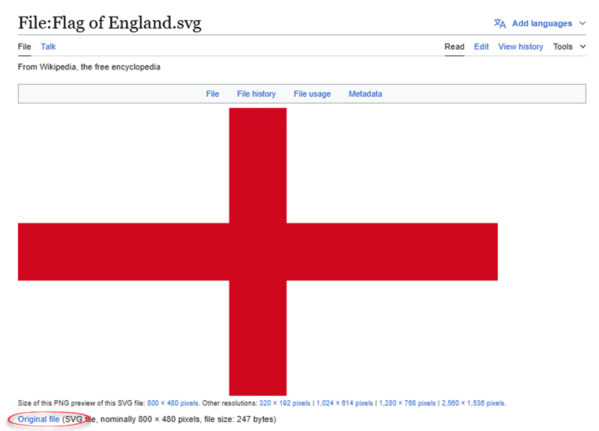
For Microsoft 365, Office 2024, 2021 and 2019 choose ‘Original file’ which is the SVG version.
Otherwise choose one of the ‘PNG preview’ options. Select a resolution larger than what you’ll need in your document.
An alternative source is the Office image search at Insert | Pictures | Online pictures. It gives you a few variations to choose from, plus some Union Jacks.

Click the funnel icon to filter the search.
Two things to do with England flag
Lock the aspect ratio. In Picture Format | Size, open the dialog and tick “Lock aspect ratio”. The St George’s Cross is unusually cruel to sloppy resizing. Stretch it and the vertical arm of the cross ends up a different thickness from the horizontal arm, which looks obviously wrong even to people who could not tell you why.
Add alt text. Right click the image, choose “Edit Alt Text” and write something like “Flag of England, red cross on a white background”. Takes five seconds and makes the document accessible.
England Flag Colours
The specific colours in the flag are useful to know when designing a document, worksheet or slide. It helps choose matching or contrasting colours.
The Flag Institute specifies the red as Pantone 186 C, the same red used in the Union Jack. Where possible use the #Hex colour code in modern Office, see Hex color code advantages in Office
Red: 207, 17, 36 or #CE1124
That’s the colour used in the Wikipedia version of the flag. However, the Pantone 186 C converted colour is #C8102E, RGB 200, 16, 46.
White: 255,255,255 or #FFFFFF
Insert England Flag to Word, PowerPoint or Excel
Once the flag image is saved to your computer, it’s the usual process to insert into a document. Go to Insert | Pictures, and choose the image you just downloaded.

In Office, you can resize and position the image just like any other.
Flag Effects
Once you have the image in Office, all the usual Office Graphic or Picture Format options are available. Note that if you are using an SVG file, you will have a Graphics Options tab on the ribbon, when you click on the image, whereas if you are using another image format, it will say Picture Format.
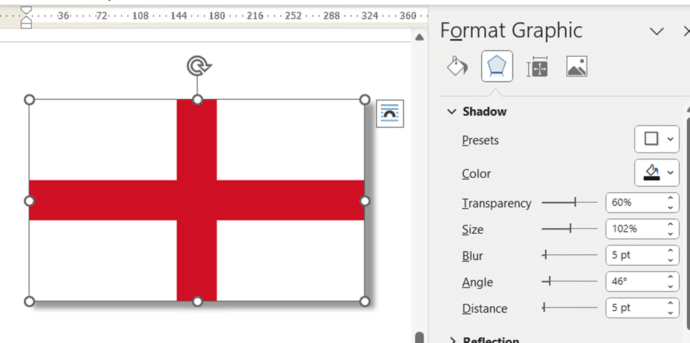
Some of the Graphics Effects like Shadow, Reflection and Bevel add a little visual interest without distorting the flag to a level that might offend.
Shadow
For a nice little shadow effect, try Graphics Effects | Shadow | Outer which adds a little ‘shadow’ to the right and bottom of the image. Open the side-pane to change the finer settings.
Reflection
Reflection is another way to add a little effect to an image.

Beveled Edges
Beveled edges is another choice for a slight 3D effect.

Beyond these choices there are many more available, especially if you’re using an SVG. Graphics Fill or Graphics Outline can change the colors of an image.
The England flag emoji: mostly a waste of time
There is a proper Unicode England flag emoji: 🏴
It was approved in 2017 and uses a “tag sequence” (U+1F3F4 followed by tag characters spelling GBENG) rather than the two letter country code system used for the Union Jack emoji.
Here is the catch. On Windows it will not display as a flag. The Segoe UI Emoji font that Word, Excel, PowerPoint and Outlook use on Windows has no glyphs for national flags. You will get a plain black waving flag, or a “tofu box”, instead of the red cross. Mac and iPhone render it correctly, which is exactly what makes this a trap: it looks fine when you write it and broken when a Windows colleague opens the file.
What this means for you: do not use the emoji in any document that other people will open. Use an SVG or PNG image in Office documents. Emoji is fine in a chat message to someone you know is on a Mac or phone. It is not fine in a report.
Flag etiquette in England
England has no statute governing how the St George’s Cross may be used in print or on screen, and no penalties. Guidance comes from the Flag Institute and the Department for Culture, Media and Sport, and most of it concerns physical flags on poles and planning consent, not documents.
That gives you a lot of freedom, but three practical points:
- You cannot fly it upside down. The design is symmetrical in every direction, so there is no distress signal equivalent and no orientation to get wrong. One less thing to worry about.
- Do not distort the cross. A squashed St George’s Cross looks amateurish.
- Be aware of context. The flag is everyday and uncontroversial at sporting events, where it has been the standard England supporters’ flag since the mid-1990s. It has also been adopted at times by political groups, and mass displays of the flag in English towns during 2025 became a story in themselves. For a football fixtures list or a school project this is a non issue. For corporate or political material aimed at a UK audience, be deliberate about what you are signalling.
Insert the British ‘Union Jack’ flag into Word, Excel or PowerPoint
Add the US Flag to Word, Excel and PowerPoint in High Quality
Insert the Spanish flag into Word, Excel or PowerPoint
Add the Irish Flag into Word, Excel or PowerPoint
Australian flag and more into Word, Excel or PowerPoint docs
Canadian Flag into Word, Excel or PowerPoint
Get flag emoji in Microsoft Office with Windows workaround
Hex Color Codes in Microsoft Office: How to Use Exact Colors Every Time