Apple’s new budget MacBook Neo is aimed squarely at Windows users, and many will want to know how well Microsoft Office works on it. Should you choose Microsoft 365’s subscription apps or the stand-alone Office version for Mac? From compatibility and features to performance differences, here’s what MacBook Neo buyers should realistically expect when running Word, Excel, PowerPoint, and other Microsoft tools on Apple’s newest low-cost laptop.
Everyday Office tasks will feel snappy on the Mac Neo. Microsoft 365 of Office 2024/2021 apps, Word, Excel, Outlook, PowerPoint, Teams all have native Apple Silicon versions that Microsoft has released for years.
Also available are the Office web apps that will run on Safari, Chrome or Edge browsers.
If you have a Microsoft 365 subscription, the “Office for Mac” apps can be installed on a Mac laptop for no extra charge. That’s because a Microsoft 365 subscription allows use of the Office desktop apps on up to five devices per user. There’s no distinction between Windows vs Mac devices.

Apple’s marketing push is to young people and students, notice for four color options available.
A different core chip
The Neo is the first Mac laptop ever to use an A-series chip rather than an M-series chip. An on A-series on a laptop is new territory and a legitimate unknown.
The Neo uses the A18 Pro chip that’s in the iPhone 16 Pro and 16 Pro Max but not the M series chips that are in modern Mac laptops. The A18 Pro is at least on a par with the M1 chip that’s in older Mac laptops.
Microsoft 365 apps are compiled for Apple Silicon (arm64), which covers both M-series and A-series Macs so they should run without issues. But because no A-series Mac has existed before, there’s no real-world track record yet.
So called “Edge cases” could surface in the first few weeks after the Neo ships. If there is a problem, Apple should move quickly to fix it.
Practical risk level: Low, but watch the tech press for the first two weeks after launch.
The 8GB Memory Ceiling
This is the more pressing day-to-day concern for a Mac Neo. With only 8GB of unified memory and no upgrade option:
- Running Word + Excel + Outlook + Teams simultaneously a typical office workload will push the Neo hard. macOS will start swapping to the SSD, which slows things down noticeably.
- Really large (enormous) documents, workbooks or presentations might struggle but that’s beyond what most people use Office for.
- Teams in particular is a memory hog. Video calls while other Office apps are open can get sluggish.
- The M1 MacBook Air had the same 8GB base spec, and many users found it just about adequate for M365 work but those users could choose a 16GB model. Neo users can’t.
If you’re running Teams meetings while multitasking in Excel and Outlook, 8GB will feel tight.
Port Limitations Matter for Office Users
The Mac Neo has two USB-C sockets which look the same but they have very different capabilities.
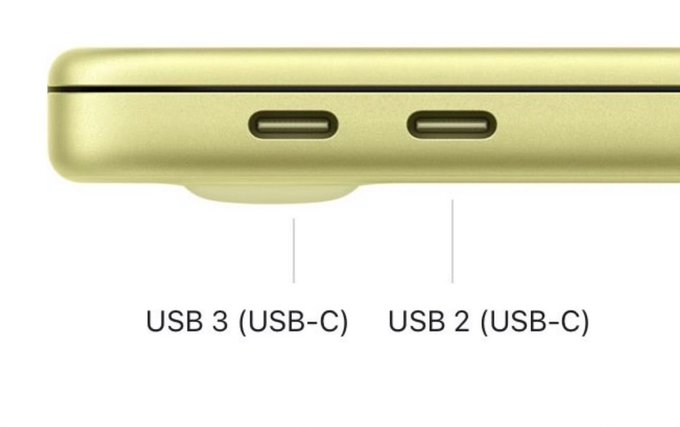
The left/rear USB-C supports a form of USB 3 with data transfer speeds up to 10 Gb/s/ That’s enough for a USB hub with external monitor, external drive (for TimeMachine) and even wired Ethernet.
The hobbled right or forward USB-C port is USB 2.0 only with a mere up to 480 Mb/s.
Compare that with the Macbook Air M1 with two full Thunderbolt ports both up to 40Gb/s.
Both sockets can charge the Neo. In practice, many people will charge using the lesser USB 2 socket and plug a display or hub into the superior USB 3 port.
For a desk-based Microsoft 365 worker who connects to a monitor, drive and other accessories, this worth keeping in mind.
No Touch ID on the Base Model
Microsoft 365 and apps like Outlook support Touch ID for authentication (including passwordless sign-in via Microsoft Authenticator). You lose that on the $599 base Neo. You’d need to spend $699 for the 512GB model to get it.
TouchID is a fingerprint reading button that lets you unlock a Mac and also quickly authorise secure changes and verify passcodes. It’s much the same as fingerprint verification on some iPhone/iPad. TouchID is very, very handy but not essential.
But the 512GB drive part of the $100 upgrade is probably worth it.
The iPhone connection benefit
It’s surprising that Apple hasn’t pushed the advantages of having a Mac Neo with an iPhone.
After all, many of their target audience will have an iPhone already. Pairing that with a Mac Neo or other Macbook will automatically bring benefits, many of which make Windows users jealous.
My favorite Mac with iPhone features are:
- iPhone Mirroring: Use your iPhone directly from your Mac’s screen.
- Continuity Camera: the iPhone camera becomes a high-quality and mobile webcam for your Mac.
- Shared Internet: Instantly use your iPhone’s Personal Hotspot (tethering) on your Mac.
- Universal Clipboard: Copy text or images on your iPhone and paste them directly onto your Mac.
Other useful features: AirDrop, Handoff, Sync & Backup (Finder), iPhone calls and SMS messages directly on a Mac.
All Macs come with good security inbuilt including an encrypted drive only accessible after login. Also “Find my” to help you locate or disable a lost or stolen laptop.
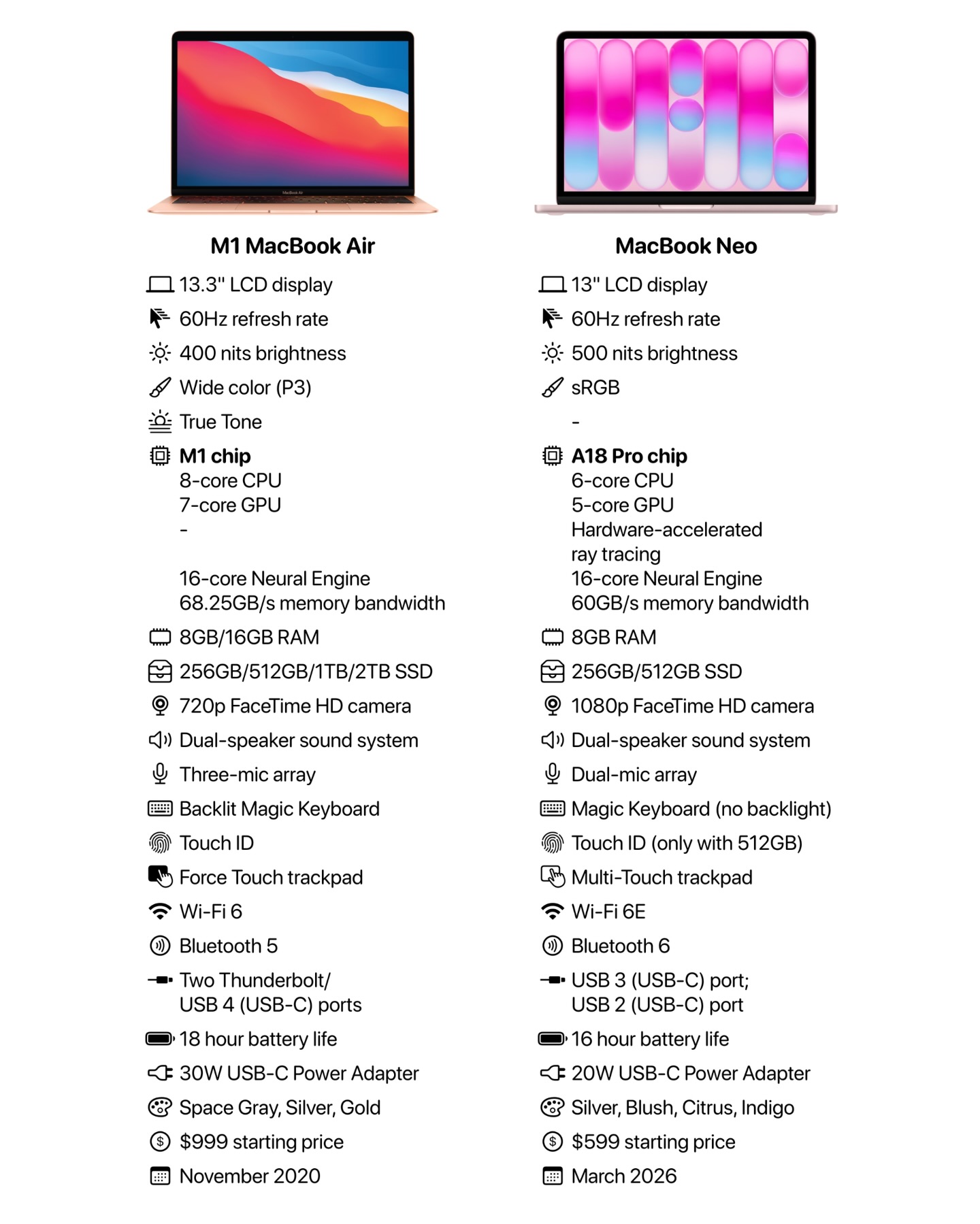
M1 vs Neo side-by-side
Here’s a useful comparison of the M1 Macbook Air and Neo. An M1 Macbook was the cheapest laptop option until the Neo arrived.
Running Windows on Neo
Some people need occasional access to Windows apps on their Mac. On MacBook that’s possible using Parallels software which lets you start Windows virtual machines.
Office for Windows is sometimes needed on a Mac for compatibility or to use features not available on the Office for Mac software. Other Windows-only apps can run nicely on a Mac computer with a Parallels virtual machine making it a useful fallback position.
A Mac Neo may be able to install Parallels (no definite statement from Parallels, so far). Check out their system requirements page which, at the time of typing, only says “M series chips”.
If Parallels Desktop does officially work on an A18 Pro chip, it might not operate very well. A Windows virtual machine on a Mac Neo could be sluggish. 8GB of RAM isn’t a lot (16GB is recommended) and virtual machines take up a lot of disk space on a limited 256GB or even 512GB machine.
Other differences
Wifi 6E (IEEE 802.11ax to its friends) is supported on the Neo giving speeds up to 1.5 Gbps. That should be enough for most people.
Bluetooth v6 is the latest generally available version and should work with any accessory.
There’s a multi-touch trackpad however the keyboard does NOT have backlighting.
The supplied AC power adapter is just 20W which should be enough. More powerful USB-C chargers are widely available from many companies and there’s no need to pay more for another Apple original charger. There’s no Magsafe option.
Who Should and Shouldn’t Buy Neo for Microsoft Office work
Fine for: Light users — email, documents, occasional spreadsheets, solo video calls. Students using Microsoft 365 or Office for coursework.
Think twice if: You run Teams meetings regularly, multitask heavily across several Office apps, or need a reliable external monitor setup at a desk.
A MacBook Air with 16GB, larger drive options, two full Thunderbolt ports and backlit keyboard is a significantly better Microsoft 365 machine, especially if you might need a Windows virtual machine too.
A lot of the complaints about the Mac Neo are from current Mac users who are comparing it with their current machines that are more powerful and more expensive!
Current Mac users aren’t the market for the Neo. It’s aimed at students and others with modest computing needs plus those on a budget. Anyone with an iPhone can get a lot from having a laptop in the same tech ‘eco-system’.
If your budget can stand it, the $699 Neo is probably worth it for the extra disk space and TouchID convenience.
Money saving tips
Get US$100 off the Mac Neo if you qualify for Education pricing.
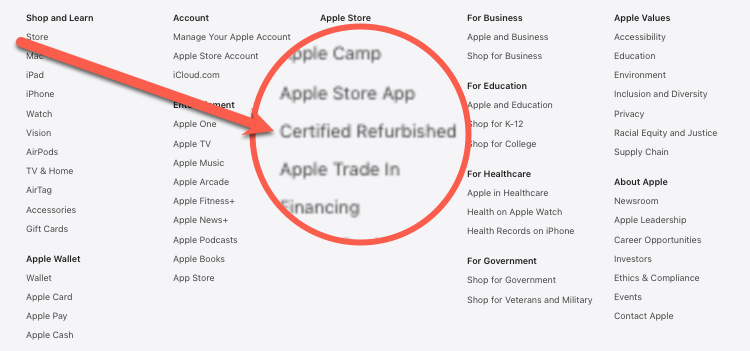
Look out for refurbished Macbook or Macbook Air models as an alternative to the Neo with more features. These can be excellent value and come with a full warranty from authorized dealers. At the bottom of the Apple home page for your country, look for the tiny “Certified Refurbished” link.