Native Markdown Editing now in OneDrive and SharePoint
Microsoft has switched on native Markdown editing in OneDrive and SharePoint, giving .md files a proper browser editor with View, Edit and Split modes. For anyone working with AI generated outputs, README files, technical notes or reusable prompts, this finally turns .md files into first class citizens inside Microsoft 365, complete with version history, sharing and permissions like any other Office file.
A few months ago we explained Markdown and how it works with Microsoft Word perhaps Microsoft listened 😎 and now .md files are properly supported. But people still need one of the 6 Ways to Convert Markdown to a Word Document.
Until now, opening an .md file in OneDrive showed raw text with no formatting, no preview, and no decent way to edit. Markdown files in OneDrive and SharePoint lacked native browser rendering and required downloading or a third party tool. That round trip is gone.
The feature went generally available on April 21, 2026 across consumer and commercial Microsoft 365 accounts, with the full rollout expected to complete by late May 2026.
What changes when you open a .md file
Click an .md file in OneDrive or SharePoint and you now get a proper editor in the browser. Users can switch between View, Edit, and Split modes, with side by side editing and preview capabilities that reflect changes in real time:
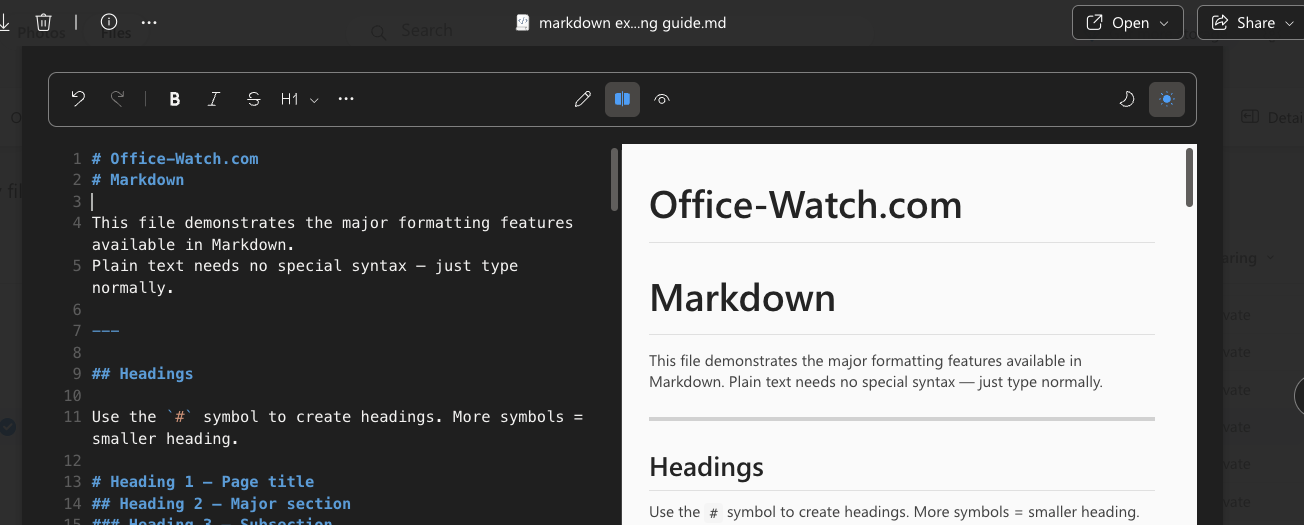
- View: clean, formatted reading with modern typography (Microsoft calls it Fluent 2).
- Edit: raw Markdown editing with a formatting toolbar.
- Split: editor on the left, live preview on the right that updates as you type.
Tables, checkboxes, links, and code blocks all render correctly, with full syntax highlighting code blocks. A Python or JavaScript snippet looks like it would in a real code editor.
The formatting toolbar is the practical bit for non technical users. A formatting toolbar covers headings, code blocks, links, images, and lists. You do not need to write Markdown manually. Click the toolbar option and the editor inserts the correct Markdown for you.
Make Markdown files in OneDrive
Make a new .md file from scratch the same way you make a Word document. Create Markdown files directly in OneDrive for the web using the “Create or upload” button.
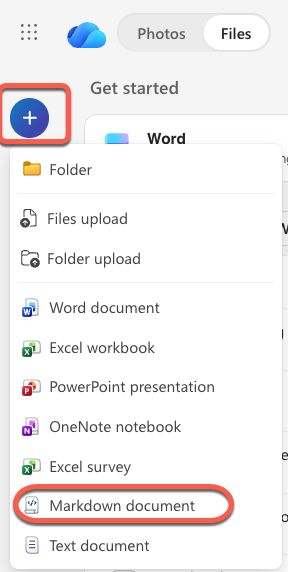
There is also supposed to be a new file type “Markdown” filter button across Home, My Files, and Document Libraries. We can’t find that option and Microsoft didn’t offer a sample image.
Why Microsoft now cares about Markdown
Plain Markdown was an odd thing for Microsoft to ignore for so long, and an even odder thing to add now. The reason is AI. Markdown is the “lingua franca” for AI systems.
Markdown files are increasingly becoming the foundation for the instructions and context that guide how AI operates, acting as durable AI artifacts that capture rules, preferences, and repeatable processes.
Sometimes AI systems will offer a Markdown file for a long response. AI gurus can upload reusable Markdown files as part of a prompt.
What this means for you
For you, that means the .md files your AI assistant generates now have a real home in Microsoft 365, with version history, sharing, and permissions like any other Office file.
If you never touch .md files, this changes nothing. Most everyday Office users will not notice.
If you do work with Markdown, whether for README files, technical documentation, AI prompts, or notes, the practical wins are real:
- No more downloads just to read or edit a file.
- Version history on .md files, so you can roll back changes the same way you would in Word.
- Markdown files sync across Teams, Outlook, and the browser once saved to SharePoint or OneDrive.
- AI generated .md files are usable in place, not stuck as awkward raw text.
The rollout is on by default. This feature is enabled by default and requires no admin action. There is no opt out switch documented. If your organization wants to block Markdown editing in the browser, you will need to wait for guidance from Microsoft or fall back on existing file type restrictions in SharePoint.
A reasonable bet is that this is the first move, not the last. Microsoft has signaled more innovation to come for .md files and AI across OneDrive and SharePoint. If your team uses Copilot or any agent that produces structured outputs, expect Markdown to creep further into your online life.
What is Markdown and how it works with Microsoft Word
6 Ways to Convert Markdown to a Word Document
Copilot Can Now Actually Do the Work in Word, Excel, and PowerPoint
Why AI Is Almost Intelligent: The Honest Truth About ChatGPT and Copilot
Writing better & faster with any AI
Open Office Files in Browser or Desktop App: How to Take Control
AutoSave vs AutoRecover in Microsoft Office: What Each One Actually Does to Save Your Work
Build a Better Excel Workbook with Copilot: Smarter Prompts, Stronger Results