Microsoft’s Copilot Merge Eats Your OneDrive Space and Cuts Features
Microsoft is merging its two Copilot apps into one, and the changes buried under that announcement will cost you storage space, features or money. Your Copilot uploads and generated images are being moved into OneDrive, where they eat into the same allowance as your documents and photos. Deep Research has gone for consumers unless you pay for Microsoft 365 Premium. Podcasts, Group Chat, Mico and Copilot Labs are all being retired, and anything you want to keep has to be saved manually, one item at a time. Here is what changed, what you lose, and what to rescue before it vanishes.
Microsoft is combining the two AI apps into one Copilot application, merging the Copilot app with the Microsoft 365 Copilot app.
Your Copilot files move to OneDrive
Files shared with and generated by the standalone Copilot app are being moved to OneDrive, where you manage them through the OneDrive app on desktop or mobile, or by signing into your Microsoft account.
That means more of your OneDrive space is going to be gobbled up by Copilot.
This is the same tactic that Microsoft has used elsewhere to load up OneDrive with data from various services like Designer and Outlook.com attachments. Look under the Apps folder in OneDrive via a browser to see some of these extras.
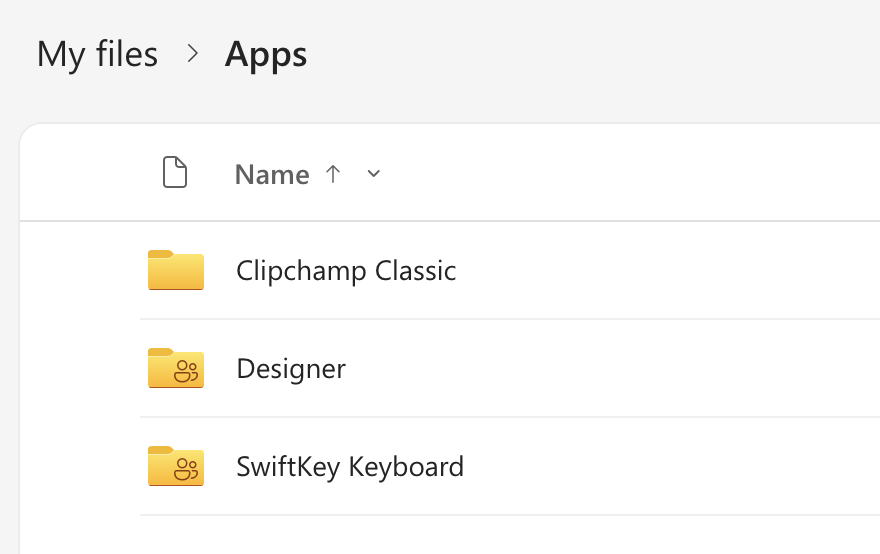
It’s another way to get people paying for more OneDrive storage by using up a bit more of the available space.
If you are close to the 5GB free OneDrive ceiling, check your storage now. A pile of migrated Copilot files is an unpleasant way to discover you are full.
There’s an upside. You’ll be able to quickly view all your past generated images or uploaded files in one place, rather than hunting around old chats and prompts.
Free access continues, with a warning attached
Chatting with Copilot, creating images and uploading files stay free, subject to available capacity and limits. When you hit a limit you can upgrade or come back later. Higher limits, agents and complex tasks with several steps require a Microsoft 365 subscription.
Microsoft has acknowledged that some users will hit those limits sooner than they do today. That is the sales pitch buried in a merger announcement: the free tier is the funnel, and the funnel is narrowing.
What died on August 18 and what you need to save
As a prelude to the Copilot app merge, Microsoft has trimmed some of the underperforming parts of the Copilot network. This happened on 18 August 2026.
Deep Research becomes Researcher
This is the painful one for anyone who used Copilot for serious work. Deep Research retired for consumers on August 18.
The replacement, called Researcher, is only available to Microsoft 365 Premium subscribers.
Personal and Family subscribers can still open their old reports from chat history and save them to Word, but cannot create new ones.
This is a paid feature moving up a pricing tier. If you are on Microsoft 365 Personal or Family and you relied on Deep Research, you have lost it unless you upgrade, which is presumably Microsoft’s reasoning.
Other Copilot dropped features
Group Chat. Your group chats are converted into individual conversations with Copilot. The history and your own messages survive, but you cannot continue the conversation as a group, and prompts, images and artifacts created by other participants will not be accessible.
Podcasts. Copilot Podcasts retires completely. After August 18 you cannot create or open podcasts in Copilot. You can save existing ones using the download option in the podcast menu, but you have to do it one podcast at a time. There is no bulk export.
Mico. The animated blob added to Copilot’s voice mode less than a year ago, is disappearing with few mourning its passing. A memorial service will be held in a phone booth. Microsoft expects (threatens?) that Mico might survive in some of Copilot’s education features.
Copilot Labs. The home for experimental features, is also being retired. That’s a shame because it was a good place for smart Microsofties to try things out before joining the more formal Insiders/Frontier path.
Related Reading: Copilot Changes That Affect You
The bare facts of the app merge are covered in Microsoft is combining its two Copilot apps into one, which is worth reading if you want the announcement without the sales gloss. If you have both apps sitting on your PC and still cannot work out which does what, Microsoft 365 Copilot App vs Copilot App: What’s the Difference? sorts out the confusing naming and tells you which one you can safely ignore.
If Deep Research was doing real work for you, our hands on testing in Microsoft Copilot Deep Research: Pros and Cons shows what the feature actually delivered, which is useful for deciding whether the replacement is worth an upgrade.
Working out what your plan gets you now
Microsoft’s pricing tiers change often enough that most people have no idea what they are entitled to. Copilot Access Levels for Microsoft 365 Consumer Plans: What You Actually Get breaks it down plan by plan, and Microsoft 365 Premium: Copilot AI, New Features and Pricing Explained covers the $199 a year plan that now holds Researcher hostage.
Your OneDrive space is under attack from several directions
Copilot is not the first Microsoft product to quietly park files in your cloud storage. OneDrive Secret Folders: What You Need to Know shows you where to look for the hidden folders already using up space you are paying for.
Getting more out of the Copilot that remains
With Deep Research gone for most people, Copilot Notebooks explained: what they are and who gets them now is the closest thing to a free replacement for grounded, source based research. And before you rely on any of it, 9 AI Mistakes to Avoid in Copilot, ChatGPT and Gemini covers the traps that catch people out. For light relief, Microsoft also found time to redesign the logo, as covered in New Copilot Logo Is Here: Flatter, Simpler and Completely Useless to You.