Excel Copy Paste Bug: Is Your Office Version Fixed Yet?
Microsoft has partly fixed their Excel copy paste bug in some versions of Office but left others broken or with an incomplete fix. If you run Office 2024, Office 2021 or Office 2019 for Windows, your paste can still fail silently and quietly lose data. Office LTSC 2021 and Office LTSC 2024 are fixed, Office 2016 and Office LTSC 2019 are only partly fixed, and Microsoft 365 was never affected. Confused? Here is the full list so you can check your version in under a minute and decide whether to roll back, wait or work around it.
The Microsoft Excel copy/paste bug continues to trouble many users and the company’s response is both slow and fragmented. So Office Watch decided to make a summary page showing which versions of Office are affected, partly fixed or completely fixed.
Microsoft’s September 2026 security update broke Excel’s copy and paste for users across Excel 2016, 2019, 2021 and 2024, including the LTSC versions. Update KB5002914, released on September 8, 2026 silently kills paste operations with no error message and no warning, creating a serious data integrity risk.
See Excel Copy and Paste Broken by Microsoft’s Own Security Update — How to Fix It
Last updated: 20 September 2026
Who is still affected by the copy/paste bug
These versions of Office for Windows, if fully updated, are still at risk of the Excel copy/paste bug.
- Office 2024
- Office 2021
- Office 2019
At the moment, the only complete fix is to uninstall the buggy security patch released by Microsoft. See fixing Excel copy/paste bug.
Partial workaround
Microsoft’s workaround comes with a downside the company does not mention.
They say that you can bypass their bug by using Paste Special with Formulas, Formulas & Number Formatting, Values, Values & Number Formatting, or Paste Link.
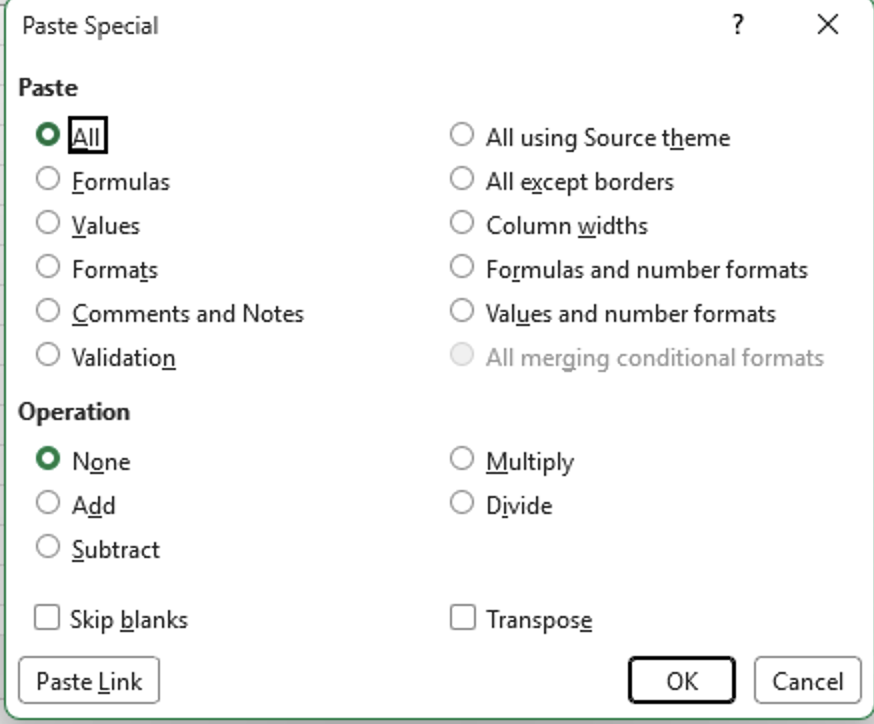
Microsoft ‘forgets’ the downsides of their supposed workaround. Paste Special strips important details from what you copied and is slow. Paste Special with Values loses your formulas. Paste Special with Formulas loses cell formatting. Anyone doing this many times a day is losing real time and might not paste everything that’s needed.
Keyboard shortcut worth memorizing while this lasts: Ctrl+Alt+V opens Paste Special directly.
Partly fixed
Microsoft says that these versions of Office for Windows are partly fixed. The main copy/paste bug is repaired, but pasting can still fail when the workbook uses conditional formatting.
- Office LTSC 2019 build 10417.20208 and later
- Office 2016 with the KB5002665 update, released September 16, 2026
Office 2016 Still Gets Security Updates: Check If Yours Qualifies
What does Microsoft mean when they say “might” be affected?
The company’s wording is “If the workbook contains conditional formatting, paste operations might continue to fail.”.
In Microsoft-speak, ‘might’ covers a lot of ground from ‘rarely’ through ‘occasionally’ to ‘almost always’ and ‘every time’.
Copy/paste in Excel fully fixed
- Microsoft 365 for Windows was never affected.
- Excel for Mac (any version) was never affected.
These versions are fully fixed (Microsoft’s word is ‘mitigated’).
- Office LTSC 2024 build 17932.21000 and later
- Office LTSC 2021 build 14334.20918 and later
The pattern is clear. LTSC and volume licence builds are getting fixed first. Retail perpetual copies are not.
More on the Excel Paste Bug and Office Updates
If you have not read the original coverage, Excel Copy and Paste Broken by Microsoft’s Own Security Update has the exact commands to remove the patch on both MSI and Click to Run installs, plus the build numbers to roll back to. The bug arrived as part of a much larger batch, and September 2026 Patch Tuesday: 20 Critical Office Bugs to Fix Now covers what else landed on your PC that day.
Rolling back only helps if you know what you are rolling back. Is my Microsoft Office .MSI or Click to Run takes about thirty seconds and decides which set of instructions applies to you.
Once you are back on a working build, Office will happily reinstall the broken one within days unless you stop it. Two ways to stop Office automatic updates shows both methods, and Microsoft Office Updates: A No-Win Scenario and How to Stay Safe makes the case for simply waiting a week before you accept any Office patch.
Stuck on a locked down work PC with Paste Special as your only option? It is worth learning properly. Excel Paste Special with math operations shows the tricks most people never discover, and New Paste Values keyboard shortcut for Excel covers the faster shortcuts that save you a trip to the dialog box. If conditional formatting is the reason your paste still fails, Excel Conditional Formatting, beyond the presets explains what those rules actually do to a worksheet.
Whether you get a fix at all now depends on which version you own. Office 2016 Still Gets Security Updates: Check If Yours Qualifies and Office 2019 Is Still Getting Security Updates, But Only for Some both explain the awkward truth that Microsoft is patching some customers and quietly ignoring others.