PowerPoint’s New Table Controls: Insert, Move and Delete Rows in One Click
PowerPoint 365 is adding one-click table controls that let you insert, move or delete rows and columns without digging through menus. Here’s what the new table tools do, how to get them and what Microsoft still hasn’t told us.
One of these new PowerPoint table controls will be familiar to Word users. But there’s more added that the Word team should consider adding and not just for consistency across the Office apps.
How to add a row or column with one click
Hover the mouse pointer on the line between a row or column to see a plus + sign with an orange line. Click on the + to insert a row or column.
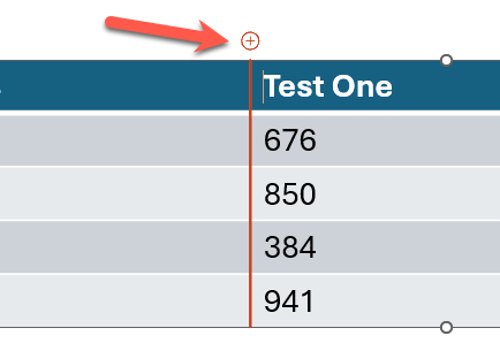
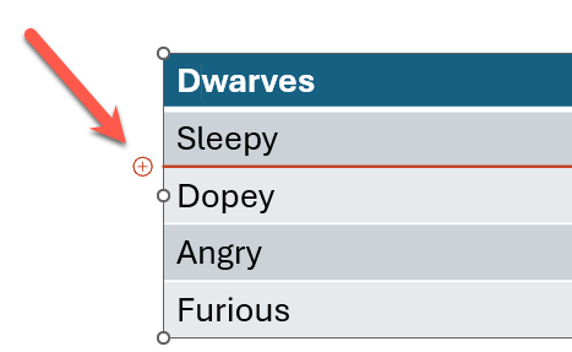
It’s a feature that’s been in Word for Windows for almost a decade (i.e. Word 2016) and Word for the web for the last two years. PowerPoint users might well ask “What took Microsoft so long?”
Move or delete rows and columns instantly
Truly new and welcome innovations are the buttons to move or delete a row/column.
Hover near the start of a row/column to see a little six-dot handle. Drag that handle to move the row or column around.
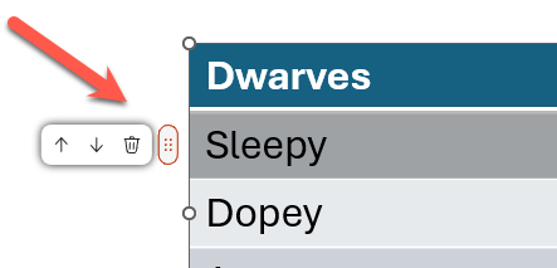
Click on the six dots to see up/down buttons plus a delete button.
What’s still unknown about the table tools in PowerPoint 365
Microsoft is keeping important details about PowerPoint table controls to itself, like:
- Which Insider channel gets it first (Beta Channel or Current Channel Preview). It’s appeared in our Beta Channel machines but Microsoft hasn’t said anything.
- The minimum version and build number
- Whether PowerPoint for the web or iPad will get it too
- When it reaches regular Microsoft 365 customers
Why Microsoft’s announcement falls short
The first and only public mention of the new PowerPoint table controls so far is a post on X, published November 9, 2026:
“One click to insert, one click to add a row or column, and one click to get to move or delete commands, right on the table. Now rolling out to Microsoft 365 Insiders for Windows and Mac.”
There’s no Microsoft 365 Insider blog post, no Message Center notice, and the Beta Channel release notes are useless with the phrase “Various fixes to functionality and performance” pasted in week after week.
Just a short social media post that’s NOT from one of Microsoft’s social media accounts. The post is from Derek Johnson, Microsoft’s General Manager of the PowerPoint Product Group and responsible for “visual creation” in Copilot.
We have no problem with Microsoft staff promoting the work of their team, as long as their allegiance to the company is disclosed. But there’s an increasing trend of new and changed features being announced first and only partly, via unofficial social media accounts.
These mentions don’t include important information that paying customers deserve to have. A short 45-second video is no replacement for proper documentation, despite what Microsoft might like to think.
More Ways to Get More from PowerPoint and Microsoft 365
If you’re exploring what Copilot can do inside PowerPoint, Which Copilot Model Should You Use in PowerPoint? Auto, GPT, or Claude Opus walks through the model choices and when each one makes sense, while PowerPoint AI Images Tested: Which Copilot Model Actually Works puts the image generators through their paces.
The one-click row insert has been in Word for years, but Word keeps getting its own quiet upgrades too. Microsoft Word Now Supports Markdown, Here’s What Works and What Doesn’t covers another feature that arrived with almost no documentation, and Ctrl+Shift+V in Microsoft 365: The Paste Shortcut That Changed and Broke a Few Things Along the Way tells the story of a simple shortcut that took Microsoft years to get right.
Microsoft’s habit of announcing features through social media instead of proper documentation is part of a bigger pattern. Microsoft 365 Insiders: The Risks Microsoft Does Not Mention explains what you’re really signing up for when you join an Insider channel, and why the release notes rarely tell the full story.