Microsoft 365 – the subscription / annual fee plan for Microsoft Office on Windows, Mac, iPhone, iPad and Android.
Includes Word 365, Excel 365, PowerPoint 365, Outlook 365 and many other ‘365’ programs, apps and services.

Making QR codes step by step for Office
Making QR codes is quite simple, all you need is a simple online code maker and by following our step by step guide you’ll have it set-up in no time. We’ll show how to make QR codes for web links and even easily sharing Wifi settings. Nowadays, QR Codes are widely used thanks to COVID, […]

True Teleprompter options for PowerPoint
Microsoft is taking liberties with their new “Teleprompter View” in PowerPoint because it’s not a true Teleprompter with text that scrolls as you speak. But there are options for a true Teleprompter/Autocue professional effect. A real Teleprompter (aka AutoCue) displays the speech text in front of the camera so the speaker appears to be talking […]
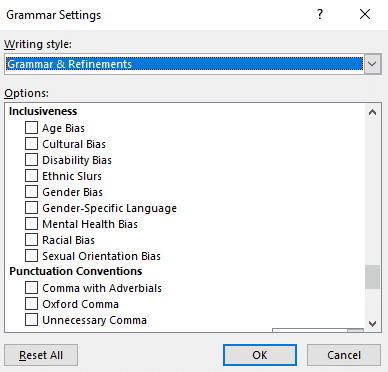
How does Microsoft Word handle non-binary grammar like they?
Microsoft Word has a powerful grammar checking system but how does it handle changes in English usage like the rise of non-binary or non-specific pronouns like ‘they’ and ‘them’? We took put sample words and sentences in Word to see how ‘woke’ it is. As a bonus, we’ll explain Pibling and Nibling that are already […]

Microsoft Loop changes name in Teams
As promised, the Live Components in Teams are now called Microsoft Loop or Loop Components In Teams chats and posts, look for Loop Components under their new or old name. The features haven’t changed, just the labelling. And there’s a new ‘Loop’ icon in the taskbar, a blue circle with a break, please try to […]

Discover Microsoft Loop in Teams
Microsoft Loop is Microsoft’s next ‘big thing’ and the first place to try and use it is in Teams. Here’s how to use, or at least try out, Loop components in Teams. Loop is a new way of collaboration using small modules that can be dropped into various locations. People can edit these live components […]
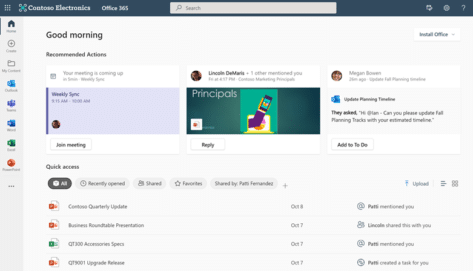
Office.com web page changes coming soon
The Office.com web page is getting some changes in the near future, here’s the details. Many of these updates apply to people using Microsoft 365 Business or Enterprise plans that looks like this now. Here’s details of the updates, according to Microsoft. Home page updates Recommended actions to help you quickly take action – you […]
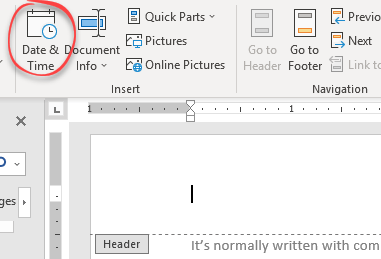
Three more Word date and time options
Aside from inserting the current date or time, Microsoft Word has some other useful choices for inserting dates automatically. The date/time the document was created, last saved or last printed. Header / Footer In a Word document header or footer, the same Insert Date options and shortcuts apply as in the main document. There’s an […]

Many ways to insert the current date and time in Word
Here’s all the different ways you can quickly insert the current date or time into a Microsoft Word document. There’s the ‘official’ shortcut and the ‘secret’ shortcut with better options than the usual tip. As usual with Word and Office, there’s the simple but incomplete answer that’s commonly given but more useful info when Office-Watch.com […]

White Right backhand pointer 👉 in Word, Excel, PowerPoint and Outlook
Type the White Right backhand pointer 👉 into Microsoft Word, Excel, PowerPoint or Outlook. Both in Office for Windows and Office for Mac. It’s officially called “White Right Pointing Backhand Index”. White Right Pointing Backhand Index 👉 symbol is great for signs, simple hand graphics in slides or an alternative bullet in lists. There’s also […]

Microsoft 365 “Subscription” vs Rental
Why call Microsoft 365 a software ‘subscription’ when it’s really renting? A few readers have asked us why Office-Watch.com calls Microsoft 365 renting when it’s called ‘subscription’ by Microsoft. Microsoft relentlessly uses the word ‘subscription’ to describe their preferred way to pay for Office but that doesn’t mean their use of the word is accurate. […]

Excel Paste Special with math operations
Excel’s Paste Special feature can be used to modify multiple numbers at once. Paste Special is more commonly used to paste only values or formatting, it has other tricks to offer. We’ll show you firstly how to multiply numbers in Excel by using Paste Special then add, subtract and division. Addition and Multiplication are easy […]

Changing Word’s Text Box Gallery to suit you
The Word Text Box Gallery gives you a head start on nice document effects. Under the Insert tab in Word is the Text Box gallery, a selection of pre-set options to jazz up your document. It’s the easy way to put in fancy design elements you see in books and magazines like side-bars or ‘pull […]

Inside OneNote Pages, what to add and search
OneNote Pages can contain all manner of things; text, files, documents, PDF, drawing, images, tables, web clippings, lists, audio and video files. Pictures and recordings in OneNote have some nifty tricks and you can search everything you’ve added to OneNote. Text is very simple just ‘click on the page and type’. A container is automatically […]

Speaking a search now in Word
Word 365 is getting another improvement to the Search feature, now you can speak your question or search. Look at the Search box on the title bar, now or soon there’ll be a microphone button at right. Click on the microphone icon and speak your search terms. Assuming your microphone setup is OK, Microsoft’s cloud […]

Word Style inheritance made clear and simple
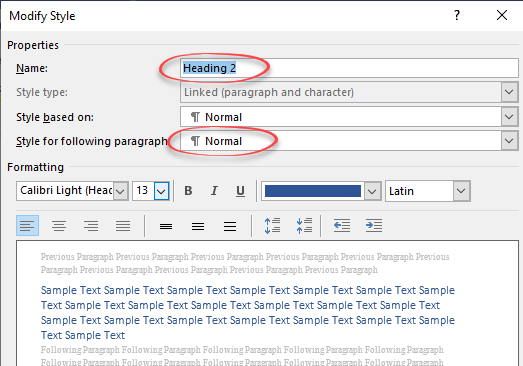
Styles in Microsoft Word would be very cumbersome if you had to set up each one individually. To make it easier, styles have inheritance. A new style is usually a copy, linked to an existing style with just some changes to selected items. Here’s an example of inheritance in a simple Word document. This is […]
Why choose Body Text vs Normal style in Word
There are good reasons to avoid the Normal style for the main text in a Word document and use the hidden ‘Body Text’ style instead. The standard Microsoft Word document structure has Headings (Heading 1, Heading 2) … with paragraphs of text in the Normal style. It sounds good but, as usual with Microsoft Office, […]