Microsoft 365 – the subscription / annual fee plan for Microsoft Office on Windows, Mac, iPhone, iPad and Android.
Includes Word 365, Excel 365, PowerPoint 365, Outlook 365 and many other ‘365’ programs, apps and services.

Quick Teams links added to Outlook 365
Outlook 365 for Windows is getting more Teams features that link received emails with Teams, start chats or schedule a meeting. Above the email, beside the Reply, Reply All and Forward buttons is now a Teams pull-down menu. Only in Microsoft 365 hosted mailboxes, including Outlook.com Share to Teams This opens a new Teams message […]

New look file browsing in Office for iPhone and iPad
There’s a new “File Card” look coming to the Office ‘all in one’ app for iPhone and iPad which shows document thumbnails and other information. File Cards use the document thumbnails that are in most, but not all Office documents plus PDF files that are stored on OneDrive. Microsoft says there’ll be support for locally […]

Make thumbnails for Office documents with extra tricks
Adding thumbnail or preview image for Word, Excel or PowerPoint Office documents is easy, though you won’t find the choice anywhere obvious. We’ll dig into how thumbnails work for some nerdy extra detail. Thumbnails are the small images that appear in File Explorer and elsewhere instead of the standard icons for Word, Excel, PowerPoint etc. […]

Ordinal Numbers in Excel, 1st, 2nd, 3rd etc.
You can show ordinal numbers in Excel; 1st, 2nd, 3rd. Sadly, it’s not as simple as you’d think. The ‘Ordinal Rank’ column, 1st, 2nd etc you’d expect to be provided by Microsoft, but it’s not. There’s no in-built function nor a number format. After all, Excel has many different number formats already, so ordinal numbers […]

How to avoid the Gill Sans font controversy in Windows and Office
The work of Eric Gill is controversial these days, for good reason. Microsoft Windows and Office have fonts based on Gill’s work so users might need to think twice about using Gill Sans and similar fonts. Gill Sans MT and Gill Sans Nova are supplied with Windows and Office but are becoming stigmatized. Those fonts […]

Why Office for Mac will never match Office for Windows.
Office for Mac users yearn for the day when their software matches ‘feature parity’ with Office for Windows. “Two platforms, One Office” is the dream. But is it possible or even likely? We’re inspired by this tweet from José Rodríguez-Suárez. If Microsoft responds, we can predict what they’ll say, because its the same line they’ve […]
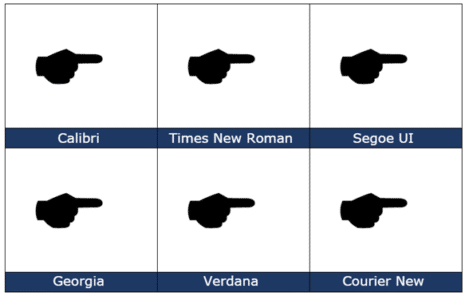
Black Right Pointing Backhand Index 🖝 symbol in Office
insert the Black Right Pointing Backhand Index 🖝 into Microsoft Word, Excel, PowerPoint or Outlook. Both in Office for Windows and Office for Mac. Black Right Pointing Backhand Index 🖝 symbol can be used as a creative bullet symbol in lists or to point a direction on a sign. It’s the lesser known complement to […]

Playing one song after another in PowerPoint
To play a selection of different audio tracks, one after another is surprisingly clumsy even in Microsoft 365 PowerPoint. For example, you might like to have multiple tracks from a single album or several movements from a symphony. We expected that a simple Animation would work with the second music track set to play ‘after previous’ […]

Add music for the whole PowerPoint presentation
A common request is for music to play throughout a PowerPoint presentation. Handy for automatic and kiosk slideshows. That’s easy in PowerPoint these days. Insert the audio then look on the Playback tab. There’s a choice ‘Play in Background’ that does the job in one click. ‘Play in Background’ is just a way of turning on three existing settings: Play across […]

Almost Equal ≈ symbol in Word, Excel, PowerPoint and Outlook
Almost Equal sign ≈ can be typed into Microsoft Word, Excel, PowerPoint or Outlook. Both in Office for Windows and Office for Mac. The Almost Equal symbol ≈ is commonly used within Mathematics to indicate two values are roughly equal, but not exactly equal. Or use it whenever you need horizontal wavy lines! How Almost […]
Moving a row or column in Excel
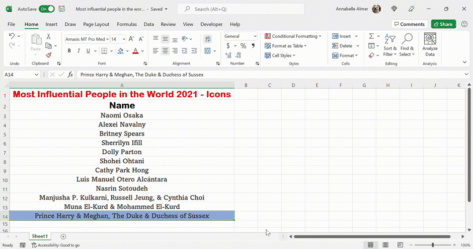
How to move rows or columns up, down or across an Excel worksheet. There’s a quick way but it’s not obvious. Excel has a variety of different ways in doing this, but it’s important to know the fastest and easiest way, to save you a lot of time and hassle. In Word, moving paragraphs or […]
Easy 2024 calendars in Microsoft Word
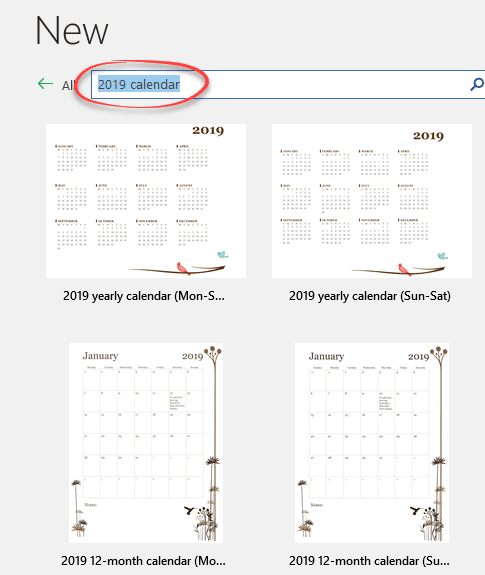
Word has many calendars in the File | New templates supplied by Microsoft. Search for “calendar” in the File | New pane then make simple changes to suit you. In Microsoft Word’s File | New pane, search for ‘calendar’. There are two basic calendar designs: Start of Week Some have macros to change which day […]

Google Font recommended pairing for Word and Office
Here’s how to choose good looking font pairs for your Word headings and body text or PowerPoint titles and text. We’ve shown you how to use Google Fonts in your Office documents. The Google Fonts site itself is little help but others have curated suggested pairings. Most of the suggested Google Font pairs are for […]
Using WOFF fonts in Microsoft Office
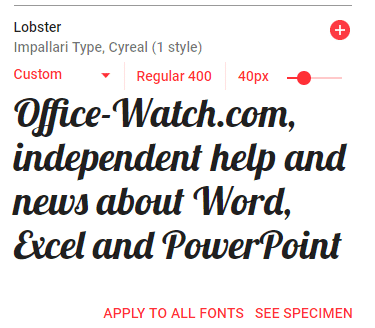
WOFF are a new-ish type of font that you might have seen mentions or downloads. Here’s how to use them in Microsoft Office; Word, Excel or PowerPoint. WOFF is Web Open Font Format designed to be compact and easy to download. WOFF is for web sites and mobile apps, not desktop programs like Office. Despite […]

Up Down Arrow with Base ↨ symbol in Word, Excel, PowerPoint and Outlook
Type Up Down Arrow with Base or underline ↨ into Microsoft Word, Excel, PowerPoint or Outlook. Both in Office for Windows and Office for Mac. How Up Down Arrow with Base ↨ looks in different fonts. Here’s some examples of how Up Down Arrow with Base / Underline ↨ looks in common Office fonts. Up […]

How to share a single Excel worksheet
Is it possible to share or send a single Excel tab or worksheet from an entire spreadsheet? Sharing a single worksheet or tab isn’t possible. Excel’s sharing features work on the workbook or entire document level. But it is possible to send out or share a single worksheet/tab with a little workaround. Definitions These terms […]