Microsoft 365 – the subscription / annual fee plan for Microsoft Office on Windows, Mac, iPhone, iPad and Android.
Includes Word 365, Excel 365, PowerPoint 365, Outlook 365 and many other ‘365’ programs, apps and services.

Copilot Search now on the Word title bar
Copilot is now appearing on the Microsoft Word title bar as part of the combined search and help, now called “Copilot Search”. The Copilot ‘ads’ for blank documents keep changing too. In the latest Word 365 Insiders builds the Search box (which combines Find, Help and broader Searches) is now labelled ‘Copilot’ and starts with […]

Stricter requirements for mass mailings to Microsoft mailboxes
Stricter requirements are coming on mass mailings to Microsoft hosted mailboxes including Outlook.com. The new rules also affect anyone with a Microsoft managed Inbox. Any organization (domain name) sending “over 5,000 emails daily” will have to comply with new rules from 5 May 2025. At the same time, Microsoft is changing how ‘unverified’ emails are […]
Important changes for your Microsoft and Outlook.com email
Emails you want to see might end up in Junk Email as Microsoft imposing new standards to ensure emails are legitimate. Microsoft isn’t allowing any way to bypass their new rules for emails you want. The new standards apply to senders but there are important and less well promoted effects for anyone using Microsoft hosted […]

Paste Text Only, Word shortcut change and confusion
Paste text into Microsoft Word without unwanted fonts, colors, or styles can save time and frustration. There’s a (relatively) new keyboard shortcut to do that directly. This guide breaks down all the changed keyboard options made to make room for a Paste Text Only shortcut in Word on Windows and Mac. New Paste Text only […]

Office help on the right-click menu ‘Search the menus’
There’s a little undocumented surprise on the right-click menu. Tucked away at the top is ‘Search the menus’ help. Sadly the underlying help system is still woefully inadequate. Right-click in a document (Word, Excel, PowerPoint or Outlook) and the top item isn’t ‘Cut’ but a “Search the menus” box. This is different from the main […]
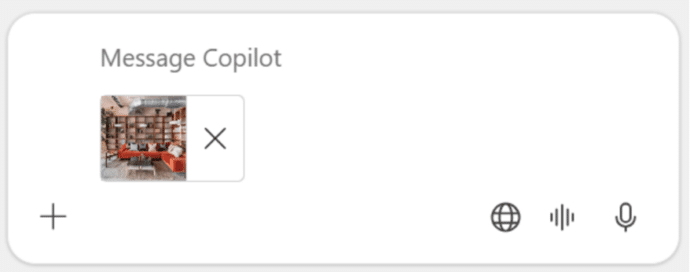
Upload a phone image to Copilot chat
Microsoft has introduced a new feature allowing users to upload images directly from their mobile devices to Microsoft 365 Copilot. A nice trick but there are other ways to do the same thing, including two from Microsoft itself! The idea is to streamline tasks such as transcribing handwritten notes, summarizing charts, and digitizing receipts. Copilot […]
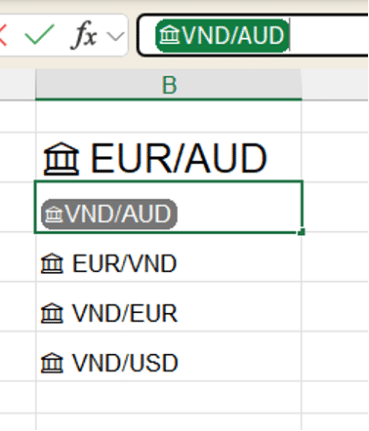
Excel Value Tokens – what are they good for?
Excel is getting Value Tokens but what are they good for? Do they add any ‘value’ or are they just a ‘token’ extra? The ‘Value Token’ appears in the formula bar when you select a data linked cell e.g. Stocks, Currencies, Geography or custom data types. According to Microsoft “This enhancement provides a clear visual […]
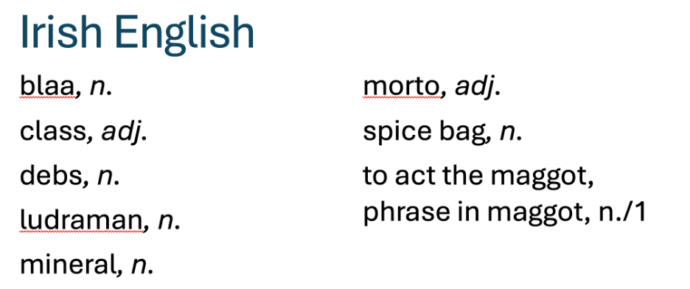
Does Microsoft Word understand new English words?
The Oxford English Dictionary has a list of new English words for 2025. We’ve checked to see if the Microsoft Word dictionary understands all these new terms. Some of the ‘new’ words are very familiar (‘load’, ‘class’ or ‘terror’) but with new meanings. Others are quite new (‘gigil’, ‘ludraman’ or ‘shweshwe’). We put them into […]
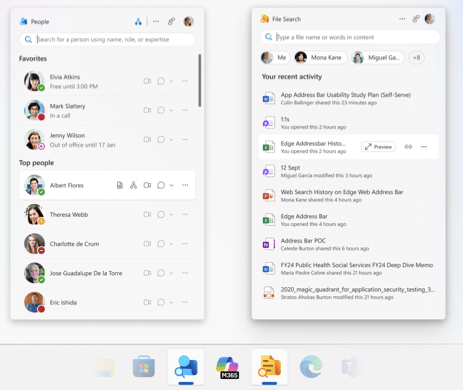
People and File Search apps coming to Microsoft 365
Two new Microsoft 365 “mini-apps” are being rolled out to some customers. People and File Search are coming for business and enterprise customers. Microsoft buries the important limitations of the two new apps, so we’ll put them first to save you wondering. Microsoft 365 Companions Both File Search and People are being called “Companions” or […]
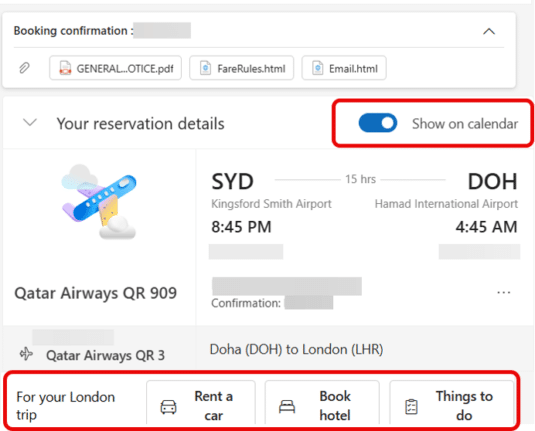
‘Show in Calendar’ pros, cons and ads in new Outlook
Outlook (new) has some more ads appearing in it as well as a handy way to add calendar events from an email. An incoming email to Outlook (new) can have a “Show on Calendar” option at the top when the software detects an event like a flight booking. Look for the “Show on Calendar” slider. […]
Copilot loses an AI writing competition
The Washington Post has done an interesting comparison of AI services and their email drafts for some difficult situation. Microsoft’s Copilot came last. Check out “We asked 5 AI helpers to write tough emails. One was a clear winner.” (login may be required) The headline is a little misleading. Copilot came last in this comparison, […]
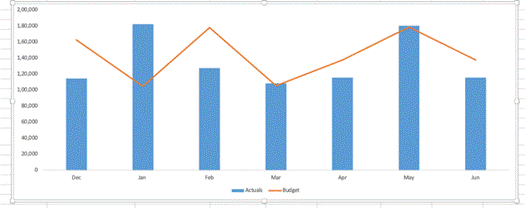
Create A Variance Chart in Excel
There are better ways to chart differences between matching values like budget vs actual than the simplistic one offered by Excel. A variance chart in Excel shows differences and trends at a glance and is easy to make. In Excel, a variance chart visually compares data sets, such as actual performance versus budget, last year […]

Confused About Your OneNote App? Discover the Quick and Easy Tricks to Identifying which one you have
There are a few ways to quickly tell which OneNote app you have on Windows. The OneNote that will continue development or the OneNote for Windows app which is gradually being allowed to die. Previously we’ve explained about the upcoming changes for OneNote, including how Microsoft have decided to keep the OneNote desktop program ongoing, […]

OneDrive messages pushed into Microsoft 365 apps.
Microsoft is adding yet another push for customers to save all their documents to OneDrive. This time inside Word, Excel and PowerPoint documents. OneDrive is Microsoft’s preferred place to save files and they cite various benefits to cloud storage. The company ignores the downsides to OneDrive and the right of customers to choose where to […]
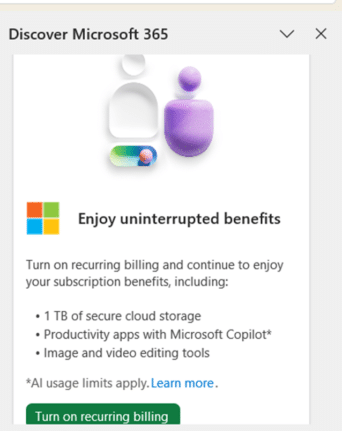
More Microsoft ads inside Office apps
Microsoft has no shame about dropping ads into paid Microsoft Office apps when there’s a way for the company to make even a little more money. We’ve received reports of the Word 365 or PowerPoint 365 side-pane opening to show this ad because the customer has turned off automatic renewal (aka recurring billing). It’s bad […]

Pie or Pi emoji and more in Microsoft Office
Three Pie emoji 🥧 🍕🍰 in Microsoft Office (Windows or Mac) plus some Stock Images, one for ‘Pi’ and a lot more for ‘Pie’. Just part of our tongue-in-cheek Pi 𝜋 Day and Pie series of articles. Pi 𝜋 emoji There is no emoji for 𝜋 because it’s a text symbol (Unicode U+1D70B) To insert 𝜋 […]









