Microsoft 365 – the subscription / annual fee plan for Microsoft Office on Windows, Mac, iPhone, iPad and Android.
Includes Word 365, Excel 365, PowerPoint 365, Outlook 365 and many other ‘365’ programs, apps and services.
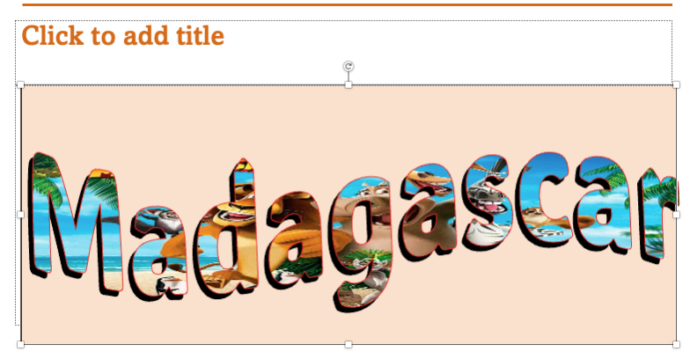
Great PowerPoint heading with picture fill
Adding a picture to PowerPoint text background look great and is easier than you might think. Even better, are many hidden options to adjust the image and position it exactly as you want. Curious about how to create text effects like in the image below? Look no further—if you have PowerPoint, you can easily do […]

Copilot shock in latest Word release
Office Insiders will get a nasty Copilot shock when they start a new document in Word 365. Microsoft has gone ‘over the top’ in their latest effort to push Copilot. The latest Insiders release of Word 365 with a paid Copilot plan has this when a new blank document is started. Talk about unsubtle. Not […]
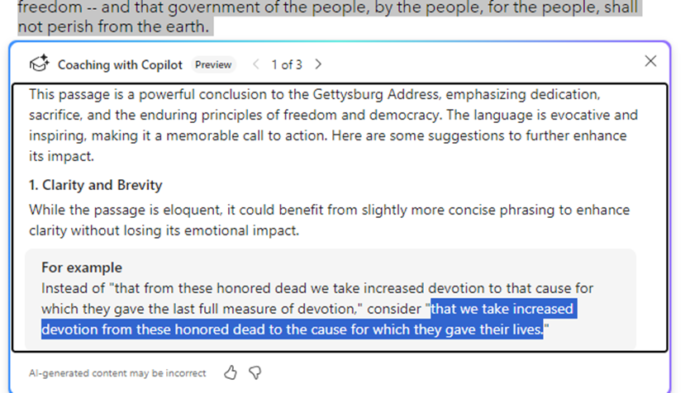
Now Copilot is a writing coach
Word is getting an online coach to improve or adapt your writing with the Copilot Coaching. It’s an extension of the current rewrite option in Copilot. Coaching analyses the selected text or entire document then makes suggestions that you can accept or reject. There are quite a few conditions on Copilot Coaching as it’s available […]

Straight lines and neater drawn shapes in Office
If you’ve used OneNote recently, you’re probably aware of the feature allowing you to draw shapes and make lines straight. Then Word for Windows got “Draw and Hold”. Now Excel and PowerPoint can draw straight lines and draw neat shapes (circle, square and more). We’ll explain how it works and how it’s different to the similar […]

Feed in Microsoft 365 is ending soon
The Feed feature on Microsoft 365 for business is ending in just a few weeks. It’s being replaced by a less helpful AI feature that doesn’t always help. The Microsoft Feed feature will retire starting November 1, 2024. the Feed feature will be retired from the Microsoft 365 app, affecting https://www.microsoft365.com and https://www.office.com , as […]
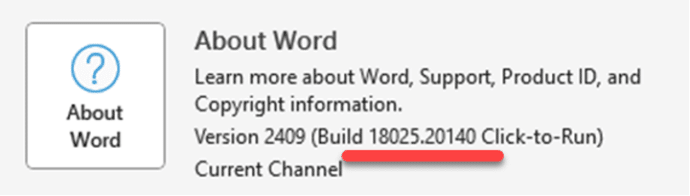
Word deletes a document when you’re trying to save it
Word for Windows has a new and dangerous bug which deletes a document as you try to save it. The bug has been fixed but here’s how to make sure you’re not running the bad Word. Any bug which deletes data is bad and while it takes a specific set of circumstances to trigger the […]
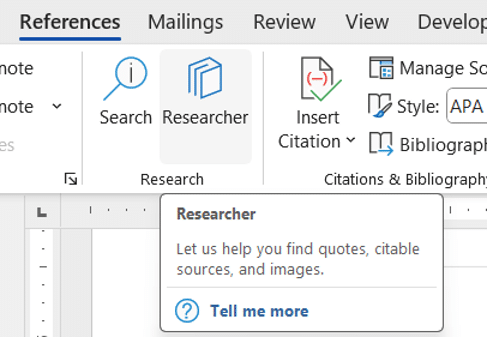
Word’s Researcher feature is ending soon
Researcher, a search and citation tool in Word 365 will disappear in a few months. You’ll find Researcher, for now, on the References tab in Word 365 for Windows or Mac. That button will be removed from the Word ribbon sometime in late December 2024 and should be totally gone during January 2025. Why? The […]

Microsoft has a OneDrive song and it’s as bad as you’d expect
A rap about OneDrive? If your ears can stand it, Microsoft has a OneDrive song for you. This tune was played as a prelude to a live Q&A session, possibly to discourage people from attending? “OneDrive, it’s the king of the cloud… never loses a file” Click on the image or link to hear the […]
Force Microsoft Office 365 to half-yearly feature updates
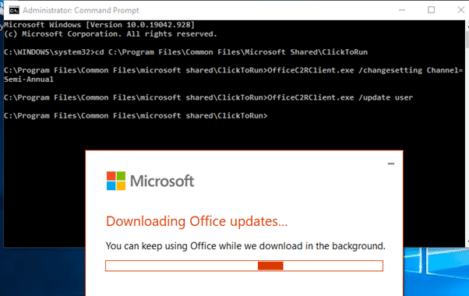
There is a way to force the Microsoft 365 Office apps to half-yearly feature updates instead of the usual monthly changes. Microsoft Office 365 for consumers and small businesses (Personal, Family and other plans) automatically updates each month with new and changed features. Some are minor but others are big and important. That’s OK for […]
Make simple bar charts with Conditional Formatting
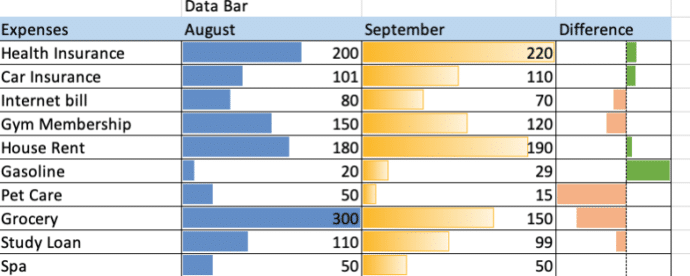
Excel can make bar charts in-cell without bothering with the full Chart system. Despite what you might have seen, there’s plenty of options in Excel Data Bars. The usual example of Excel Data Bars has the colored bar in the same cell as the value. In this article we’ll show how it’s possible to have […]
Check your Microsoft account recovery options … now before it’s too late
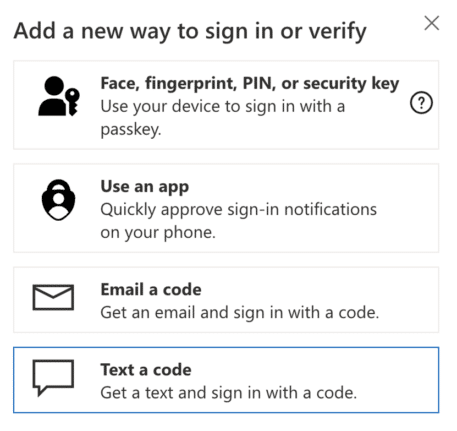
It’s not enough to setup two-factor security for your Microsoft account. Make sure your recovery settings are checked and up to date. Do it now before it’s too late. Today we’re helping someone trying to login to their Microsoft account after losing their password. Many, many hours of frustration and worry that could have been […]
Investigating the Word language bug
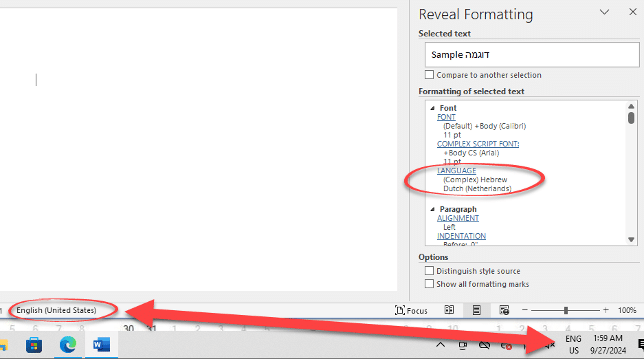
Here’s how Office Watch reader, Erik and we drilled down into Windows and Word to narrow down the source of the Word language bug. Erik’s tests are with Office 365 on Windows 11 Pro 23H2 but the same behavior has been reported by others in many versions of Word and Windows. Office Watch had a […]
Inside the Language choice bug in Word
Sometimes Word will switch to another language despite all the settings saying otherwise. With the help of an Office Watch reader, we’ve dug into the details to find what might cause the bug in Word and suggest some possible solutions. Word and Office should obey the default language setup in Office but, as some people […]

How to correctly spell Brontë in Microsoft Word with the diaresis
An 85-year-old blunder has just been fixed at Westminster Abbey to change the spelling to Brontë with the important diaresis. Here’s how to type an ë in Word and other matters arising. Here’s how the memorial to the Brontë sisters looked in Poets Corner until a few days ago. For 85 years this memorial, seen […]
Audio tricks and traps in PowerPoint
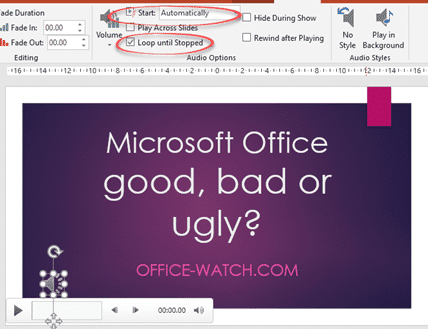
There are plenty of audio and music options available in PowerPoint if you want to give your audience a break from your voice. We’ll go beyond the simple ‘adding music’ help to give some practical advice for audio in presentations: You will find the audio basics at Insert | Media | Audio Choose a music/audio file […]

Add genuine BBC Sound Effects to PowerPoint
The BBC has a great collection of over 16,000 sound effects that you can add to your PowerPoint presentations. Use them as a trigger sound for a click on a presentation, as a novel background noise or even an alert sound on your computer or smartphone. Sound Effects Galore Exploring the 16,000 sound effects available […]









