Microsoft 365 – the subscription / annual fee plan for Microsoft Office on Windows, Mac, iPhone, iPad and Android.
Includes Word 365, Excel 365, PowerPoint 365, Outlook 365 and many other ‘365’ programs, apps and services.

See the world’s top companies in Excel
In Excel 365 you can list the world’s top companies and their market capitalizations including the shortlived leader, NVIDIA. NVIDIA have a lock on the supply of AI related hardware and so their stock price has dramatically risen. ‘Dramatic’ is an understatement because NVIDIA briefly jumped over Microsoft and Apple to become the world’s largest […]
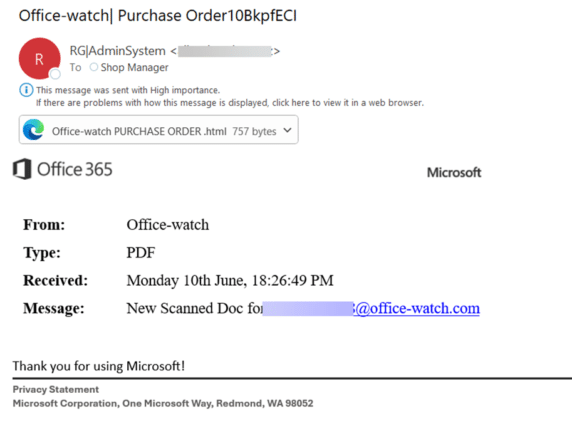
Don’t Fall for This Fake Microsoft Email Scam
Here’s the latest example of a fake Microsoft email that slips past their anti-virus and security checks to end up in a Microsoft 365 mailbox. It might look like a real email at first glance but it’s not. The big clue to us was “Office 365” which is a name Microsoft rarely uses these days […]
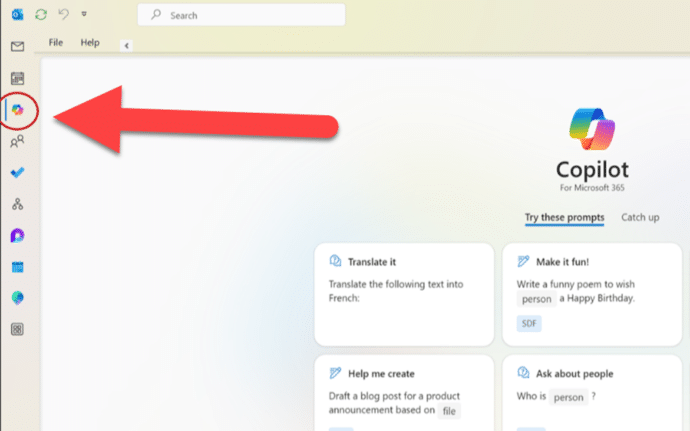
Copilot comes to some Outlook for Windows
Outlook (classic) for Windows is getting Copilot AI features but only some people will get the summarizing, draft, rewrite and coaching benefits. You might have seen the news that the current Outlook 365 for Windows is getting Copilot but few mentioned the crucial detail that Microsoft put in the fine print. Before we explain what […]

All about Clear Formatting in Word
Clear Formatting lets you remove extra text formatting in Word documents. As usual in Microsoft Word, there’s a lot more happening behind a seemingly simple feature. Sometimes the formatting of some Word text gets very confused but there’s a simple way to get it back to plain formatting. Word has a command ‘Clear Formatting’ that […]
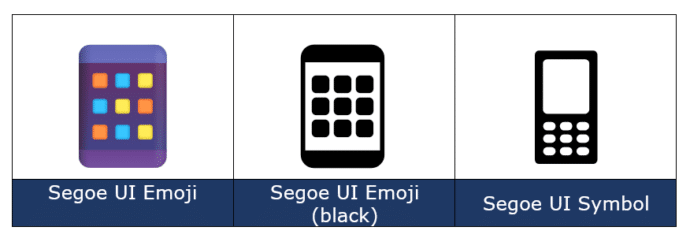
Mobile Phone 📱 emoji in Word, Excel, PowerPoint and Outlook
How to insert the Mobile Phone 📱 or smartphone emoji into Microsoft Word, Excel, PowerPoint or Outlook. Both in Office for Windows and Office for Mac. How Mobile Phone 📱 symbol looks in different fonts. The mobile phone emoji is available in these standard Windows fonts: Segoe UI Emoji and Segoe UI Symbol. Not surprisingly, […]

Join Tables with Excel Power Query
Excel’s PowerQuery has many clever tricks, one of them is merging and matching data from multiple tables into a single table. Combine, clean, and transform data from multiple sources into the single format you need; a table, PivotTable or PivotChart It’s a simple relational database with relations set to match up the rows in each […]

Make lines and arrows straight – a Word bug fix
Ever since Word 2013 there’s been a line alignment bug in Word. Line and Arrow shapes aren’t straight, horizontal or vertical. Here’s how to fix this ten year (and counting) bug. Whenever a line or arrow is inserted (Insert | Shapes | Lines ) the result is always a little off. The end points never […]

How changes in Outlook login will affect you
There’s about to be a big change in how you login to Outlook.com (Hotmail.com, live.com email and it’s best to get ready now. We explain which email apps are already setup OK, some apps might need a simple change while others have to be replaced. From 16 September 2024, Outlook.com won’t just accept a simple […]

Transform a photo with Restyle Image in Designer
Ever wanted to make a drawing from a photo? Now you can with a new Microsoft Designer feature “Restyle Image”. It turns any photo into an image in a variety of styles. “Restyle Image” lets you upload a photo, choose a drawing style and then the Designer AI system will mash to two together to […]
What’s in and out of the new Microsoft 365 Basic
There’s a fairly new Microsoft product called Microsoft 365 Basic featuring 100GB of OneDrive and a 50GB mailbox for under US$20 a year. There’s a hidden opportunity for anyone with non-subscription Office 2021/2019 too. What’s in Microsoft 365 Basic Stripping away all the hype and marketing blurb, the Basic plan has two main elements: There’s […]

How to select more than one Office document to open
How to choose more than one Microsoft Office file or document to open at the same time. One of the frustrations about the ‘pane’ interface in Office for Windows is the failure to include all the features that customers were accustomed to from the standard File dialog boxes. Microsoft added new and useful features like […]

Make a Jigsaw Puzzle in PowerPoint
Make your own jigsaw puzzle in PowerPoint to gradually reveal a photo or logo hiding underneath. We’ll show how to make the pieces plus a download sample PowerPoint file for our loyal subscribers. You can use a jigsaw puzzle PowerPoint slide as a powerful storytelling tool, ideal for illustrating how different parts of a story […]

The truth behind the Word controversy “Economically disadvantaged” vs “poor”
A minor social media storm over another suggested word change by Microsoft Word. The word ‘poor instead of ‘economically disadvantaged’. Which has some people complaining about Microsoft forcing changes in what we write. On Tiktok, the user @itschicabtw posted a video noting a wording suggestion made by Microsoft Word. It proposes that ‘economically disadvantaged’ be […]

Spam arrives in a brand new Outlook.com account – how?
How can spam email appear in a brand new Outlook.com account right away, before anyone has been given the address? Office Watch reader Sophie J setup an Outlook.com account and was shocked to see spam email appear in the mailbox within minutes. She hadn’t given out the email address to anyone (barely had time enough) […]

Windows Recall must be a choice
One part of Microsoft’s AI push should scare the hell out of anyone interested in their privacy but Microsoft is ignoring that with their upcoming Recall feature. Recall is one of the upcoming AI features in Windows 11. It’s supposed to help people search through their past actions by snooping on the computer every five […]
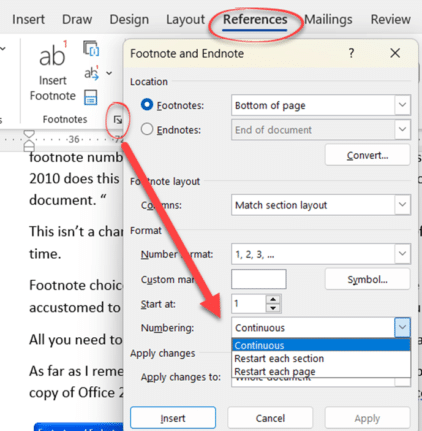
Have Footnotes changed in Word?
Has there been a change Microsoft Word’s Footnotes settings or has the ‘Numbering’ choices (Continuous, Restart each page or section) remained the same? How much of Microsoft Office is really new, despite appearances? Office Watch reader “Joe L.” has done a big Microsoft Office leap from Office 2010 to the latest Microsoft 365 or 14 […]









