
Python Editor for Excel is out and essential
The Python Editor for Excel is a welcome innovation of the Microsoft Garage project making editing and debugging Python code in Excel a lot easier. Python Editor add-on for Excel mirrors the functionalities of renowned integrated development environments (IDEs) using the code management system behind Visual Studio Code. Sample code from A new way to […]
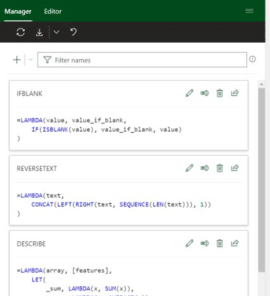
Microsoft fixes a big hassle with Excel’s great Lambda()
Microsoft has fixed the big hassle that comes with the otherwise excellent Lambda() feature in Excel 365 with the new Advanced Formula Environment. Office Watch has sung praises over the power that Lambda brought to Excel. It’s the ability to write custom functions within Excel but without VBA macros. Proper IDE for Excel formulas But […]

Copying images from Designer to Office documents
Unfortunately, copying an image made in Designer isn’t as simple as it should be. Here’s how to grab images made with Designer to use in your own Office documents. Don’t wait, start using Microsoft Designer now It’s easy to paste an image into Designer. Just copy the image from your app (like Word or PowerPoint), […]

Get current UTC time into Excel with Python
Python in Excel adds lots of new possibilities to Excel including a new way to the latest UTC time. Here’s the full code, how it works and a fix for an annoying problem. Knowing the UTC / GMT time is important for comparison with the ‘Last Trade Time’ data from Excel’s Stock / Currency data […]
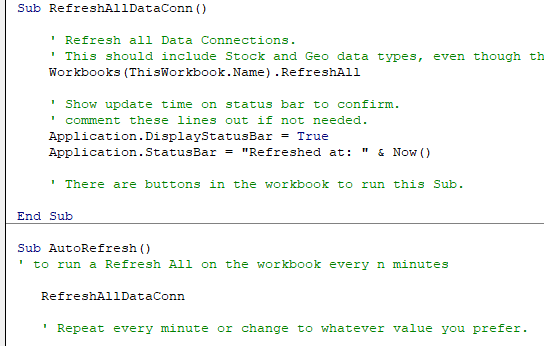
Two Excel workarounds for automatic refresh and recalculation
There are two ways to make Excel automatically refresh data connections and recalculate a worksheet. These tricks are important with the Stock and Currency data type in Excel 365 but also other situations. Normally Excel will update itself when you change a cell value. These days there are situations where cells change value but Excel does […]

Gun 🔫 emoji in Word, Excel, PowerPoint and Outlook
Insert the Water Pistol or Gun emoji 🔫 into Microsoft Word, Excel, PowerPoint or Outlook. Both in Office for Windows and Office for Mac. AND how to make the ‘gun’ point to the right. Water Pistol 🔫 symbol is the only ‘gun’ style symbol in the emoji collection. It’s officially called ‘Water Pistol’ but searching […]

Ten ways to Reverse, Mirror or Flip Text in Microsoft Word
There are at least ten ways to ‘reverse’ ‘mirror’ or ‘flip’ text or images in a Word document. Horizontal, vertical, reversed, combined or any angle you like. When people say those terms they can mean different things so we’ll look at many options and how to do them. Also along a curve, but that’s a […]

Surprise! Office 2021 & Office 2019 has the all Aptos fonts
An undocumented surprise for Office 2021 and Office 2019 customers. The new Aptos fonts are automatically installed in Office 2021/Office 2019 even though Microsoft insists they are for Microsoft 365 only. However, there’s a crucial difference and strange anomaly between how Aptos fonts work in Office 2021/2019 vs Microsoft 365. According to Microsoft the Aptos […]

Fun Eyes 👀 symbol in Word, Excel, PowerPoint and Outlook
Type the fun Eyes 👀 symbol into Microsoft Word, Excel, PowerPoint or Outlook. Both in Office for Windows and Office for Mac. Eyes 👀 symbol / emoji is a bit of fun for documents and PowerPoint slides. How Eyes 👀 looks in different fonts. Eyes is available in symbols fonts like Segoe UI Emoji and Segoe […]

Make Cloud Fonts available to all programs, not just Office
Microsoft 365 / Office 2021 Cloud Fonts are only available in Office programs … that’s the official line unless you know the trick to make the fonts available in other Windows or Mac apps Cloud Fonts can be selected and installed for Word 365/2021, Excel 365/2021, PowerPoint 365/2021, Outlook 365/2021 and Publisher 365/2021. You might […]
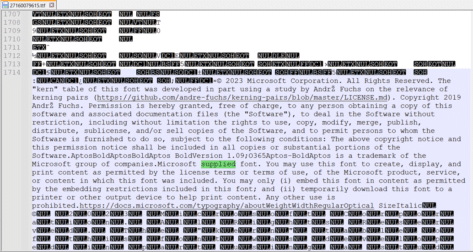
Aptos & Microsoft fonts, what can you legally do with them?
What are the legal limits on fonts supplied by Microsoft in Windows or Microsoft Office? Is there anything special for the Microsoft 365 only Aptos fonts? A few readers have asked us about the font license rules that apply to fonts provided by Microsoft. Can the fonts be embedded in documents or PDF’s for portability? […]

Finding more SVG or Icons for your Office documents
There are a lot more Office Icon or SVG graphics available than the ones in Microsoft 365, Office 2021 or 2019. Jazz up your documents, emails or presentations with a wider range of graphics than the (overused) ones that come with modern Word, Outlook or PowerPoint. Microsoft 365, Office 2021 and 2019 have Icons which […]
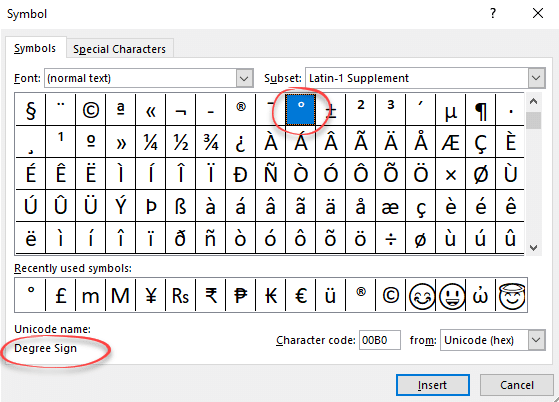
Degree symbol ° in Word, Excel and PowerPoint
Type or enter the ° Degree symbol into Microsoft Word, Excel, PowerPoint or Windows / Mac programs generally. Degree ° is a common symbol and should be available in most fonts. If not, try another font or one of the fonts with a very wide range of characters like Arial Unicode MS or Lucida Sans […]

World Map 🗺 symbol in Word, Excel, PowerPoint and Outlook
Insert a World Map 🗺 symbol into Microsoft Word, Excel, PowerPoint or Outlook. Both in Office for Windows and Office for Mac. Of course, there are many Earth map images or drawings available on the Internet. There’s also some Microsoft Office Icons that we’ll explain below. We’re mostly talking about the World Map 🗺 symbol […]

Show Changes is a wonderful addition to Excel
Excel 365 has a detailed history of workbook changes down to the cell level so users can see what’s changed, when and who did it in Show Changes. Office-Watch.com explains how to use the new feature, some handy tricks plus the inevitable traps and limitations. This is great for collaborative worksheets with many people making […]

Aptos fonts and making a PDF from Office
The new Aptos fonts in Microsoft 365 are installed and licensed in a different way from most fonts. How does that affect making a PDF either saving or printing. Can it be done at all? There are two broad ways to make a PDF file from an Office document. Save As PDF or Print to […]









