Discover the secret powers of a 3D model
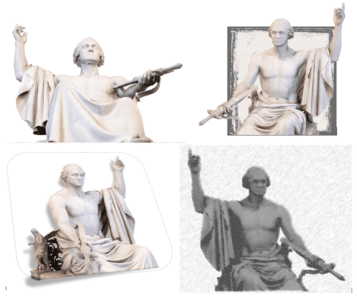
3D models have a secret. They let you choose the exact look you want, turn it into a 2D ‘normal’ image that you can do a lot more with. Here’s a 3D model from the Smithsonian collection, a full length but frankly plain view of a famous statue. With a little Microsoft Office trickery, you […]

Goldman Sachs font for a new look in Excel, Word and Office
The (in)famous Goldman Sachs bank has released their own font which anyone can use in their Word, Excel or Powerpoint documents. It’s called Goldman Sans and is available for anyone to download and use. The font is especially useful in Excel workbooks. The company describes the sans-serif typeface as “approachable without being whimsical”. Goldman Sans, […]

Speaking Head in Silhouette 🗣 emoji in Word, Excel, PowerPoint and Outlook
How to insert the Speaking Head in Silhouette 🗣 emoji into Microsoft Word, Excel, PowerPoint or Outlook. Both in Office for Windows and Office for Mac. Speaking Head in Silhouette 🗣 emoji can be used as a different way to draw attention to a special point or note. Or as an alternative icon for a speaker […]

Siren 🚨 emoji in Word, Excel, PowerPoint and Outlook
Insert the Siren or Police Car Light 🚨 symbol / emoji into Microsoft Word, Excel, PowerPoint or Outlook. Both in Office for Windows and Office for Mac. Police Car Light🚨 (aka Siren or Emergency Vehicle Light) symbol can be used any time you want to add warning or alert to a document, slide or sheet. […]
Starting out with 3D models in Microsoft Office
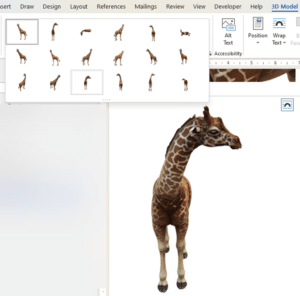
How to insert and use 3D models in Microsoft Office. 3D models let you rotate, pan and zoom all around an object to show it exactly the way you want. Microsoft Office’s 3D models feature has more uses than you might expect. From the Microsoft promotion, it looks like 3D models are only good for […]
Degree Fahrenheit ℉ symbol in Word, Excel, PowerPoint and Outlook
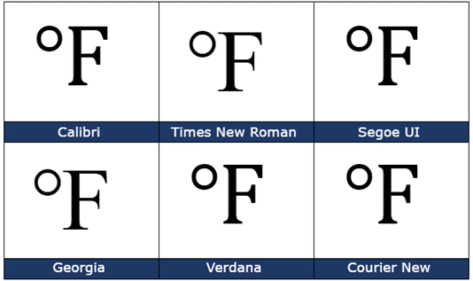
How to insert the Degree Fahrenheit ℉ into Microsoft Word, Excel, PowerPoint or Outlook. Both in Office for Windows and Office for Mac. Degree Fahrenheit ℉ symbol is used as the unit for the Fahrenheit temperature scale. It’s a single character that’s a combination of the degree symbol and capital F. There’s a matching Degree Celsius […]
Degree Celsius ℃ symbol in Word, Excel, PowerPoint and Outlook
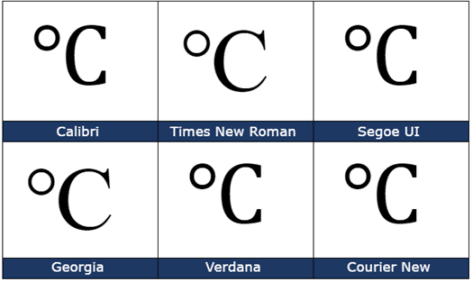
Insert the Degree Celsius / Centigrade ℃ into Microsoft Word, Excel, PowerPoint or Outlook. Both in Office for Windows and Office for Mac. Degree Celsius ℃ is a single character symbol is used to refer to a specific temperature on the Celsius or Centigrade scale. Centigrade was the original name for the temperature scale before 1948 […]
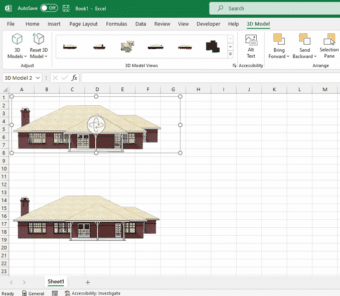
SketchUp 3D graphics in Office 365
Microsoft has added SketchUp 3D graphics (.skp files) to the models inserted into Word, Excel, PowerPoint, and Outlook. SketchUp is a 3D graphics program where you can create shareable designs such as architectural models and graphics used in industrial design, product design, and civil and mechanical engineering. SketchUp Free is available for everyone. Adding Sketchup’s […]

Use the Smithsonian for great photos and 3D models in PowerPoint and Word
The Smithsonian has millions of images and 3D models available online to add something great and different to Microsoft Office including PowerPoint slides and Word documents. The Smithsonian Institution has been a US cultural, scientific and historical resource for the last 170 years. No visit to Washington DC is complete without going to several of their […]

Microsoft fixes their Quick Access Toolbar changes
Microsoft has reversed course on their proposed changes to the Quick Access Toolbar (QAT) in Microsoft Office 365 apps. The current defaults remain for new installs with ‘below the ribbon’ available as an option. In other words, common sense has prevailed. Microsoft wanted to move the Quick Access Toolbar from its familiar location ‘top left’ […]

Myth Busting about Office document formats
Even after 15 years, there’s still misinformation about the ‘new’ Office document formats .docx .xlsx etc. We’ll explain these myths and how you can easily disprove them yourself. Most of these myths surround the use of ZIP compression to make the document files smaller. Folks have jumped to wrong conclusions after hearing about ZIP. Not […]

Vertical Bar | symbol in Word, Excel, PowerPoint and Outlook
How to insert the Vertical Bar | into Microsoft Word, Excel, PowerPoint or Outlook. Both in Office for Windows and Office for Mac. Vertical Bar | symbol (technically a glyph) has many uses in computing, physics, maths and typography. In some programming languages | has a special meaning, for example in PowerShell | is called […]

Excel’s Round () and nine other rounding functions
Excel’s Round () function rounds a number to a specified number of digits. It might seem like the choice for your rounding needs but there are NINE more rounding functions that might be better and even that’s not enough to cover all rounding needs. Round () basics Round() is pretty simple, give it a value […]
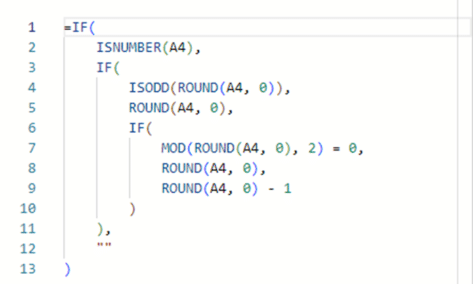
More accurate Excel rounding to the international specification
Here’s how to round numbers more accurately than Excel’s in-built Round() and other functions. This method uses the internationally recognized standard for rounding (yes, there is one), we’ll show the long formula, how it works plus the Let() and Lambda() versions that can make your worksheet easier to deal with. Rounding ‘Ties to Even’ The […]
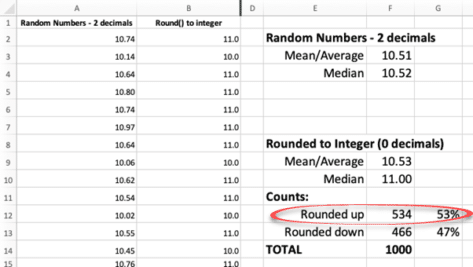
Why Excel’s Round() function is wrong
Excel’s Round() function is not totally accurate. There’s a lot more to rounding numbers than we were taught in school and how Microsoft’s Round() function works. What we learned in school and Round() is OK. But if you’re dealing with larger groups of numbers, narrow rounding ranges or should be very, very fair (e.g test […]
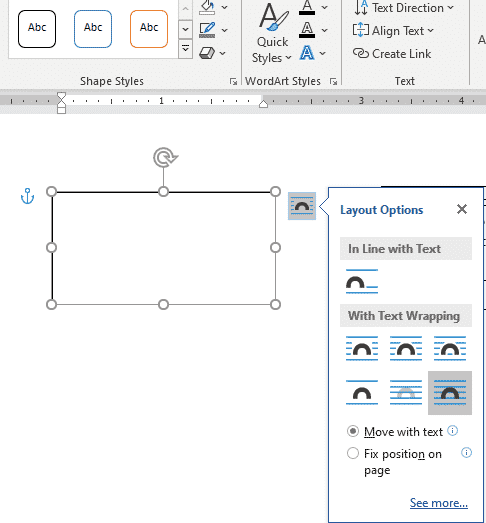
Set your own Text Box default settings in Office
You’re not stuck with the Microsoft Office automatic settings when inserting a new text box. Change the Text Box defaults to whatever you like for faster text box formatting in Office; Word, Excel, PowerPoint or Outlook. There are TWO ways to add a Text Box in Word and Outlook – each with their own ways […]