All about Microsoft Office for Apple Mac. Word, Excel, PowerPoint, Outlook on macOS, Microsoft 365 for Mac, Office 2021 for Mac and earlier versions.
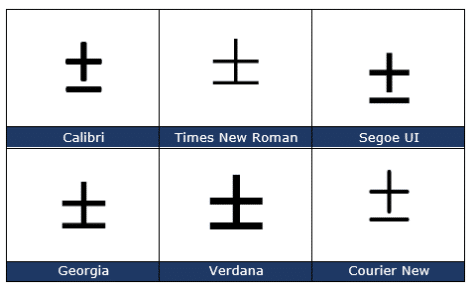
Plus or Minus sign ± in Word, Excel, PowerPoint and Outlook
Type the ‘Plus or Minus sign’ ± into Microsoft Word, Excel, PowerPoint or Outlook. Both in Office for Windows and Office for Mac. Plus-Minus ± symbol isn’t just used for equations, it’s also used as a shortcut for ‘plus or minus’. In statistics you’ll often see results given as being “ ± 3% ”. How […]

Change sentence space after fullstop/period in Word
Microsoft Word can check if you use a single or double space after a sentence (fullstop/period) but how can it be changed throughout a document? Make all sentences end with a single space instead of double spaces, triple or more. The Sentence Spacing settings (single, double or don’t care) is in Word’s Grammar settings see […]

Send party invitations from Outlook
Sending out party and other non-business invitations is quite possible in Outlook. While the system is primarily intended for meetings in companies, individuals can use it too. Microsoft has tinkered with the look of Outlook but the fundamentals remain the same. Using Outlook you can email invitations which include links to maps or more information. […]

Where is Excel’s Show Changes?
Back in August we told you about the interesting ‘Show Changes’ feature in Excel which tracks not only edits made to a workbook but who made them. Since then eager Excel users have wondered when it’ll appear in Excel 365 for Windows or Mac … and so are we. According to Microsoft’s own documentation, Show […]

Two checkmark or tick ✓ choices in Word, Excel, PowerPoint and Outlook
Check mark or tick has two options, normal ✓ or heavy ✔ to insert into Microsoft Word, Excel, PowerPoint or Outlook. Both in Office for Windows and Office for Mac. Checkmark ✓ symbol is used for bullet or check lists and other indicators. There’s also Heavy Check Mark ✔ which looks different, heavier, than the […]

Four X cross ✗ choices in Word, Excel, PowerPoint and Outlook
Type one of the four diagonal cross Mark ✗, multiplication or ballot symbols into Microsoft Word, Excel, PowerPoint or Outlook. Both in Office for Windows and Office for Mac. The X or Cross Mark ✗ symbol is used for bullet or check lists and other indicators. It’s the opposite of the tick or Checkmark. There […]

Microsoft 365/Oreo massive price hike
As we predicted last week, the “Microsoft 365 Oreo Expansion Pack” have appeared on Ebay and at a massive markup over the original price. The ‘special’ offer had a Microsoft 365 “Expansion Pack” of Oreo’s (apparently no waistline joke intended) plus a little plastic tong called a “Clippy Dippy”. Only 2,800 packs were sold for […]

Printing tricks for Microsoft Word and Office
There’s a lot more printing and money saving options available if you know where to look or use a little cunning to get what you want. Microsoft Word documents with rescaling paper size, saving money in ink or toner, double-sided printing, two pages to a sheet, poster sizes and booklets. There are ways to save […]
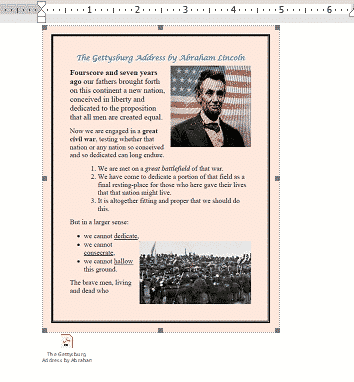
Three ways to add a PDF into a Word document
Here’s three ways to add a PDF into your Word document. Like many things in Microsoft Word, there is more than one way to add a PDF file into a Word document. From a simple link to another file to converting the PDF into a Word document. In most cases you’ll link to a PDF […]
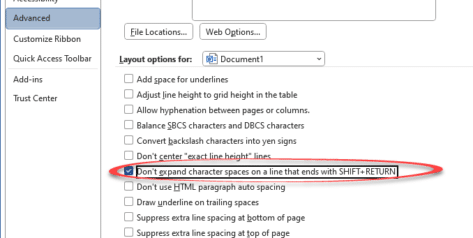
Four Word fixes for stretched out last line
To my horror, I encountered something strange while working on a Word document with “strung out” or ‘stretched’ text on the last two lines with huge gaps of space between them. Here’s the two ways it can happen and the four fixes available. A stretched-out line in a Word document often happens while pasting text […]

Inside Smart Copy and Paste in Word
When Microsoft Word was first released, all those years ago, it had a Paste feature but it was dumb and literal. These days Word’s Paste (Word for Windows and Word for Mac) is a lot smarter and does very useful things that you may not realize or appreciate. Before the ‘Smart Paste’ options came along, […]
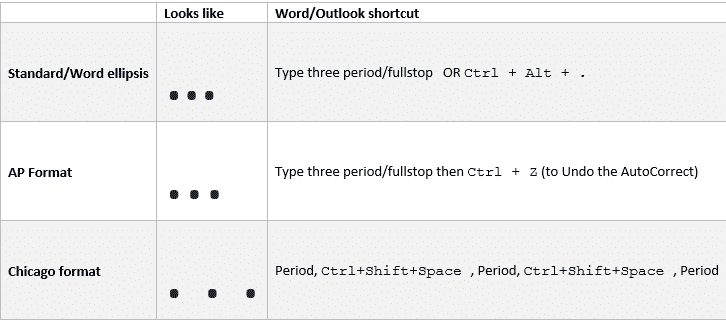
Ellipsis … symbol in Word, Excel, PowerPoint and Outlook
Type the three different types of Ellipsis … marks in Microsoft Word, Excel, PowerPoint or Outlook. Both in Office for Windows and Office for Mac. Ellipsis … symbol is used for a gap or break in some text, usually to drop out some irrelevant text or speech. The same applies in maths e.g. 1,1,2,3 …. […]

Comma Ellipsis ,,, in Word and Office
Like it or loath it but the comma ellipsis has arrived ,,, as an alternative to the more common ellipsis with dots. Here’s how to use it in Word and Office. The comma ellipsis is a modern, more casual version. It’s used as a more dramatic, even annoyed trailing off of a thought, compared to […]
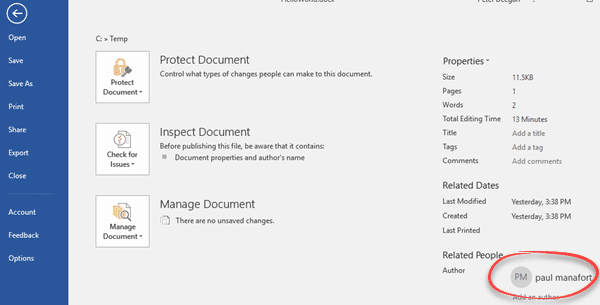
Changing the Author name in an Office document
How can you change the Author name in an Office document? How can you know that the name in a Microsoft Word document is the actual person not an imposter? It’s easy enough to go to File | Info to see and change the document Author name. We did that in a few seconds … […]

Ten Microsoft announcements in brief
Last week Microsoft made a series of announcements of new and changed features in Microsoft Office and Microsoft 365. Here’s a brief roundup of what the main ten promises and what they mean for you (if anything). The important word is ‘announcement’. Almost all the statements are about future arrivals, not available now. A lot […]
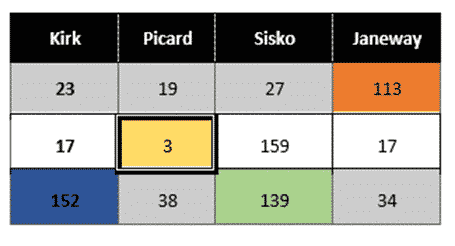
Merge or Split cells in Word and PowerPoint tables
Combine or divide adjacent Microsoft Word or PowerPoint table cells into a merged single cell or split a cell in two. Welcome to ‘Merge Cells’ where you can combine adjacent cells into a single cell. It’s very handy for table formatting tricks and other unusual situations like a longer than common text label. Or a […]









