
Hidden picture info in your Office documents
The BBC has a ‘long read’ about hidden information inside almost all photos. Office Watch has talked about this problem many times before including how the extra image data hides in Microsoft Office documents, despite the ‘Document Inspector’. It’s too easy just to think of an image as just what you see on the screen […]

The case of the missing file extension
You’ve received a document, but when you try to open it, the file stubbornly won’t appear! We explain how to fix it. Our editor-in-chief saw that problem in an Internet cafe‚ in Ketchikan, Alaska and was surprised when neither the manager of the store nor the cruise computer ‘expert’ knew the answer. As you probably know, […]

Black Right Pointing index ☛ symbol in Office
How to insert the Black Right Pointing index ☛ into Microsoft Word, Excel, PowerPoint or Outlook. Both in Office for Windows and Office for Mac. Black Right Pointing index ☛ symbol can be used for pointing a direction on a sign or as a different bullet symbol. There’s also a similar, lesser known symbol Black […]

Right-click menus now in Office for iPad
The Word, Excel and PowerPoint apps for iPad are getting right-click menus when there’s a external mouse or trackpad connected. It’s a good move with more iPads being used with separate keyboard & mouse as a mini-PC. Sadly the new menus aren’t all they could be. Right-click (Microsoft calls a ‘secondary click’) on an image […]

Broken Vertical Bar ¦ symbol in Word, Excel, PowerPoint and Outlook
Type the Broken Vertical Bar ¦ in Microsoft Word, Excel, PowerPoint or Outlook. Both in Office for Windows and Office for Mac. Broken Vertical Bar ¦ symbol was sometimes used in computing. These days there’s no specific use for the broken vertical bar but it’s good to keep in mind as a design alternative to […]

Windows fixes for Office and printing problems
The March 2021 Windows patches have caused at least two major bugs (sorry ‘issues’) that can affect Office users or anyone trying to print. Here’s the fixes and workarounds. Printing bug This is a nasty bug caused by the Windows patch KB5000802 not being properly tested before release. An update to vaguely ‘improve security’ in […]
Office docs to avoid at all costs, the old formats
There are types of Office documents that you should NOT open, even if they come from someone you trust. Here’s the full list of file extensions for the older Office document formats which are much more likely to be ‘malicious’ docs from hackers and criminals. We’ve talked about the risks of receiving hacked documents using […]
PowerPoint crashes fixed with February 2021 bug patches
PowerPoint 2016, 2013 and 2010 users need these bug fixes from Microsoft to prevent the program crashing. The bug might happen opening a presentation with a diagram – ouch. There are two updates needed to fix the bug, one for Office generally and for PowerPoint itself. PowerPoint 2016 KB4493164Office 2016 KB4493189 PowerPoint 2013 KB4493169Office 2013 […]

A new way to convert a Word document to PowerPoint
Word online (web browser) is getting a way to convert a Word document into a PowerPoint presentation. For the moment it’s available as a preview feature in Word online. See if you have it at File | Transform. Transform document to presentation Start from File | Transform | Transform to PowerPoint presentation First, choose a […]
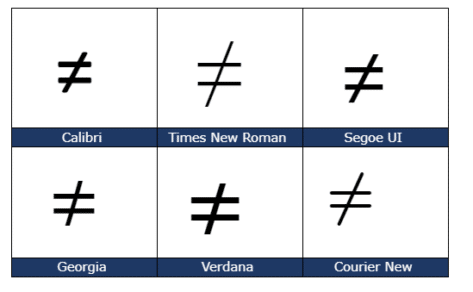
Not Equal ≠ symbol in Word, Excel, PowerPoint and Outlook
Type the Not Equal ≠ sign into Microsoft Word, Excel, PowerPoint or Outlook. Both in Office for Windows and Office for Mac. Not Equal ≠ symbol is used in equations, obviously but it’s also handy shorthand in a heading or slide. The official Unicode name is ‘Not Equal To’. How Not Equal ≠ looks in different fonts. Here’s some examples of how Not Equal ≠ looks in […]

Two new Microsoft Office bundles coming in 2021
Microsoft has announced two ‘perpetual licence’ or non-subscription versions of Office that will be released later in 2021. Both continue Microsoft’s unstated but bleedingly obvious attempts to push customers to annual ‘subscription’ payments. Here’s what Microsoft has disclosed so far with an explanation of the continued reduction of value for perpetual licence purchasers. To replace […]

Office ‘all-in-one’ app, get it now for iPad
The Office ‘all in one’ app, already available for iPhone and Android, is starting its arrival on Apple iPad. The app combines Word, Excel, PowerPoint and other goodies into a single app. The ‘all in one’ app, officially called just ‘Microsoft Office’ has started a limited preview. We’ll explain how to get it now, either […]
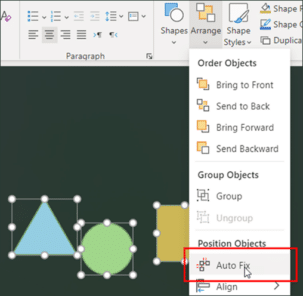
Auto Fix coming to PowerPoint and not a moment too soon
PowerPoint is getting a new feature ‘Auto Fix’ that Office users have wanted for many, many years. We hope it’s the start of deployment to Word and Excel across all platforms. Auto Fix is a way to automatically arrange a collection of shapes and other objects into neat rows and proper alignment. It does the […]
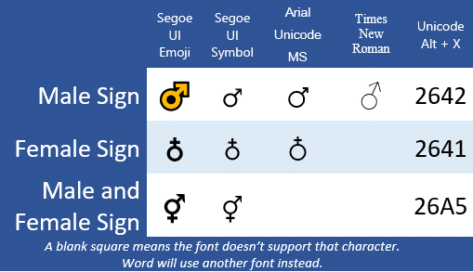
Male ♂, Female ♁ or ⚥ symbols in Word & PowerPoint
Should automatically redirects to Male ♂ Female ♁ both ⚥ symbols in Word and Office, if not, please click the link
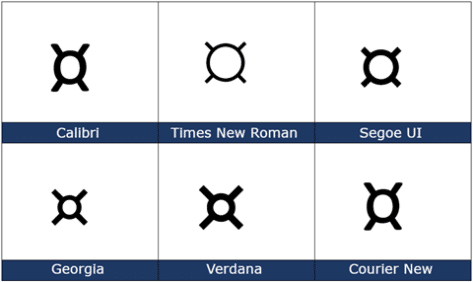
Currency ¤ Symbol in Word, Excel, PowerPoint and Outlook
How to insert the Currency ¤ or scarab symbol into Microsoft Word, Excel, PowerPoint or Outlook. Both in Office for Windows and Office for Mac. Currency ¤ symbol is used to denote an unspecified currency. It’s the generic sign you could use if the correct symbol isn’t available. It doesn’t seem to be used a […]

Van Gogh masterpieces right into your PowerPoint slides
The full collection of Van Gogh masterpieces are available online, ready to be used in PowerPoint slides. Here’s how to get good quality images of the great man’s work and use them wisely in slides. Not interested in Van Gogh? These tips show how to fit any image into PowerPoint as a picture or slide […]









