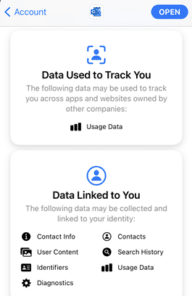
Apple Privacy tags don’t tell the whole story with Office
Apple’s new Privacy tags sound like a great idea but they rely on the honesty of app makers (Ha!) The simple labels can cover an enormous amount of privacy intrusion in Microsoft Office and Outlook mobile apps. The Washington Post is behind a paywall but the ‘general tenor of his spray’ is that each developer […]

Right Pointing Hand ☞ symbol in Word, Excel, PowerPoint and Outlook
How to insert the white right pointing hand ☞ into Microsoft Word, Excel, PowerPoint or Outlook. Both in Office for Windows and Office for Mac. Officially called “WHITE Right POINTING INDEX” ☞ symbol is a different or novelty form of the right arrow as a hand. It can be used in standard text or a […]

Get more from two free professional PowerPoint Templates
Shutterstock are offering two nicely designed PowerPoint templates for free. We’ll explain how to get more from the professional templates with a few clicks. Minimalistic PowerPoint templates comes in two styles: Dawn and Midnight. Dawn Template Evokes a meadow at dawn with a muted color scheme. Midnight Template Midnight template is a stark, black look. […]
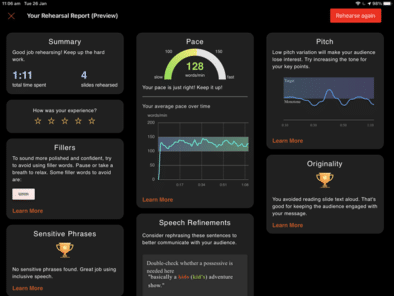
Presenter Coach now in PowerPoint for iPad
Presenter Coach or Rehearse with Coach is now available in PowerPoint for iPad. You can practice your presentation with Microsoft’s systems ‘listening’ and giving advice on how to improve. Presenter Coach is already in PowerPoint 365 for Windows or PowerPoint Online on the web. See Presenter Coach makes for better presentations to explain the details […]

Black ‘Not Allowed’ circle/line symbol
Continuing our series on the ‘Not Allowed’ symbol, let’s make a version with a black background and white center graphic. This isn’t part of the official ISO specification for the symbol but it’s widely used. It’s done by adding a black circle under the main circle/line & graphic (which is changed to white, naturally). An […]
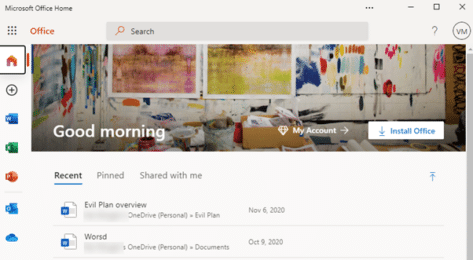
Make Microsoft Office a Progressive Web App or PWA
Microsoft Office (plus Word, Excel and PowerPoint) can be installed as a standalone web apps or PWA. We’ll explain how and the current limitations. This looks like the Office.com web page but it’s not, it’s Office as a standalone Progressive Web App (PWA). It’s available now in Windows 10 with the Edge (Chromium) browser. To […]

What Office users need to know about the new Windows 10X
Windows 10X is coming and you’ll hear a lot about it in the coming months. Let’s see what Windows 10X is, how it will run Office (Word, Excel, PowerPoint, OneNote and Outlook) and why most people won’t need to worry about Windows 10X. What is Windows 10X? Windows 10X is a very scaled-down or lightweight […]

Better ‘Not Allowed’ red circle/line symbol with text
Continuing our series on the ‘Not Allowed’ symbol, let’s make a versions with text instead of a graphic or icon. Check out our article on Make a ‘Stop’ circle / diagonal symbol in Word, Excel & PowerPoint about creating, resizing and coloring the basic shape. Text in circle Instead of the usual symbol, let’s add […]

Great text & image ‘Not Allowed’ red circle/line symbols
Continuing our series on the ‘Not Allowed’ symbol, let’s make a version with text and graphic or icon. Check out our article on Make a ‘Stop’ circle / diagonal symbol in Word, Excel & PowerPoint about creating, resizing and coloring the basic shape. Better ‘Not Allowed’ red circle/line symbol with text has the basics of […]

Office Lens leaves Microsoft Store but lives on!
As we mentioned back in October, Office Lens has been dropped from the Microsoft Store but it’s not the end of Lens, far from it. Microsoft announced that the cloud services backing Lens features would be disabled from 1 January 2021. Only Office Lens for Windows 10 and Windows Mobile are affected. Saved documents retained […]

Nice variations for Stop shape in Word, Excel & PowerPoint
There’s plenty of scope for variations on the basic Not Allowed symbol (red circle with diagonal) using the tools in Microsoft Office. See Make a ‘Stop’ circle / diagonal symbol in Word, Excel & PowerPoint for how to insert the basic ‘Not Allowed’ shape and change to suit your needs. Line Direction The line across […]

Office Watch most popular articles of 2020
Well, that’s been an ‘interesting’ year for all of us <sigh> . Here’s some of the articles that have been popular with our worldwide audience over 2020. Getting more from online video calls With the global lockdown, Office Watch switched roles for a while and added lots of advice for online video calls. We’ve been […]

Pantone 2021 colors in your Word, Excel and PowerPoint
Pantone has announced not one but TWO ‘colors of the year’ for 2021 and, as usual, we’ll explain how to use those exact colors in Word, Excel, PowerPoint and Outlook. The colors of 2021 are … Illuminating and Ultimate Grey As usual what’s more amazing than the color is the description that goes with the choice. […]

Synonyms in Word and, maybe, PowerPoint for the web
Word and PowerPoint online, the browser versions, now have the same Synonyms feature that’s in the Windows and Mac releases. Synonyms helps you vary your vocabulary by suggesting alternative (different, substitute, other ) words. If you’ve used Synonyms in Office for Windows or Mac, there’ll be no surprises in the browser version. Right-click on a […]
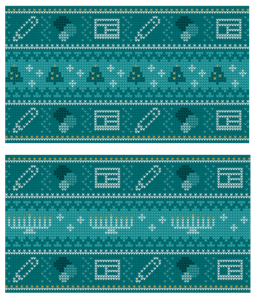
Get your Holiday ‘sweaters’ for Teams, PowerPoint & more
Microsoft has released some ‘sweater’ backgrounds for Christmas, Hannukah or anytime of year. The PNG images are intended as backgrounds for Teams calls but can be used anywhere. A PowerPoint slide, Word background, Zoom call background or whatever. Adding Virtual Background or blurred video to TeamsAdd your own background image to a Teams call They […]
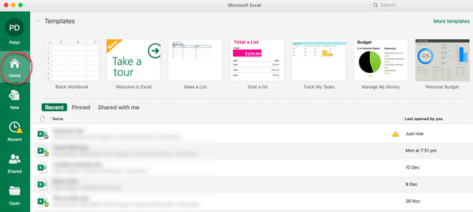
New look in Microsoft 365 for Mac coming in early 2021
Microsoft 365 for Mac is getting a revamped look for the Home or Start menu in early 2021. Here’s all the new and old features in the Home pane or as Microsoft calls it “Office Start experience” (no kidding) The Home panel changes to be more consistent with what’s visible in Microsoft 365 for Windows […]









