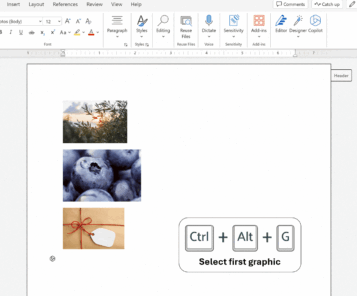
Jump quickly to graphics with new Word shortcut
The latest enhancement in Word for the web brings a better graphic navigation experience. Now, with keyboard shortcuts alone, you can select and move between graphics like never before. In short, Ctrl + Alt + G or Cmd + Alt/Option + G will select the first graphic in the document and then jump between other […]
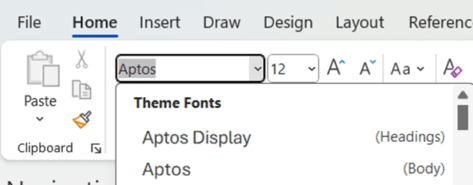
New default styles in Word, PowerPoint and Outlook
The change of fonts in Microsoft 365 also means a change of default styles (normal and headings) are also changing. Here’s what the new styles look like and the exact settings Microsoft has chosen for Word, PowerPoint and Outlook. At the moment, these fonts and styles are in Microsoft 365 Insiders builds for Windows and […]

Two ways to change document defaults in Microsoft Word
How to change the ‘Blank Document’ defaults like font etc. in Microsoft Word. Either ‘Set Default’ choices or update Word’s core template. What to do when the usual tips don’t work. In other words, all about Normal.dotm in Microsoft Word. Microsoft 365 customers are getting new default fonts called Aptos, which means many people are […]

List fonts in a Word document – method 2
There’s another way to make a list of all the fonts in a Word document. This method is probably faster than using VBA to search for fonts through large documents. This is an alternative to the VBA code in How to list all fonts in a Word document Word documents contain a list of fonts […]

Check out the winner and other new fonts in Microsoft 365/Office 2021
Here are samples of the five new fonts available for Microsoft 365 and Office 2021 customers one of which has become the new default font, but under a different name – Aptos. Did we say five? … there are really 10 new sans-serif fonts. Each of the five newbies come in two versions, normal for […]

Word’s Find can’t find all Unicode symbols and emoji
Word has a way of finding Unicode symbols by their reference number, except it doesn’t work for many symbols and not at all for emoji! And the Find ^u option is inconsistent with the rest of Word and common practice. These bugs have been in Word for a few years now with no sign of […]

Make your own Worlde in Office and Word
Make your own Wordle grids in Microsoft Office, Word, PowerPoint or Excel. Choose the right font, colors (the exact green, yellow or grey) plus grid details including blank or unfilled boxes. Wordle was originally a standalone app, created by Josh Wardle . It’s now owned and run by The New York Times, though the look […]
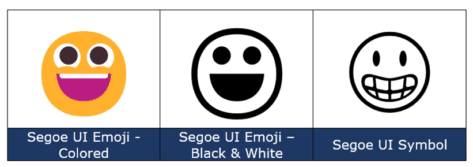
Grinning Face 😀 emoji in Word, Excel, PowerPoint and Outlook
How to insert the Grinning Face 😀 emoji into Microsoft Word, Excel, PowerPoint or Outlook. Both in Office for Windows and Office for Mac. Grinning Face 😀 emoji is usually depicted as a yellow face, with open eyes and a wide smile. Conveys good cheer or humor, often to make it clear that the sentence […]
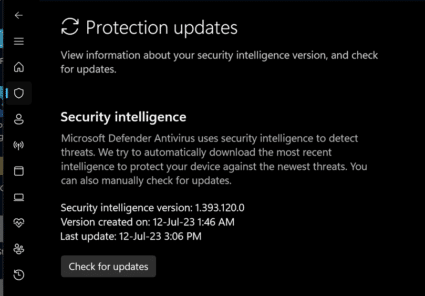
Beware unpatched Windows and Office security bug
Microsoft is warning about a security bug in Windows and Office that has no patch (yet) but is being publicly exploited. We’ll explain what to look out for and how to protect yourself. It appears to be (yet another) security hole in Windows which allows unauthorized code to run on a computer. It’s from a […]

Get the right Barbie color for Word, PowerPoint and Office
Barbie (the doll, not the Aussie BBQ) is everywhere at the moment so we’ll explain how to select Barbie Pink in your Word documents, Excel sheets and PowerPoint slides. There’s no one Barbie Pink but a selection to choose from. We looked around various official sources for the toys and movie trying to find the […]

How to find emoji in Microsoft Word and the bugs to avoid
Finding emoji or any high value Unicode symbol is difficult in Microsoft Word because of bugs in the software. We’ll explain the only reliable way to find emoji and the problems with the features that should work, but don’t. We’ll start with the best answer we can find. It’s not a perfect solution but it’s […]

More Word Find / Search tricks
Some more Microsoft Word Find tricks. Select and Find, finding blank lines, search for special characters/emoji, find a certain font or formatting plus wildcard options. This article follows on from our introduction Find pane search secrets in Word Select and Find If you select some text in a document then use the Ctrl + F […]
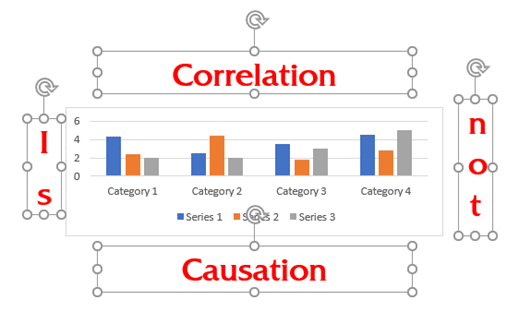
Put text around a shape, square or circle in Microsoft Word
How to put text around an object; image, chart, shape or other Microsoft Word object. Continuing from our look at putting Word text vertically, at an angle or curved Text around a Box Putting text around a box requires four separate text boxes, positioned and grouped around the object. Here’s a chart with four text […]

How to set vertical text, an angle or a curve in Word
Word isn’t limited to horizontal text, with a little digging on the ribbon you can put text vertically, at an angle, on a curve or even around a shape or picture. And in Put text around a shape, square or circle in Microsoft Word we’ll look at: From the Office-Watch.com archives there’s also Reverse, Mirror or Flip Text […]

Moai 🗿 or stone statue emoji, 3D model and more in Word, Excel, PowerPoint and Outlook
Add the Easter Island stone statue (Moai/Moyai) 🗿 symbol, 3D model or photo into Microsoft Word, Excel, PowerPoint or Outlook. Both in Office for Windows and Office for Mac. Moai 🗿 symbol represents the famous stone statues of Easter Island. It can be used to show a deadpan, ‘straight face’ or ‘stone face’ (literally) expression. […]
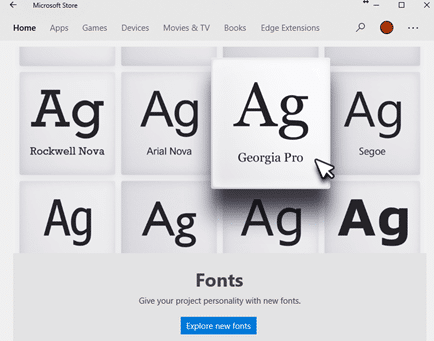
Why there’s three font locations in Windows 11 and 10
With the sale of fonts via the Microsoft Store and cloud fonts there’s now a complication in the familiar way fonts are managed in Windows 11/Windows 10 and how Office for Windows handles new fonts. There are now three different locations that fonts can be saved. For as long as anyone can remember, all Windows […]









