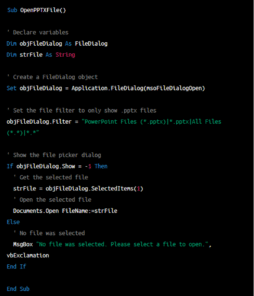
More adventures with Office VBA and AI
Get ChatGPT or Copilot to show working Office VBA code to select and open a Word, Excel or PowerPoint document. It’s an example of how to work with ChatGPT to get the code you need and its limitations. In episode 1 of this saga, Office Watch showed how to use ChatGPT to make sample Office […]
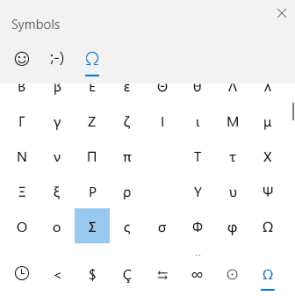
Sigma upper Σ or lower σ case symbols in Word and Office
How to insert the Sigma upper case Σ and Sigma lower case σ symbols in Microsoft Word, Excel, PowerPoint, or Outlook. Both in Office for Windows and Office for Mac. Sigma (uppercase Σ / lowercase σ) is the eighteenth letter of the Greek alphabet. In mathematics, the uppercase sigma symbol is used as an operator for summation, […]

Make a Word text box with rounded corners
A Microsoft Word text box can have rounded corners instead of the default square corners. It’s remarkably easy once you know the simple trick. Word Text Boxes always start with square corners, no matter which default you choose from the gallery. But once it’s inserted, a Word text box can be transformed many different shapes […]
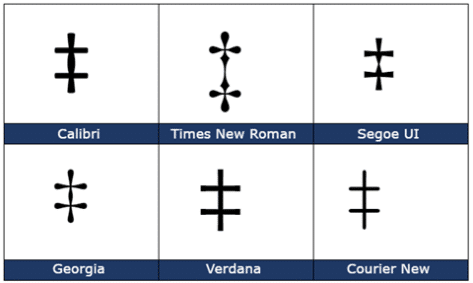
Double Dagger ‡ symbol in Word, Excel, PowerPoint and Outlook
Insert the Double Dagger ‡ into Microsoft Word, Excel, PowerPoint or Outlook. Both in Office for Windows and Office for Mac. Double Dagger ‡ symbol is used to mark a third footnote after the asterisk and dagger in a Word document. How Double Dagger ‡ looks in different fonts. Here’s some examples of how Double Dagger […]

Read Aloud a doc in Word for iPhone or iPad
Word 365 Mobile for iPhone and iPad have Read Aloud or Speak options to make a voice read the document to you. The Microsoft Office options are almost the same for both devices. Read Aloud in iOS is similar to the feature in Word for Windows with the same little control panel and options. It […]

Choices for formatting fields in Word Mail Merge
How to change the look of Word mail merge data like dates and dollar amounts to exactly what you want to see in the documents. Nancy M asks: “I try to merge data (such as amount, PO#, to whom, as well as the date) from an Excel database. In the Excel database the amount cells […]

Percentages that look right in a Word Mail Merge
How can you put percentages into a Word mail merge? There are several methods including the one we like because it’s reliable and simple. Following our article on importing Excel data into a Word mail merge, here are the options for using percentages. Excel might show a percentage but the number stored is a fraction. […]

Hide any footnotes and endnotes in a Word doc
Hiding Footnotes or Endnotes in a Microsoft Word document is possible but needs a little trickery. Maybe you want a ‘clean’ version of the document without the clutter of notes. Or maybe the footnotes/endnotes are your own references for sources of information not intended for others to see. Ideally there should be options to print […]

Biohazard symbol for Word, PowerPoint and more
There are official and unofficial biohazard symbols available for Word docs, PowerPoint slides or any other place you need them. We have download links to better graphics you can use with variations to make them stand out The official biohazard symbol was developed in 1966 and there are many variations available. The widely used symbol […]

Type Infinity ∞ symbols in Word, Excel, PowerPoint and Outlook
Type Infinity ∞ and similar symbols into Microsoft Word, Excel, PowerPoint or Outlook. In Office for Windows and Office for Mac you can enter Infinity, Incomplete Infinity, Tie over Infinity and Infinity negated. Infinity ∞ symbol is used for anything that has no end or boundless. Of course, it’s in mathematics where Infinity was first […]
Installing older Office on Windows 11
Can Office 2007 and other older versions of Office (Office 2010, Office 2013) be installed on Windows 11? What are the licensing, activation problems? How about moving documents? There are four issues to consider; licencing, compatibility, support/patches and migrating documents: Officially only these versions of Microsoft Office are supported on Windows 11: But that’s just […]
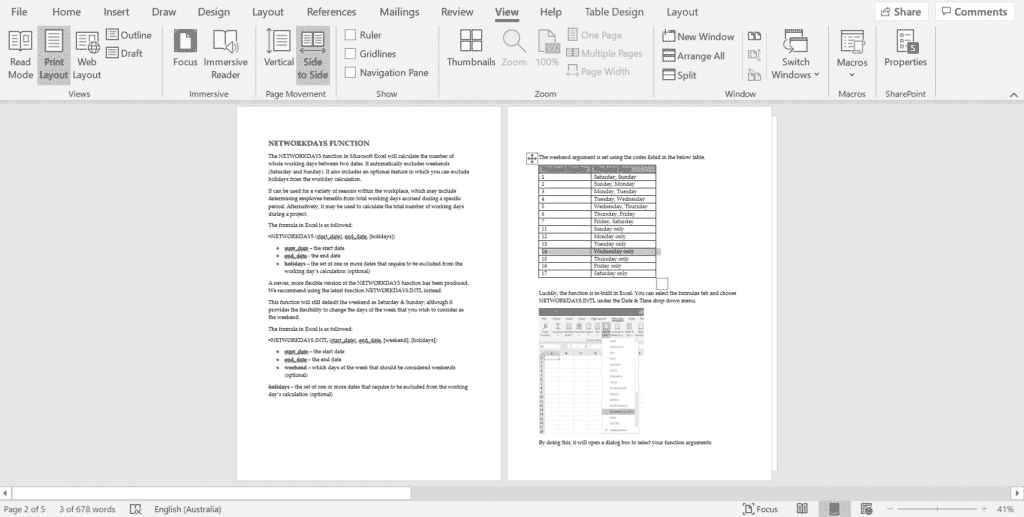
Side to Side – a touchy way to view Word documents
Side to Side is a different way to view a Word document. Flip through the pages with touches on the screen, like a book. If you’re sick of endless scrolling, Side to Side Page Movement is available for Word 365, Word 2021/2019 and Word 2016. Using Side to Side View The side to side command […]

Installing older Office on Windows 10
Can Office 2007 and other older versions of Office (Office 2010, Office 2013) be installed on Windows 10. What are the licensing, activation problems? How about moving documents? Eileen G asks a common question to Office Watch: “I got a new HP desktop computer, but can I install the old MS orig office, “Home and […]
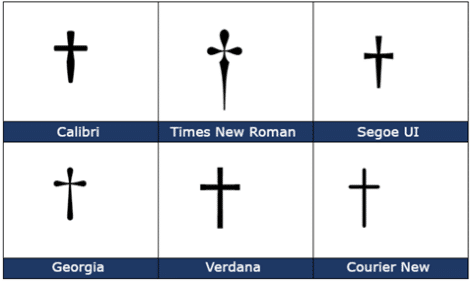
Dagger † symbol in Word, Excel, PowerPoint and Outlook
Insert a Dagger † into Microsoft Word, Excel, PowerPoint or Outlook. Both in Office for Windows and Office for Mac. Dagger † symbol is used to indicate a footnote if an asterisk has been already used. Footnotes and Endnotes in Word Formatting Footnotes and Endnotes Dagger is a different look (depending on the font) but […]

Even more Airplane and related symbols in Microsoft Office
There are a lot more airplane symbols available in Microsoft Office including ones for landing, takeoff and even pilots. Also how to get plane graphics for specific models like a 747 Jumbo. If you know where to look, Office has plenty of ‘airplane’ related graphics beyond the simple Airplane ✈ symbol in Unicode. Office Icons […]

Gradient Effects and Text in Word – in depth
Adding color gradient effects to your text, shapes and borders is a good way to give it a bit more zing to Microsoft Word, PowerPoint or other Office docs. The gradient feature is quite sophisticated, with a wide range of options and adjustments available but not obvious. To add a gradient effect to text, select […]









