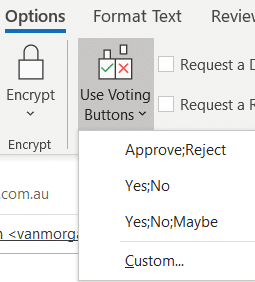
Easy Voting by email in Outlook
Microsoft is releasing a ‘Quick Poll’ option in Outlook ignoring the very similar, voting buttons, option that’s already in Outlook for Windows and Outlook for Mac. Use Voting Buttons to ask a question and Outlook will automatically collect responses. Office Watch also explains how recipient see the voting options and respond. Voting buttons have been […]

Format text with Dictate voice commands in Word
Dictate now has formatting commands with two ways to apply bold, italic, underline and other text formatting as you speak. Dictate with formatting is now available in Word Online (in a web browser) for Microsoft 365 customers. It’ll spread to other Word releases (for Windows, Mac etc) later. To use voice formatting, choose Home | […]
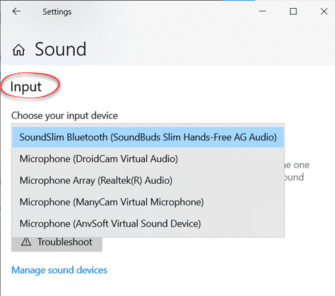
Microphone setup and settings for Dictate and Windows 10
Setting up and testing a microphone to work with Windows 10 is necessary before using Dictate in Office. Go to Windows settings to control which microphone is used by Word 365’s Dictate. Dictate has no microphone settings of its own (in Word for Windows or Word Online). Both use the Windows default recording device. That’s […]
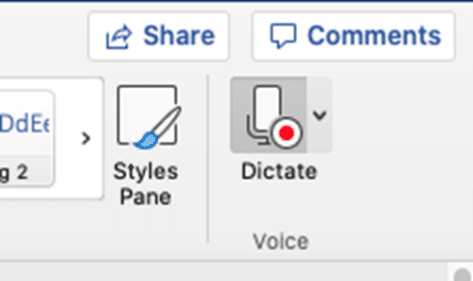
Dictate into documents with Word 365 for Mac
Mac Word 365 and Outlook 365 have the same powerful ‘Speech to Text’ option, Dictate, that’s in the Windows version of Word and Outlook. No compromises or differences except the setup is a LOT easier. Dictate is only available to Microsoft 365 subscribers with Office 365 software for Mac, Windows, iPhone, iPad and Android devices. […]
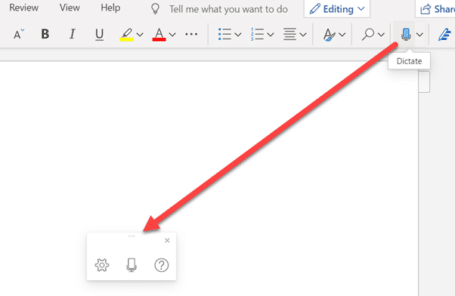
Did Dictate disappear in Word?
Click on Dictate in Word Online (in a web browser) and it looks like nothing happens. Don’t worry, you can still speak to Word and it’ll type but the interface has been minimized. Instead of opening a Dictate pull-down list, it’s now a trio of icons at the bottom of the document. You’re fully forgiven […]

Left Right arrow ↔ in Outlook, Excel, PowerPoint and Word
Type the Left Right arrow ↔ into Microsoft Word, Excel, PowerPoint or Outlook. Both in Office for Windows and Office for Mac. How Left Right arrow ↔ looks in different fonts. Here’s some examples of how Left Right arrow ↔ looks in common Office fonts. Left Right arrow ↔ codes These are the important code […]
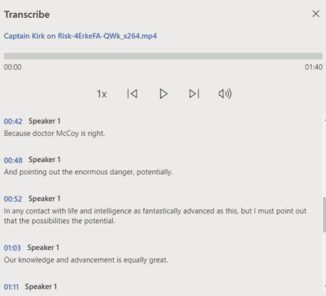
Three extra audio formats that work with Microsoft 365’s Transcribe
According to Microsoft, there’s only four audio formats accepted by their new Transcribe option to convert audio into a text transcription. That’s not true, there are more formats possible with no conversion necessary. The official list of audio formats for Transcribe is .MP4 .M4A .MP3 and .WAV. Strictly speaking that’s only three formats because .MP4 […]
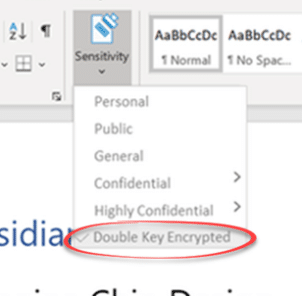
Double Key encryption coming to Microsoft 365
Microsoft is making an important step towards cloud storage security with the public preview of Double Key Encryption. That means, for the first time, Microsoft customers can secure their data from access, even by Microsoft itself. All the ‘secure’ cloud storage from Microsoft can be accessed by Microsoft. For all their talk about security, the […]
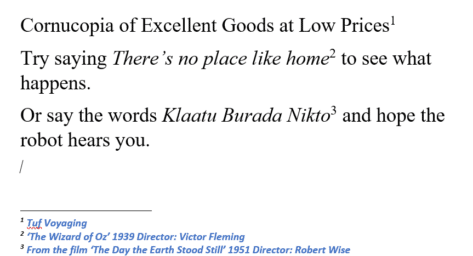
Tricks to formatting Word’s Footnotes and Endnotes
Change the look of Microsoft Word footnotes and endnotes. You can change the look of footnotes and endnotes using their linked styles: Footnote Reference Footnote Text Endnote Reference Endnote Text The two ‘… Reference’ styles create the look of the numbers, usually just superscript positioning of the default paragraph font. Changing the style could radically […]

Introducing the Notes Pane for Footnotes and Endnotes
The Notes Pane is the key to some useful Footnote and Endnote options Now that Print Layout is the main editing view in Microsoft Word, the Notes pane has been somewhat forgotten but it’s the home of details in the Footnotes and Endnotes. Get to the Notes Pane Switch to the References tab and choose […]

Delete or change the separator line for Footnotes and Endnotes
Don’t like that short dividing line between the Word document and footnotes/endnotes? You can change the color or look. Even delete the line completely. Though it’s hardly obvious even to Word experts. Most commonly you want to remove the footnote dividing line to completely hide the footnotes from a version of the document. Start by […]
Word Footnote hidden bug
Hiding footnotes in Word triggers an annoying bug that’s been there for at least ten years. There’s no sign of it being fixed. While looking into Footnotes and Endnotes in Word for Office-Watch.com we came upon a strange bug. Anyone trying to hide the footnotes in a document will strike it. Here’s the bug and […]

Turn talk into text in Word 365 for Windows
Modern Word has a powerful ‘Speech to Text’ option ‘Dictate’ which works a lot better than similar options in the past. If you’d tried and been disappointed with dictating into Word, it’s time to give it another try. Dictate is only available to Microsoft 365 subscribers with Office 365 software for Windows, Mac, iPhone, iPad […]

Get 11 Indian languages translated by Microsoft 365
Microsoft 365 Translator now has the language Odia (or Oriya), taking the list of Indian languages supported to 11. in Odia, according to Microsoft …. Microsoft 365 ଅନୁବାଦକ ବର୍ତ୍ତମାନ ଓଡ଼ିଆ ଭାଷା (କିମ୍ବା ଓଡ଼ିଆ) ଅଛି, ଯାହା ଦ୍ୱାରା 11ଟି ଭାରତୀୟ ଭାଷାର ତାଲିକା ଗ୍ରହଣ କରାଯାଇଛି । Microsoft Translator is a cloud-service so Odia is now on the list […]

Immersive Reader in Teams and Word Online
The Immersive Reader features of modern Word 365 are also available in Microsoft Teams and Word Online (browser based Word) to view documents and messages. Look for the Immersive Reader option on the menu for post threads. It’s also available on the View menu for any Word documents opened in Teams or Word Online. The […]

Office 2010 – not long before it ‘dies’
Microsoft Office 2010 ends support later this year but there’s no need to panic. Here’s what to do, when to change from Office 2010 and what to replace it. Office 2010 countdown [ycd_countdown id=”31774″][/ycd_countdown] Office 2010 ends support on Tuesday, 13 October 2020 All the Office 2010 programs will keep working. No change there. Tuesday, […]









