Adding a continent map is easy in Word, Excel or Powerpoint, in fact there’s a few ways to get them for the Americas, Europe, Africa, Asia, Australia and Antarctica. It depends on the quality you need and version of Office. Continental Icons Among the many icons are silhouettes of all
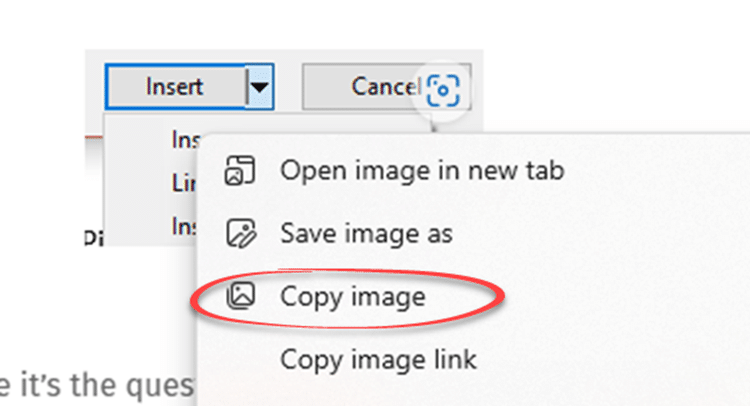
Microsoft is expanding their support for SVG graphics by allowing these ‘Icons’ to be copied from Office documents into other third-party apps. Users can take an Office Icon or SVG and easily copy it to another app to use or change beyond Office’s in-built features. There’s no special menu item
Microsoft is trying a new way to push Office or Microsoft 365 to new customers by dropping links into the Windows Start Menu. We’ve seen this on the Start Menu of Windows 10 preview releases. It’s a group of icons for Word, Excel, PowerPoint, Outlook, OneNote and Skype. Most of
Office 2010 ends support on 13 October 2020 and we’ve been receiving questions from readers asking about switching to newer Microsoft Office. We’ll answer questions about when to update, what to replace Office 2010 and important factors to consider. We’re hearing concerns about privacy in modern Office, reliability and the
Microsoft 365 suffered a major outage of their online and cloud services. Here’s what we know, where we stand now and how to reduce your risk of trouble with future problems. The online services from Microsoft could not be accessed from about 5pm Monday (US Eastern) that included Office logins,
Microsoft 365 Enterprise customers can now try Application Guard as a new way to protect against malicious documents infecting computers.What is Application Guard and what it means for Office 365 Application Guard is a combination of Windows 10 Defender and Office programs that opens a suspect document in a special
Microsoft Word is getting the adaptive mini-toolbar. The extension to the mini-toolbar appeared in preview versions of PowerPoint recently. Now it’s in Word previews as well. The buttons on the right change according to how you use Word. Compare that to the current Word mini-toolbar with a fixed list of
PowerPoint for Windows is getting a new mini-toolbar with adaptive extra features. Some of the buttons will change depending on the tools you most commonly use. The mini-toolbar is in all Office apps, it appears whenever you select something. At the moment, the options are the same with basic formatting
Common programming tools can be used to make malicious Office workbooks which bypass both online security checks and Microsoft’s own protections in Word, Excel, PowerPoint or Access. We’ll explain what’s happening and what Microsoft could do better. VBA Purging or VBA Stomping are clever tricks to make an Office documents
There’s a change in the way Microsoft 365 works with a sign-in to a Microsoft account. This applies to Word 365, Excel 365, PowerPoint 365 and other Office apps. Up to recently, Microsoft 365 / Office 365 has worked normally either when signed into a Microsoft account or not. Having
Type the Left Right arrow ↔ into Microsoft Word, Excel, PowerPoint or Outlook. Both in Office for Windows and Office for Mac. How Left Right arrow ↔ looks in different fonts. Here’s some examples of how Left Right arrow ↔ looks in common Office fonts. Left Right arrow ↔ codes
Microsoft is making an important step towards cloud storage security with the public preview of Double Key Encryption. That means, for the first time, Microsoft customers can secure their data from access, even by Microsoft itself. All the ‘secure’ cloud storage from Microsoft can be accessed by Microsoft. For all
Microsoft 365 Translator now has the language Odia (or Oriya), taking the list of Indian languages supported to 11. in Odia, according to Microsoft …. Microsoft 365 ଅନୁବାଦକ ବର୍ତ୍ତମାନ ଓଡ଼ିଆ ଭାଷା (କିମ୍ବା ଓଡ଼ିଆ) ଅଛି, ଯାହା ଦ୍ୱାରା 11ଟି ଭାରତୀୟ ଭାଷାର ତାଲିକା ଗ୍ରହଣ କରାଯାଇଛି । Microsoft Translator is a cloud-service so Odia
Microsoft Office 2010 ends support later this year but there’s no need to panic. Here’s what to do, when to change from Office 2010 and what to replace it. Office 2010 countdown [ycd_countdown id=”31774″][/ycd_countdown] Office 2010 ends support on Tuesday, 13 October 2020 All the Office 2010 programs will keep
PowerPoint 365 way back to PowerPoint 2010 all have a ‘text to speech’ or ‘Speak’ feature to read aloud the text in a slide. It’s hiding away behind the ribbon but works fine once you’ve found it. The PowerPoint Speak or Real Aloud feature is similar to the Speak option
2020 will be remembered for many things (big sigh) but from a design viewpoint, it could be the Year of the Icon. Many of those graphics are available either in Office directly or imported from elsewhere – we’ll show you both. Everywhere you go there are signs reminding us of
How to quickly fix display problems in Microsoft Office. When Word, Excel, PowerPoint or Outlook don’t show up on the screen correctly. It doesn’t happen often but occasionally Word, Excel, PowerPoint or Outlook open but as all grey. Clicking around the screen displays just a ribbon or menu but not
Headline your next document with cats! Looking for something really different to headline your next document or presentation – why not use ‘Neko Font’ the font made out of cats. Strictly this isn’t a font you can download, instead you type text into a web page, choose the size (Large,
Microsoft’s Surface Earbuds are out now and have some extras for Word, Outlook and PowerPoint users. When we look past the hype there’s more than a few special conditions to keep in mind. Surface Earbuds have been some time coming, we first mentioned them about nine months ago. Now they
Animated GIF support is coming (finally!) to Microsoft Word, Excel and PowerPoint. We discovered the new feature in a new Insiders build, Microsoft hasn’t announced anything. Here’s an animated GIF playing in Word 365. Paste or Insert an animated GIF now has play/pause buttons included (bottom left corner). The animation
If you want a list of numbered items using only odd or even numbers; how do you do that? Are you thinking of Word’s automatic numbering feature? The answer is “Yes” if you add little Word trickery. What exactly you need to do is use the Numbering features but leave
When Microsoft announced it was firing news human editors and replacing them with ‘Artificial Intelligence’, it was only a matter of time before the AI system would get it wrong. No-one expected it to happen so soon, even before all the humans had left the building. There’s a lesson in
Some useful new features have now been rolled out to the public versions of Microsoft 365 (Office 365) for May 2020. Word, Excel, PowerPoint and Outlook all have improvements. Two we’ve already told you about, the other is new. Stock Images, Cutout People and Stickers Or what Microsoft calls “New
If you’ve lost or accidently deleted a Word for Mac document (or Excel or PowerPoint) there are various places to look for it some might not occur to you. This article is also helpful if you’re trying to find and delete any files or documents that must be removed for