Text Predictions Now Off by Default in Word and Outlook
Microsoft is switching Text Predictions off by default in Word 365 and Outlook 365. If you rely on the gray suggested text that appears ahead of your cursor, it may simply stop showing up. The feature is not gone, just no longer automatic, and you can switch it back on in about ten seconds. Here is exactly where the setting lives in each app, who is affected, and what Microsoft has left unclear.
Text Predictions still exist. It is just no longer switched on automatically. As usual, Microsoft’s announcement is annoyingly incomplete.
This is the right call though it’s taken Microsoft way too long. A feature that inserts words into your sentences should be something you choose, not something you discover mid-typing and then hunt through menus to escape. Microsoft buried the off switch in a different place in every app, which made it a scavenger hunt.
What are text predictions?
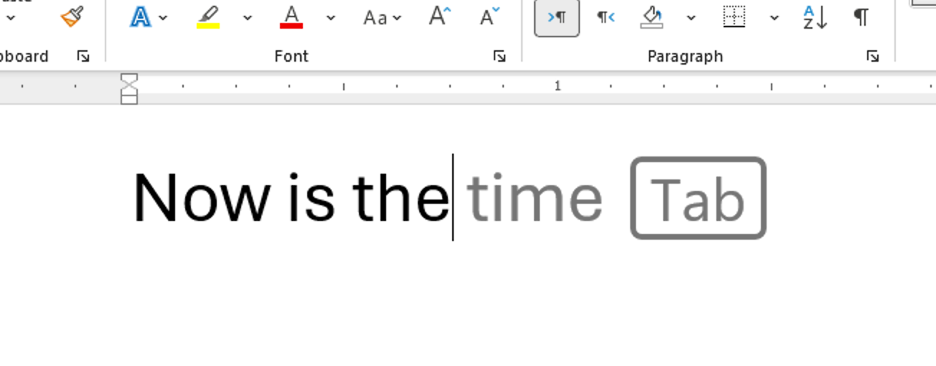
Text predictions are the gray ghost text that appears ahead of your cursor as you type, guessing the rest of your word or sentence. Press Tab to accept, Esc or keep typing to ignore.
What this means for you
It’s hard to know exactly what Microsoft is doing because they’ve been (deliberately?) vague about what’s happening.
The company has said that:
“Text predictions will continue to be available, but it will no longer be turned on by default” [sic]
Hopefully they meant to say “will no longer be turned on by default for new installations.”
It’s hard to believe that Microsoft would turn off the setting for existing installs. However, the poor wording of the announcement is open to that interpretation.
Who is affected?
All Word 365 releases are affected, for Windows and for the web. Word 365 for Mac doesn’t have Text Predictions.
Word apps for Android and iOS may have already had this default change.
The change also applies to classic Outlook for Windows and Outlook for Mac. This does not affect Outlook (new) for Windows, which already has text predictions off by default.
How to turn text predictions back on
Word for Windows: File | Options | Advanced | Editing options | Show text predictions while typing.
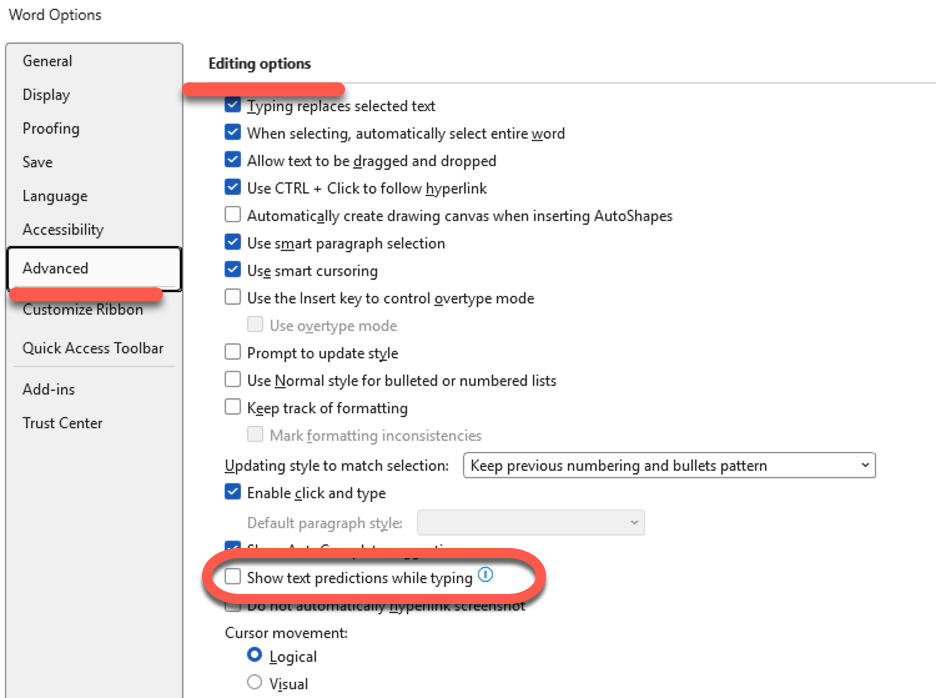
There is also a “Text Predictions” indicator on the status bar at the bottom of the window that you can click.
Classic Outlook for Windows: File | Options | Mail | Show text predictions while typing under Compose messages.
Outlook mobile: Settings | your account | Compose options | Text predictions.
Why Microsoft did it
Microsoft says customer feedback showed people generally prefer to type their own text. Microsoft knew that from the start but chose to force Text Predictions on customers anyway by defaulting the feature On.
Now, the company is finally being consistent with Text Predictions by changing the default to off across all new Word 365 and Outlook 365 installations.
Microsoft already turned text prediction off by default on July 1, 2025 for new Outlook for Windows, Outlook on the web and Outlook mobile.
This September 2026 change finishes the job by covering Word and the remaining Outlook versions.
When is it happening?
Microsoft says further timing details will be published through the Microsoft 365 admin center. Expect the change to reach Insider builds first and general channels over the following weeks, as usual.
More on Word’s Automatic Helpers
If you want the complete instructions for every version, including the awkward Mac setting and the “voodoo fix” for when the option is missing entirely, our guide to stopping predictive text adding suggestions in Word covers Windows, Mac and the browser in one place. The quickest switch of all is hiding along the bottom of the window, and All About the Word Status Bar, Hidden Power Tools in Microsoft Word shows the other twenty odd things that row can do.
Text Predictions were not always optional. When Microsoft first shipped the feature there was no off switch at all, as we reported in Text predictions will type for you in Outlook and Word, which also covers the cloud privacy question that Microsoft still glosses over. Our reaction at the time, Word is getting text prediction but who needs it?, has aged rather well given this week’s news.
Text Predictions are only one of the things Word does to your typing without asking. Stop Microsoft Word’s Automatic Formatting Tricks sorts out the asterisks turning into bullets and the quotes turning curly, while Automatic Capitalization fixes in Word deals with the capital letters you never asked for. If it is the blue underlines that bother you, Word Grammar Checker Settings Explained for You explains how to silence individual checks instead of switching the lot off.