Open Office Files in Browser or Desktop App: How to Take Control
Clicking a link to a Word, Excel, or PowerPoint file should be simple, but Microsoft has turned it into a guessing game. Sometimes the document opens in your browser, sometimes in the desktop app, and the setting that controls it is scattered across Outlook, Office apps, and OneDrive options. This guide shows you exactly where to find the open-in-browser-or-desktop settings, how the defaults actually behave, why Outlook (new) ignores them entirely, and what to do so your Office files open where you want every time.
People send you links to shared docs online, how do you control what app opens when you click on the link? There should be a simple solution but there is not. Frankly it’s a mess. We’ve not sure if there’s some reasoning behind this or Microsoft just can’t be bothered to fix something that’s not related to their current AI obsession.
As I recall and ”once upon a time” clicking an Office file link opened a little box which asked how to open it, either an app on the computer (desktop) or in a browser (Office online). Now the choice is hidden away and is as annoying as possible.
(we’re talking here about web links to Office documents, not Office files opened from Windows Explorer or Mac Finder which are controlled in a different way)
In an Outlook classic or an Office app with an Office document link, right-mouse click to see specific choices for opening the document.
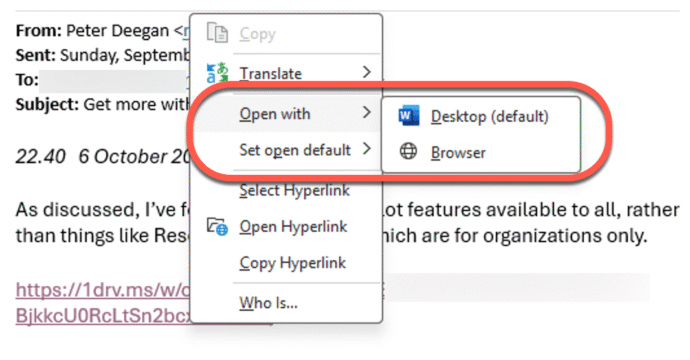
Open with … Desktop or browser.
Set open default … Desktop or browser.
Make sure the default is set the way you want and/or choose Open with each time you open a link.
Those options are only available in Microsoft apps like Outlook or Word. If the link appears in another app (e.g. in a browser or non-Microsoft app) then the link will open with Office in a browser.
Personally, I use “Open with ..” each time to make sure Office does what I want and the first time.
Outlook (classic)
In classic Outlook for Windows the choice is also at File | Options | Advanced | File and browser preferences | Open Word, Excel and PowerPoint files using: Desktop or Browser.
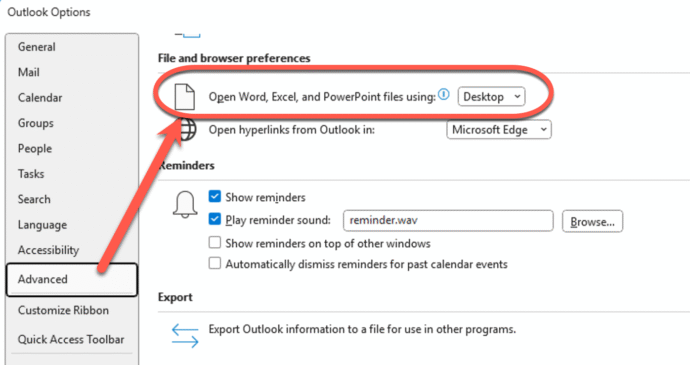
File open preference
In Microsoft 365 apps, go to File | Options | Advanced | Open Word, Excel and PowerPoint files using … choose either Desktop or Browser.
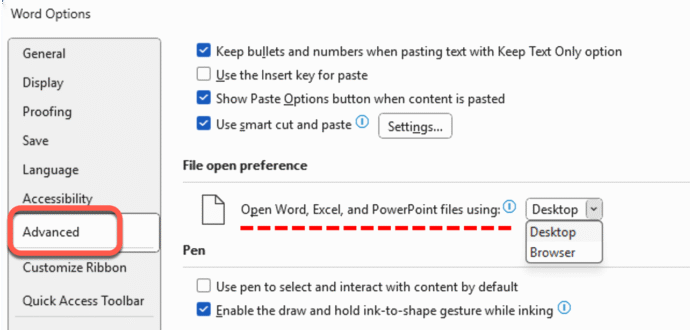
The default is ‘Desktop’ but that doesn’t help when opening a web link, despite what Microsoft says:
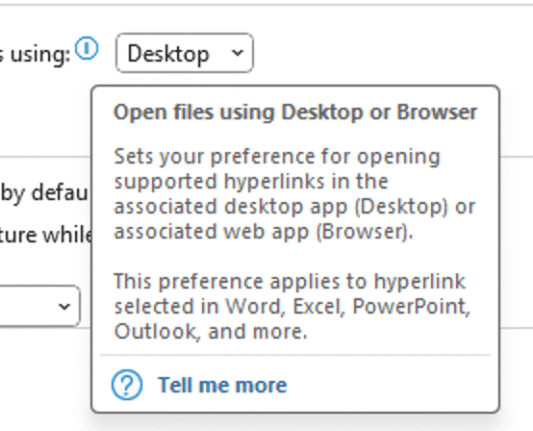
“Sets your preference for opening supported hyperlinks …”, the key word is ‘supported’ meaning not all links.
The feature only works when the file is stored on OneDrive or SharePoint and you click links within Office apps which does not include the new Outlook for Windows.
Open in Desktop from the Office web app
If a doc, sheet or slide opens in the Office online app and that’s not what you want, choose ‘Open in desktop’ from the Editing menu at top-right.
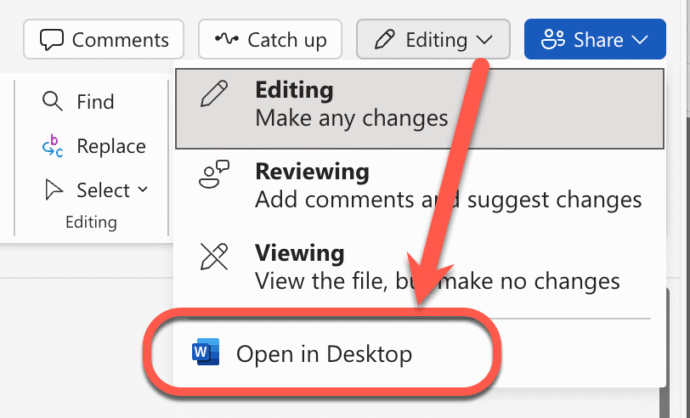
If there’s no “Open in Desktop” option, save the document to your computer then open in the desktop app.
It’s a long-winded path to getting the file open in the app you want, but that’s what Microsoft has chosen for us.
Outlook (new) gets nothing
The new Outlook for Windows has NO Desktop or Browser options at all. Nothing in the Settings nor the right-click menu.

There’s no special treatment for OneDrive/SharePoint links, just the Open or Copy options available to any web links.
Suggestion Box
Dear Microsoft,
There has to be a better way that’s clearer for customers to choose where to open an Office document and works across all links, not just some.
An option in Windows would make more sense than inside individual apps.
Please have some people from the Office team visit their colleagues working on Outlook (new) for Windows.
They can explain (using simple words and diagrams) about the much hyped “Microsoft Advantage” that’s supposed to offer seamless connections between the company’s products.
Yours in frustration,
Paying Customers.
Microsoft 365 Classic Explained: A Lower-Cost, No-AI Subscription Option
Office 2024: all you need to know
Microsoft Office upcoming support end date checklist
Microsoft buries the Copilot button and floats a nag in its place
Microsoft Rewrites How Microsoft 365 Updates Are Delivered: What IT Admins Need to Know
Office 2021 Support Ends in October: All Five Options Before the Deadline
Microsoft Redefines “Red” for Better Accessibility in Word, PowerPoint, and Outlook