Smart measurement conversion – clever Copilot in Excel
Microsoft Excel Copilot can turn a messy table of mixed measurement units into a clean, single-unit table with a custom LAMBDA function, in under five minutes. Brian Jones (a longtime Microsoft Office insider) posted a Twitter/X video showing Copilot doing the job. His prompts are a smart use of Copilot including extra requests to confirm that the AI got it all right. The result, repeatable code that handles inches, feet, centimetres and metres, plus a Copilot-built test sheet to verify it.
Brian Jones on Twitter/X has a clever demonstration of how Copilot can do an hour or more of human work in minutes. See his video online here.
It’s a great example of smart Copilot use. How to ask the right questions from AI to get back what you need. We tried the same scenario and here’s how it breaks down.
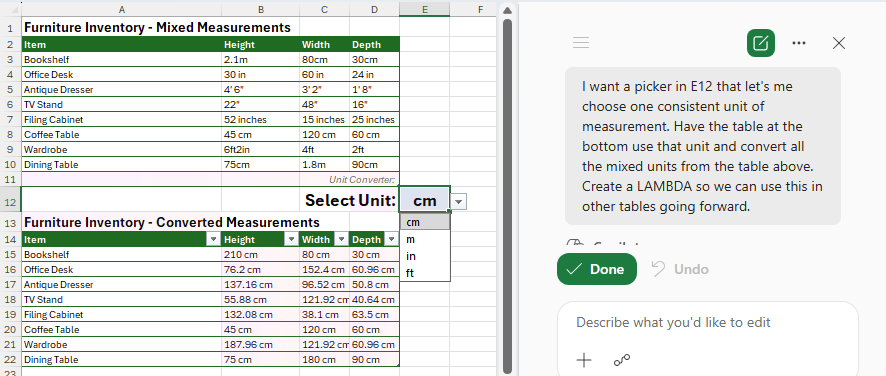
Start with a table of measurements but using different scales (inches, feet, centimetres, metres) and abbreviations (in, inches, ‘ and “, cm, m). Rows 3 and 10 have different measurement labels across the three dimensions.
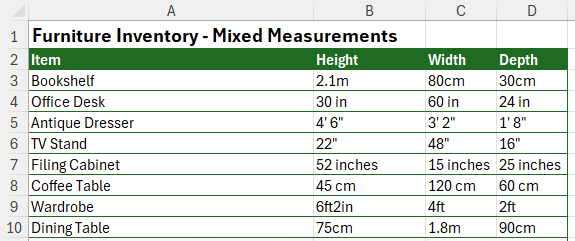
Converting all those to a single unit of measurement is not so much complicated as messy. Figuring out what each measurement means then converting.
Enter Copilot with the “Allow Editing” default that can work directly on the sheet.
Tell Copilot what you want then sit back and watch it work. Here’s Brian’s prompt in full.
I want a picker in E12 that let’s me choose one consistent unit of measurement.
Have the table at the bottom use that unit and convert all the mixed units from the table above.
Create a LAMBDA so we can use this in other tables going forward.
Asking for a Lambda or custom function is a smart move. It makes the Copilot work more adaptable in the future and saves going back to the AI for a repeat of the same request.
Copilot adds a pull-down menu to choose the converted measurement scale. The AI figures out the four choices itself; cm, m, in and ft.
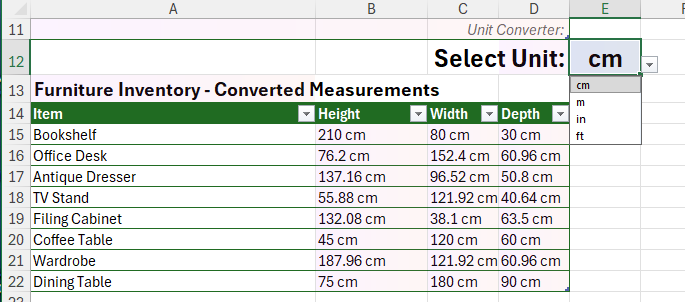
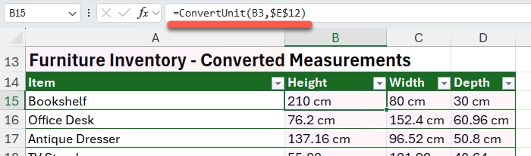
It’s made a Lambda() function called ConvertUnit() that takes the original value and the wanted scale as inputs. It can handle various formats as given in the source grid.
Trust but verify
As they say in diplomacy “Trust but verify” and that very much applies to AI / Copilot work. Brian Jones demonstrates that by asking Copilot to make a test page to confirm that that ConvertUnit() works correctly.
Could you add another sheet that serves as a test suite for the LAMBDA? I want to make sure I can trust this.
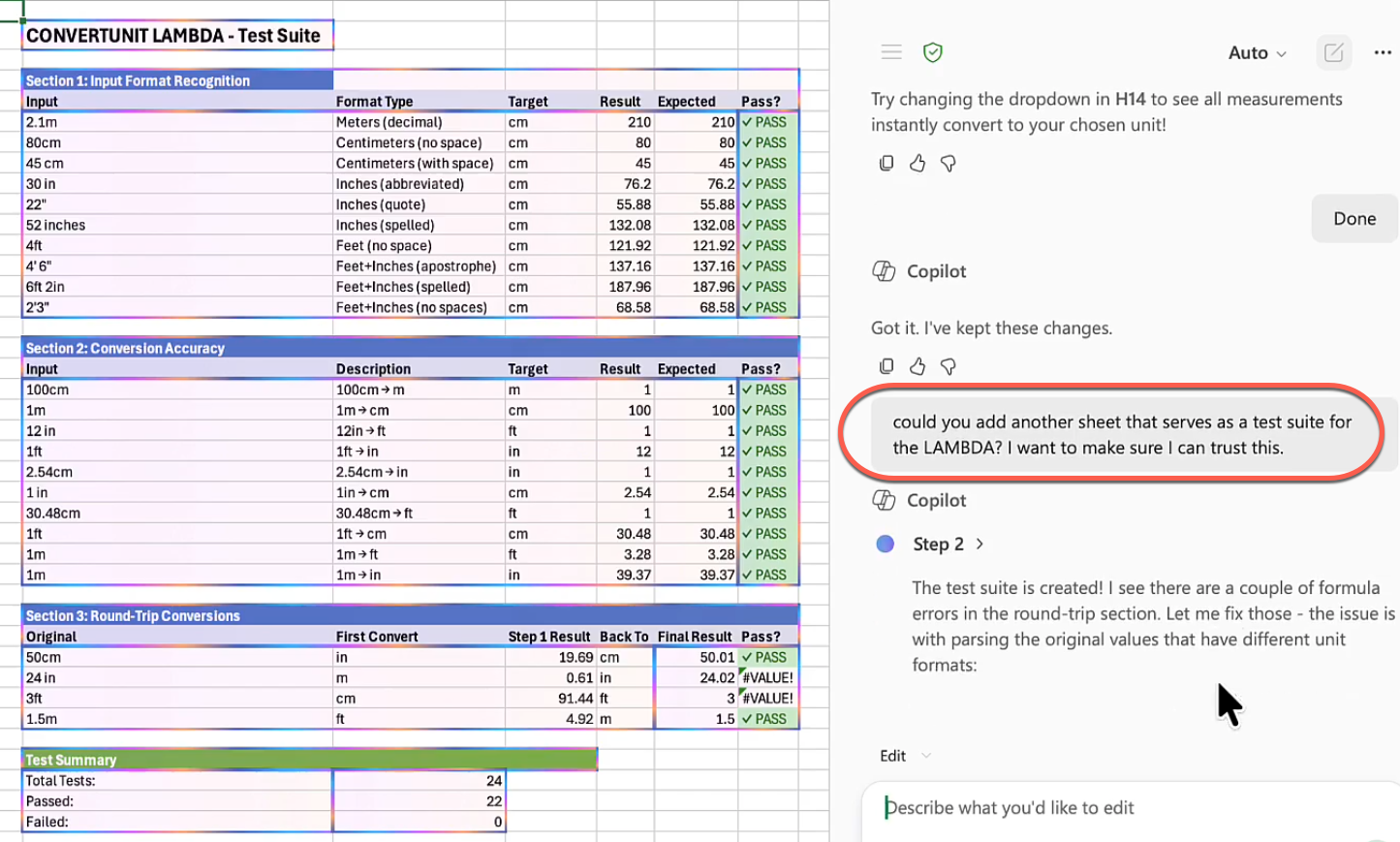
Could do more
Copilot quickly does the job that would take a lot longer, even for an experienced Excel user. Instead, Copilot handles it in less than five minutes.
But it’s very much a ‘one-off’ fix and, like many Excel sheets (human-made, AI or hybrid) it could be improved.
Office Watch is working on a closer look at improving this example. Watch out for that.
ConvertUnit() code in full
Here’s the full ConvertUnit() function made by Copilot. It accepts a range of different measures plus the target measure you want.
Hint: use Copilot or any AI to analyse, explain or improve Excel code.
=LAMBDA(measurement,target_unit,
  LET(
    text,TRIM(measurement),   hasFootInch,OR(ISNUMBER(SEARCH("'",text)),AND(ISNUMBER(SEARCH("ft",text)),ISNUMBER(SEARCH("in",text)))),
    ftInchParse,IF(hasFootInch,
      LET(
        cleanText,SUBSTITUTE(SUBSTITUTE(SUBSTITUTE(text,"ft","'"),"in",""""),"""",""),
        apostPos,IFERROR(SEARCH("'",cleanText),0),
        feet,IF(apostPos>0,VALUE(TRIM(LEFT(cleanText,apostPos-1))),0), inches,IF(apostPos>0,IFERROR(VALUE(TRIM(MID(cleanText,apostPos+1,100))),0),0),
        (feet*12+inches)*2.54
      ),
      0
    ),
    hasCM,OR(ISNUMBER(SEARCH("cm",text)),ISNUMBER(SEARCH(" cm",text))),
hasM,AND(ISNUMBER(SEARCH("m",text)),NOT(ISNUMBER(SEARCH("cm",text))),NOT(ISNUMBER(SEARCH("in",text)))), hasInch,OR(ISNUMBER(SEARCH("in",text)),ISNUMBER(SEARCH("""",text))),
    hasFt,AND(ISNUMBER(SEARCH("ft",text)),NOT(hasFootInch)), numValue,IFERROR(VALUE(SUBSTITUTE(SUBSTITUTE(SUBSTITUTE(SUBSTITUTE(SUBSTITUTE(SUBSTITUTE(text,"cm",""),"m",""),"inches",""),"in",""),"""",""),"ft","")),0),
    valueCM,IF(hasFootInch,ftInchParse,
      IF(hasCM,numValue,
      IF(hasM,numValue*100,
      IF(hasInch,numValue*2.54,
      IF(hasFt,numValue*30.48,numValue))))),
    result,SWITCH(target_unit,
      "cm",valueCM,
      "m",valueCM/100,
      "in",valueCM/2.54,
      "ft",valueCM/30.48,
      valueCM),
    ROUND(result,2)&" "&target_unit
  )
)
Copilot Can Now Actually Do the Work in Word, Excel, and PowerPoint
ChatGPT Images 2.0: New AI Image Generator in Copilot
What the !@^? Is Microsoft Copilot “Work IQ”?
How to Compare Two Columns in Excel: Find Matches and Missing Values Fast