Microsoft Word Now Supports Markdown, Here’s What Works and What Doesn’t
Microsoft Word can now convert Markdown formatting automatically, but the feature is inconsistent, undocumented and missing from some versions entirely. If you paste AI-generated text from ChatGPT or Copilot into Word, you may finally see proper headings and bold text instead of raw ## and ** symbols. Here’s what our testing found across every version of Word, and what you need to check on your end.
The catch: the whole announcement is one paragraph, tucked inside a Copilot newsletter, and it skips almost all of what you need to know. Outside Microsoft’s promotional fantasy land, Word’s support for Markdown is incomplete, inconsistent and completely undocumented.
Since Microsoft can’t be bothered telling customers, Office Watch has done its own tests on various versions of Word to see how they cope with Markdown, or not.
What Microsoft announced
Microsoft’s October 2026 Copilot roundup, published October 30, lists Markdown support alongside new legal skills and document formatting for Word. It sits under the heading for the Legal plugin and Copilot document design in Word, and Microsoft says it rolled out in October.
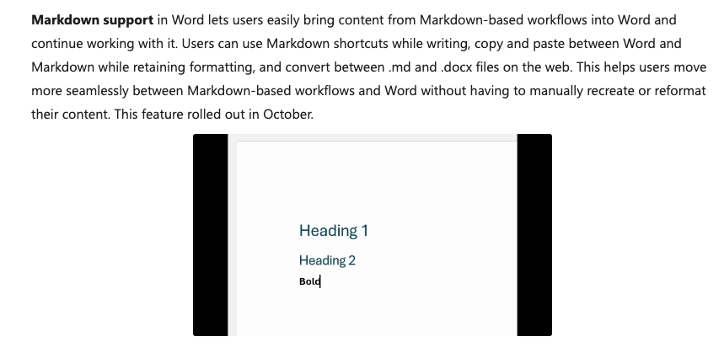
Three things are promised:
- Markdown shortcuts while typing. Type Markdown symbols and Word applies the formatting.
- Copy and paste both ways. Markdown pasted into Word keeps its formatting, and content copied out of Word can go into a Markdown tool.
- File conversion on the web. Turn a .md file into a .docx, or a Word document into .md.
Why Microsoft is supporting Markdown now
Markdown has become the house format for AI. Chatbots answer in it, and AI instruction and skill files are written in it.
Markdown is plain text with a few symbols that describe formatting. A line starting with # is a heading, **words** are bold, and a line starting with * is a bullet point. See What is Markdown and how it works with Microsoft Word
It’s what AI tools produce behind the scenes, and it’s the format inside .md files.
Word was the obvious gap. OneDrive and SharePoint got native .md editing in April 2026, for both consumer and business accounts.
What Microsoft isn’t saying about Markdown
There’s no support article or roadmap entry for this feature at the time of writing, so basic questions are unanswered.
Which versions of Word support Markdown?
Microsoft only says “Word”, as if they only had one product of that name. So we did some testing to find out what Microsoft is keeping unnecessarily secret. As you can see Markdown support in Word is all over the place.
| Word for | Open .md | Export .md | Type Markdown | Copy as Markdown | Paste from Markdown |
| Web – consumer Microsoft 365 | No “File type not supported” | No | Yes | Yes – right-click “Copy as Markdown”. | No |
| Web – business Microsoft 365 | Yes – converted to Word document | Yes – Export | Download as Markdown. | Yes | Yes – right-click “Copy as Markdown”. | Yes – right-click “Paste from Markdown”. |
| Windows | Yes – but imported as plain text. | No | Yes | Yes – right-click “Copy as Markdown”. | Yes |
| Mac | No | No | No | No | No |
Tested using Word for Web (consumer and business Microsoft 365 plans), Word 365 for Windows and Mac Insiders Beta Channel at early November 2026.
The Markdown features are erratic, to put it kindly. For example, Word in a browser has this right-click menu with both “Copy as Markdown” and “Paste from Markdown”.
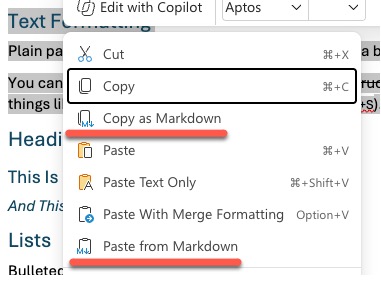
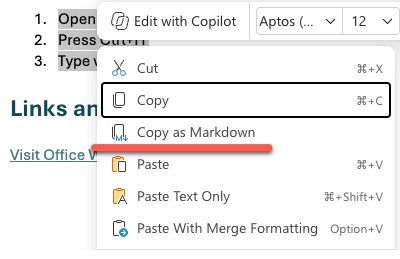
But in our tests, both options only appeared for a Microsoft 365 Business plan. Switching to a Microsoft 365 consumer plan and the “Paste from Markdown” disappears.
What Markdown parts are supported
There’s no single Markdown, instead it comes in several flavors. There are core Markdown elements like headings, bold, italics and lists but things like tables, code blocks, task lists and footnotes aren’t always recognized.
Microsoft doesn’t say what’s supported, perhaps because the company hasn’t settled the details itself. Our tests gave very different results depending on the version of Word, the date and seemingly the relative positions of the sun & moon.
Headings, bold, italics and lists were always recognized but features like Blockquote, Code Block, Task List would sometimes work OK but other times not. This is an incomplete feature that Microsoft is testing on the public.
We can only hope that Microsoft settles on a Markdown they will consistently support and, even better, let their paying customers know what that is.
Do you need Copilot to get Markdown?
The feature was announced in a Copilot blog, but nothing in the description involves AI. Microsoft hasn’t said whether a Copilot license is required.
Our tests confirm that neither Copilot nor a Microsoft 365 plan is needed. Markdown features are available in Word for the web, even for a free Microsoft account.
Watch for Word’s old asterisk trick
Word has had its own asterisk shortcut for decades. With the AutoFormat As You Type option *Bold* and _italic_ with real formatting turned on, Word makes text between single asterisks bold. In Markdown, single asterisks mean italic and double asterisks mean bold.
If text comes out bold when you expected italics, that old setting is the likely culprit. In Word for Windows, look in File | Options | Proofing | AutoCorrect Options | AutoFormat As You Type.
How to test Markdown in Word yourself
It takes just a minute or two to see whether you have the feature and how well it works.
Open a blank document in your choice of Word. Word for the web seems to have the most complete Markdown support.
On a new line, type in this text or copy/paste this using the Paste from Markdown option.
# Markdown Sample: A Quick Tour
Plain paragraphs need no special marks. Just leave a blank line between them.
You can make text **bold**, *italic*, ***bold and italic***, or ~~struck through~~.
Use `inline code` for things like file names (`Normal.dotm`) or shortcuts (`Ctrl+S`).
## Heading 2 level
### This Is a Level 3 Heading
Word should convert it like this:
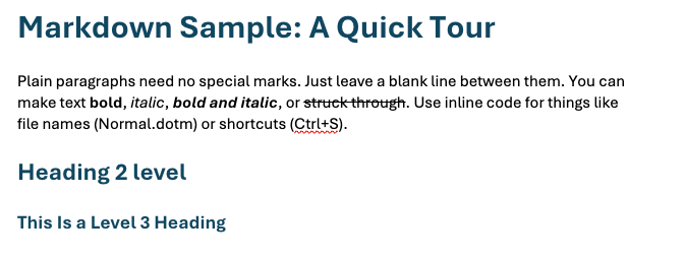
Note that currently the ‘inline code’ formatting doesn’t convert, at least not in this example.
More about Markdown
If you need to get a Markdown file into Word right now and don’t want to wait for Microsoft to sort out its built-in support, 7 Ways to Convert Markdown to a Word Document walks through every method and picks the best one for most people.
Markdown files now have a proper home in Microsoft 365 beyond Word. Native Markdown Editing now in OneDrive and SharePoint covers the browser-based editor that arrived in April 2026, complete with live preview, version history and sharing.
New to Markdown or want a quick reference for the symbols Word is supposed to recognize? What is Markdown and how it works with Microsoft Word explains the basics and how they map to Word formatting.