The new ChatGPT Images 2.0 is worth a look. Instead of jumping straight to pixels, it reasons through your prompt first and can even search the web before generating a single image. If you have ever given up on AI images because the text was garbled, the results were inconsistent,
Microsoft has upgraded the Accessibility Assistant in PowerPoint for Microsoft 365 to detect color contrast issues on transparent backgrounds, not just solid-colored ones. Until now, if your slide text sat on top of an image, gradient, or layered visual, PowerPoint’s checker could miss real readability problems entirely. The tool now
The famous Earthrise photo is not what Apollo 8 astronauts actually saw through the window. The widely shared version is cropped, rotated and color-adjusted from the original. In fact, there were three separate Earthrise photos taken during the December 1968 mission, two by astronaut Bill Anders in color and one
Microsoft is said to be dialing back Copilot in Windows, so it’s only fair to ask, will Microsoft Office get the same treatment? As Copilot’s promises and over-hype collide with reality, Office users can only hope for better AI that’s not ‘in your face‘. Microsoft now claims it will dial
Microsoft finally gave Word the Ctrl+Shift+V shortcut for pasting plain text. It is a change that millions of people wanted, but it came at a cost: several long standing keyboard shortcuts had to move or disappear entirely, and the rollout created a mess in Outlook that took months to fix.
Need to add a gender symbol to a Word document, Excel spreadsheet, or Outlook email? Microsoft Office supports all three main gender symbols: Male ♂, Female ♀ , and the combined symbol ⚥ . Both in Office for Windows and Office for Mac. Whether you are labeling a form, a
Microsoft is switching off free Copilot Chat inside Word, Excel, PowerPoint, and OneNote for millions of Microsoft 365 business users starting April 15, 2026. Unless your organization pays for a full Microsoft 365 Copilot license, the AI chat panel that appeared in those apps will either vanish completely or be
Need to type a Spade ♠, Heart ♥, Diamond ♦ or Club ♣ symbol in Microsoft Office? There are actually eight playing card suit symbols available, including solid and outline versions, and they work across Word, Excel, PowerPoint and Outlook on both Windows and Mac. Here is every way to
Microsoft designs the Office ribbon for first-time users and its own marketing goals, not for the way you actually work. The good news is that you’re not stuck with it. In Word, Excel, PowerPoint, and Outlook you can rearrange the ribbon in just a few clicks, moving the tools you
There are twelve different choices for the Pi symbol 𝜋 to type to Microsoft Word, Excel, PowerPoint or Outlook. Both in Office for Windows and Office for Mac. We’ll show you all twelve including the most common 𝜋. Pi is the famous math constant. 𝜋r2 calculates the area of a circle from
The Developer tab in Microsoft Office unlocks powerful tools like macros, form controls, and advanced customization features. Even if you’re not a programmer, many useful option, such as checkboxes, drop-down lists, and macro controls are hidden there. If the Developer tab is missing from Word, Excel, PowerPoint, or Outlook, you
Europe now has its own serious contender to Microsoft 365. Office.eu is designed to keep business data inside the EU and under European law. Built on open-source technology, the service combines document editing, cloud storage, email, chat, and video meetings in a single browser-based workspace, offering organizations a privacy-focused alternative
Whether it’s no smoking, talking, eating or whatever you can make your own ‘Prohibited’ or ‘Not Allowed’ symbol for serious or fun reasons. Whether you want to block a specific action in a document, presentation, or worksheet, Word, Excel and PowerPoint make it easy to design your own customized “Don’t”
Need to insert the square root symbol (√) in Microsoft Office? Whether you’re working in Word, Excel, PowerPoint or Outlook, there are several quick and easy ways to add √ to your document, spreadsheet or email. From keyboard shortcuts and Alt codes to Equation tools and symbol menus, here’s how
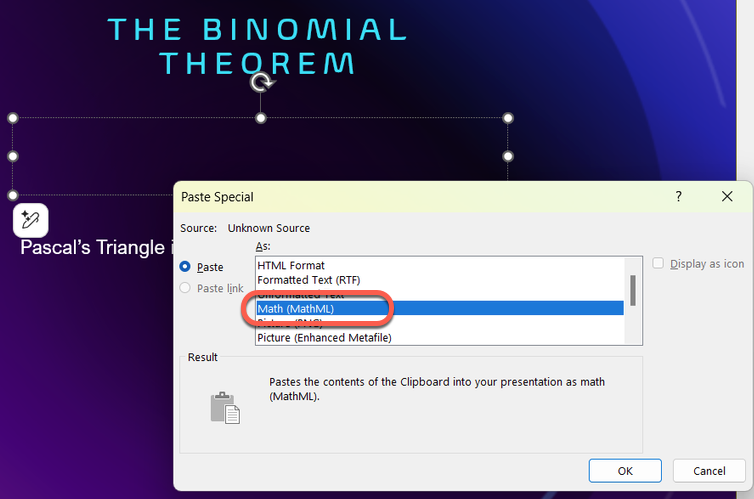
Microsoft 365 has added more accessiblity features into the Office Math or Equation part of Office. More keyboard shortcuts, better screen reading and paste options. These recent improvements in Microsoft 365 for communicating and collaborating with math were developed in collaboration with the DAISY Consortium, researchers, educators, instructional designers, and
Creating clean, professional-looking stacked fractions in Microsoft Office is easier than many users realize, if you know where to look. The built-in Equation feature lets you insert vertical (stacked) and other fractions quickly, without hacks or manual formatting. Here’s the fastest and most reliable way to add proper mathematical fractions
Microsoft talks about “Office Math” in Microsoft Office but you won’t find that name in Word, Excel, PowerPoint or OneNote. We explain where to find “Office Math” and why it appears under the name “Equation” in Microsoft 365 or Office. Also how to convert “Equation Editor” formulas into modern “Office
Microsoft Office doesn’t make hex color codes obvious, but they’re fully supported if you know where to look. Whether you’re matching brand colors in Word, Excel, PowerPoint, or Outlook, using hex color codes ensures perfect consistency across documents and presentations. Here’s how hex colors work in Office and how to
Need the real Olympic logo for Word, PowerPoint, or other Office documents? No need to make your own, use unofficial or low-quality versions. Here’s how to find and use the official Olympic logos correctly in Microsoft Office documents, sheets, slides or emails, without copyright or quality issues. Also the correct
A “service-side change” in Microsoft Office is Microsoft’s way of quietly changing how Office works, without updating your apps, asking permission, or bothering to tell you first. It’s new terminology so we explain what it is and how to know your computers are up to date. For admins, auditors, and
Microsoft has just released an emergency or out-of-band (OOB) security update to fix a serious Microsoft Office zero-day vulnerability or security bug that’s already being used in real-world attacks. Microsoft 365, Office 2024 and Office 2021 are affected, even ‘old’ Office 2019 & 2016 apps are fixed. This patch was
Microsoft’s new PowerPoint Agent promises to automate slide creation using AI, but early impressions suggest you should proceed carefully. In this first look, we explore how the PowerPoint Agent works inside Microsoft PowerPoint, what it gets right, and the potential risks around accuracy, control, and over-automation that everyone needs to
Wanna be a better, faster Office user? Impress your friends? Be the envy of women and men for miles around? Use simple keyboard sequences, called Keytips, that you don’t have to memorize because they are on the screen. Instantly access Ribbon commands in Word, Excel, PowerPoint, and Outlook for Windows
Microsoft quietly added KeyTips to Office for Mac, giving users the same faster, keyboard-driven access to the Ribbon that Windows users enjoy. The long-awaited feature brings Mac users a little closer to parity with Word, Excel, OneNote and PowerPoint on Windows. It’s another “About Bloody Time” late innovation from Microsoft.