Microsoft 365 – the subscription / annual fee plan for Microsoft Office on Windows, Mac, iPhone, iPad and Android.
Includes Word 365, Excel 365, PowerPoint 365, Outlook 365 and many other ‘365’ programs, apps and services.

Arrived! The first Office bug fixes for 2021
Microsoft announced 83 security bug fixes for January 2021, the count is really 96 once you add the Edge browser patches from last week. At first look, it seems there’s only five Office related patches including two each for Word and Excel. It’s important to keep both Office and the underlying operating system patched. The […]

Great UK deal on Microsoft 365 Family – save £30
Amazon UK has a good deal on Microsoft 365 Family (six user). For the next week only save £30 on the regular price for new and existing customers. Pay £49.99 for (another) year of Microsoft 365 Family, instead of £79.99 which is what Microsoft charges for automatic renewals. Click here for the Amazon UK deal. […]

Using Benford’s Law magic with Excel
Benford’s Law is an amazing tool that is simple to use in Excel. Benford’s Law is one of those mathematical laws that seems to defy common sense but works for most naturally occurring number sets. It says that in most groups of naturally occurring numbers, the leading digit 1 will occur more than 2 as […]

Better ‘Not Allowed’ red circle/line symbol with text
Continuing our series on the ‘Not Allowed’ symbol, let’s make a versions with text instead of a graphic or icon. Check out our article on Make a ‘Stop’ circle / diagonal symbol in Word, Excel & PowerPoint about creating, resizing and coloring the basic shape. Text in circle Instead of the usual symbol, let’s add […]

Great text & image ‘Not Allowed’ red circle/line symbols
Continuing our series on the ‘Not Allowed’ symbol, let’s make a version with text and graphic or icon. Check out our article on Make a ‘Stop’ circle / diagonal symbol in Word, Excel & PowerPoint about creating, resizing and coloring the basic shape. Better ‘Not Allowed’ red circle/line symbol with text has the basics of […]

Excel’s CONVERT function for metric and more
How to convert metric to imperial and other measure conversions in Excel. Converting measurements from one system to another can be done by Excel using the CONVERT function … here’s how it works and then we’ll tell you what CONVERT can’t do or should do better. As usual, we decided to write about an Office […]

Office Lens leaves Microsoft Store but lives on!
As we mentioned back in October, Office Lens has been dropped from the Microsoft Store but it’s not the end of Lens, far from it. Microsoft announced that the cloud services backing Lens features would be disabled from 1 January 2021. Only Office Lens for Windows 10 and Windows Mobile are affected. Saved documents retained […]

Nice variations for Stop shape in Word, Excel & PowerPoint
There’s plenty of scope for variations on the basic Not Allowed symbol (red circle with diagonal) using the tools in Microsoft Office. See Make a ‘Stop’ circle / diagonal symbol in Word, Excel & PowerPoint for how to insert the basic ‘Not Allowed’ shape and change to suit your needs. Line Direction The line across […]
Office Watch most popular articles of 2020
Well, that’s been an ‘interesting’ year for all of us <sigh> . Here’s some of the articles that have been popular with our worldwide audience over 2020. Getting more from online video calls With the global lockdown, Office Watch switched roles for a while and added lots of advice for online video calls. We’ve been […]
India price of Microsoft 365 and other products going up
Microsoft India is raising the price of their commercial and online services from 1 February 2021. The news is out despite a pointless attempt at secrecy by the local subsidiary. As reported by DQChannels Commercial on-premises software goes up 11% Online services like Microsoft 365 hosting goes up 9% The price rises apply from 1 […]

Hurry! Half price Microsoft 365 Family in the UK
Argo UK is offering Microsoft 365 Family for just £39.99 saving £40 or half the regular price of £79.99. But there’s no deadline given so we suggest you grab one or more packs asap. UPDATE The price has changed to £59.99 which is still a good deal on a 12-month Microsoft 365 Family. £79 is the […]

Editor look & feel changes coming in Word and Outlook
Microsoft has announced some changes to the Editor feature in Word and Outlook to improve access to spell-check and grammar tools. Look for these changes in upcoming releases of Word and Outlook for Windows and later for Mac. Many reports on these changes say that the Editor is a ‘new grammar checker’ in Word 365, […]
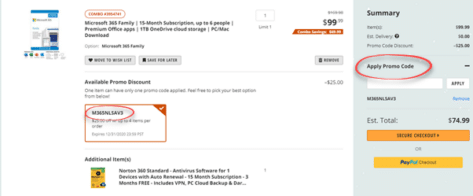
Hurry! Save more than $20 on Microsoft 365 Family only until the end of 2020
NewEgg is offering a 15-month new or renewal of Microsoft 365 Family for just $75 saving about $45. There’s a special discount or promo code that we’ll tell you below. UPDATE The price has changed to $99 which is still a good deal on a 15-month Microsoft 365 Family. $99 is the official price for […]

Jazz up your presentations with a little mmhmm
If you like to jazz up your Zoom, Teams or other presentations, try out mmhmm . It looks like an interesting tool you might like to try out over the break. mmhmm lets you create an online presentation for live broadcast or recording with many effects combined. Here’s an example with slides/images in a box, […]

Personal and work quick switching in Teams
Commercial users of Microsoft Teams can now quickly switch to a personal account without shutting down the app or browser window. Personal Teams can keep in contact any group of people, family, extended family, school friends, study group, class, sports team or club. See Teams gets personal for families and groups With a personal Teams […]

Pantone 2021 colors in your Word, Excel and PowerPoint
Pantone has announced not one but TWO ‘colors of the year’ for 2021 and, as usual, we’ll explain how to use those exact colors in Word, Excel, PowerPoint and Outlook. The colors of 2021 are … Illuminating and Ultimate Grey As usual what’s more amazing than the color is the description that goes with the choice. […]