Microsoft 365 – the subscription / annual fee plan for Microsoft Office on Windows, Mac, iPhone, iPad and Android.
Includes Word 365, Excel 365, PowerPoint 365, Outlook 365 and many other ‘365’ programs, apps and services.

Beware fake Microsoft 365 Premium for Consumer
Confused by ads promoting “Microsoft 365 Premium for Consumer”? You’re not alone. Until late 2025, no such plan even existed—making many online offers misleading at best and outright scams at worst. With Microsoft now officially releasing Microsoft 365 Premium, it’s crucial to understand how to spot the real subscription and avoid being tricked into buying […]
College and Uni students get Microsoft 365 for half price
Microsoft is making it easier for college and university students to afford essential productivity tools. Eligible students around the world can now get Microsoft 365 Personal starting with a year free before continuing at for 50% off. The plan includes full access to Word, Excel, PowerPoint, Outlook, 1TB of OneDrive storage, and limited Copilot AI […]

Microsoft 365 Premium: Copilot AI, new Features & Pricing Explained
Microsoft 365 Premium is the newest consumer plan that bundles the popular Family subscription with Copilot Pro at a much lower cost. For $199 a year, subscribers get six accounts with full Microsoft Office apps, 1TB OneDrive storage each, and premium Copilot AI tools for the plan owner—including research, data analysis, and workflow automation. Our […]
Austria’s Military boosts security by dropping Microsoft Office for LibreOffice
Austria’s Armed Forces have officially completed their migration from Microsoft Office to LibreOffice across 16,000 workstations, marking one of the largest government moves to open-source software in Europe. While cost savings were a factor, the driving force behind the switch was ensuring data security, independence from external cloud providers, and long-term control of IT infrastructure. […]
Microsoft 365 Adds ‘Vibe Working’ Copilot Agent for Word, Excel & Office
Microsoft is rolling out a new wave of AI-powered tools in Microsoft 365. Copilot Agent for Word, Excel, and Office promise to generate full documents, reports, spreadsheets, and presentations from natural language prompts, then refine them through AI chat. Microsoft aims to make content creation faster and more consistent across its apps, though concerns remain […]
What Excel Agent Mode Can (and Can’t) Do: Real-World Test Results
Microsoft is promoting Excel Agent as a powerful new AI feature designed to build entire worksheets from a single prompt—but how well does it actually work? Office Watch put Excel Agent to the test and found a mix of promise and pitfalls. From creating a mortgage comparison sheet to handling complex formulas, Excel Agent shows […]
Agent vs Agents vs Actions: Understanding Microsoft Copilot’s Confusing AI names
Microsoft has made Copilot more powerful—but also more confusing. With Agents, Agent, and Actions all referring to very different AI tools, even experienced Office users are left wondering what does what. Agents (plural) for Copilot in business and enterprises can take actions automatically such as tasks setup a new employee. Now, they’ve introduced three different Agent […]

Microsoft 365 Companion Apps: People, Calendar & File Search Explained
Microsoft is rolling out three new “Companion apps” for Microsoft 365 users on Windows 11, People, Calendar, and File Search. Designed as lightweight taskbar tools, these apps bring quick access to contacts, schedules, and cloud-stored files without switching between Outlook, Teams, or SharePoint. There are three new Microsoft 365 apps which will soon be pushed […]
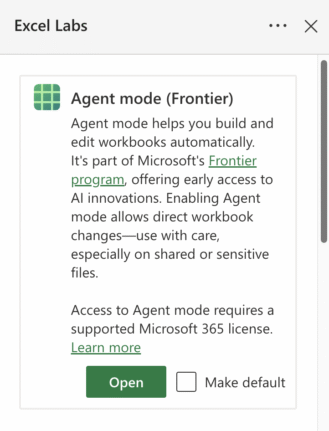
How to Join Microsoft Frontier: Early Access to AI in Microsoft 365
Microsoft has quietly opened up its Frontier program—a public preview for Copilot and AI features—to Microsoft 365 Family and Personal subscribers. While Enterprise users have had access for a while, everyday users are now being invited to test AI-driven tools across Word, Excel, and the web apps. The process to sign up isn’t entirely clear […]

Beware “Evil Kerning”: How Hackers Trick You with Fake Email Addresses
Cybercriminals are exploiting a subtle typography trick called evil kerning to disguise fake domains as trusted ones like Microsoft.com or Gmail.com. By tightening letter spacing, “rn” can appear as “m,” making scam addresses like rnicrosoft.com or grnail.com nearly indistinguishable from the real thing. Here’s how the scam works, why it’s so dangerous, and what you […]

Your Outlook.com Emails Could Kill Your OneDrive Storage—Here’s Why
Microsoft has quietly changed how storage is handled in Outlook.com: email attachments now count against your OneDrive quota. For users on free Outlook.com accounts with only 5GB of OneDrive space, this shift can quickly consume cloud storage and even disrupt email if quotas are exceeded. Here’s what this means for your mailbox, storage limits, and […]
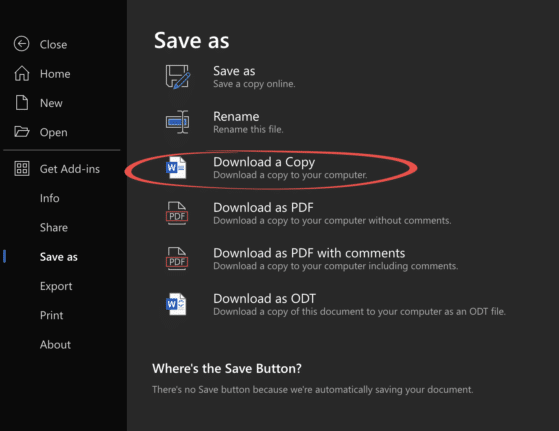
Edit Locally Saved Documents with Office Online – Free and Easy
You don’t need Microsoft 365 or desktop Office to edit your Word, Excel, or PowerPoint files. With Office Online, anyone can upload documents from their computer, make changes directly in a browser, and save the updated file back to their hard drive—all for free. This simple method works across Windows, Mac, and even Linux, making […]
Microsoft Redefines “Red” for Better Accessibility in Word, PowerPoint, and Outlook
Microsoft has quietly adjusted its classic Office “red,” shifting to a slightly softer. While the change may seem minor, it means improved readability and compliance with accessibility standards. But there’s a downside too in Word, PowerPoint, Outlook, and OneNote on both Windows and Mac, ensuring users get a color that looks the same but works […]
Ask Excel to Write or Fix Your Formula, Copilot and Beyond
Struggling with complex Excel formulas? Microsoft’s latest update brings AI-powered assistance directly into Excel, making it easier than ever to write, explain, or fix formulas. Or use free alternatives to quickly solve formula errors, create advanced calculations, or understand unfamiliar functions without needing deep technical knowledge. Here’s how Excel and AI tools can transform the […]
Restrict Editing in Word Documents (and Why It’s Not True Security)
Restricting editing in Microsoft Word is a handy way to control how others interact with your document—whether that means locking formatting, limiting changes to comments, or allowing only form filling. But don’t mistake it for true security. Word’s “Restrict Editing” feature is about managing collaboration, not protecting sensitive content. We explain how to set editing […]
What Is Email Quarantine? How It Protects You or hides missing messages
Email quarantine is a security feature used by mail systems to protect users from suspicious or spam messages while ensuring that potentially important emails aren’t lost forever. Instead of automatically deleting uncertain messages, quarantine places them in a separate holding area for you to review and decide whether they’re safe or malicious. This guide explains […]









