Microsoft 365 – the subscription / annual fee plan for Microsoft Office on Windows, Mac, iPhone, iPad and Android.
Includes Word 365, Excel 365, PowerPoint 365, Outlook 365 and many other ‘365’ programs, apps and services.
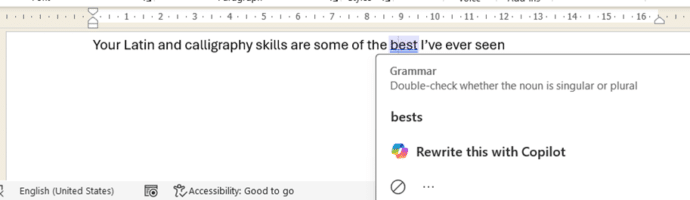
Microsoft Word isn’t always right, example 3,141,592
Word’s grammar checker is good, very good but it’s not perfect. Here’s the latest example of wrong advice under that blue underline. Office Watch reader, Simone J from Berlin sent us this English language anomaly in Word. “Your Latin and calligraphy skills are some of the best I’ve even seen” It’s the same error in […]
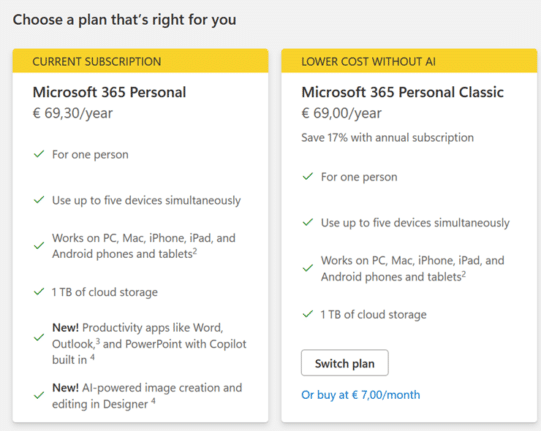
2025 changes to Workplace Discount/Home Use Program for Microsoft 365
The popular employee discount program for Microsoft 365 (Workplace Discount Program or Home Use Program) has some changes in 2025 at the same time as the price rise and Copilot addition to the Family and Personal plans. Office Watch compares the two options with a suggestion about what to do. From January 2025, the cost […]
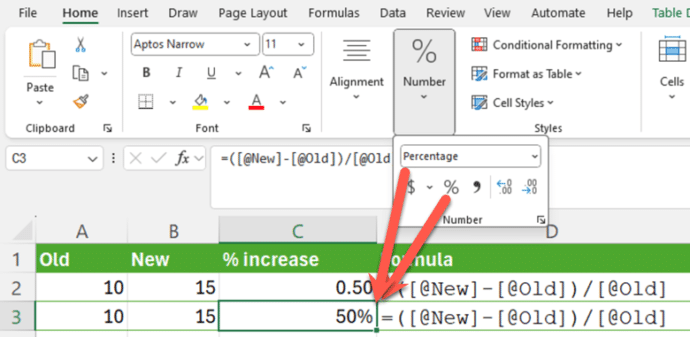
Smart Percentage Change in Excel
Calculating a simple percentage increase in Excel seems simple but, as usual, there’s a traps for the unwary. Here’s a smarter and more consistent way to figure out % change. First we’ll go over some basics which you’re welcome to skip … The formula for calculating a percentage change is simple: In other words, find […]
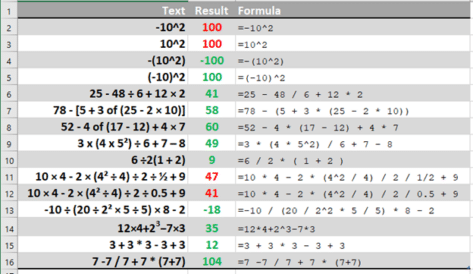
Excel’s order of calculation is not BODMAS
Excel has a slightly different order of calculation to the BODMAS rule taught to us at school. Those variations are important and can give a result you didn’t expect. Ray E from Iowa asked about one of those tricky algebra questions that appear on social media and generate heated arguments -10^2 . Ray wondered how […]
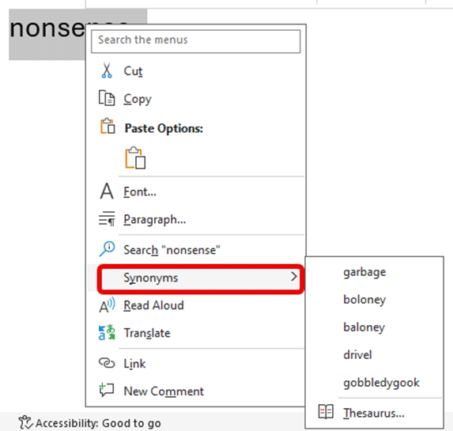
Forget what you’ve heard, Word still has a Thesaurus
Ignore the clickbait headlines and social media experts, Microsoft Word still has a Thesaurus feature. A slightly related feature has gone but Synonyms is still alive and kicking. Here’s Word’s Thesaurus or “Synonyms” still in Word 365 using Microsoft’s example word. And here’s Synonyms in Word 2024, using a more appropriate example word for this […]
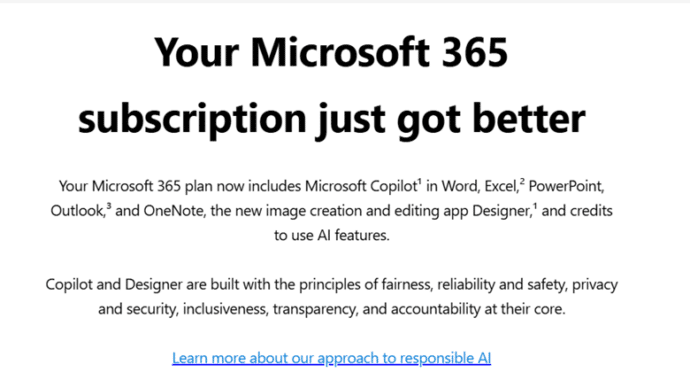
What Microsoft ‘forgot’ say in an email to Microsoft 365 customers
Microsoft sent a promo email headed “Your Microsoft 365 subscription just got better”, be aware of the details that Microsoft either missed. ‘forgot’ or buried in the fine print. That email explains about Copilot arriving in Microsoft 365 but little on the severe limitations and nothing on the price rise. As the old song goes […]
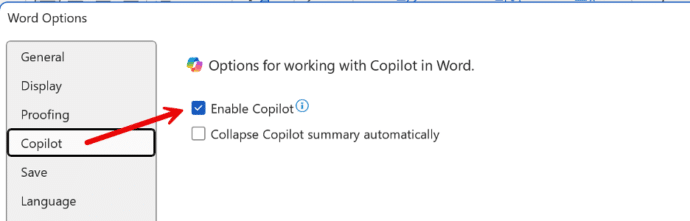
How to Disable Copilot in Microsoft 365
Microsoft is slowly adding an option to disable Copilot AI from their Microsoft 365 apps, Word, Excel and PowerPoint. Here’s what you’re supposed to see on your computer, but won’t necessarily. An option to disable Copilot is being rolled out to Microsoft 365 for Windows and Mac. First in Word 365 for Windows and later […]

Copilot Pro brings AI into Microsoft Office
AI technology without limits is available in Microsoft Office with Copilot Pro. AI features are integrated into Word, Excel, PowerPoint and Outlook for personal customers. Here’s how to get Copilot Pro and the secrets to getting it working. Copilot is Microsoft’s name for their AI based cloud services. They have been around for a little […]

Fixed: Microsoft 365 Crashes on Windows Server Systems
Microsoft has fixed an embarrassing bug that caused Microsoft 365 applications and Outlook (classic) to crash on Windows Server 2016 and Windows Server 2019 systems. The problem stemmed from a recent Office update that integrated the React Native framework to support certain Microsoft 365 apps’ features. The impact was limited to Microsoft 365 users who […]

Microsoft 365 price increases around the world
See how the price of Microsoft 365 Personal and Family has risen in USA, Canada, UK, Europe and many other countries. The new prices for Microsoft 365 consumer plans include Copilot with many limits and a high price. In some countries, it’s the first price rise in many years, despite inflation and many more features […]
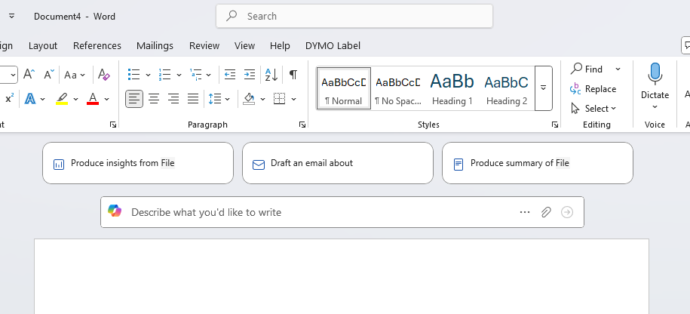
HUGE changes to Microsoft 365 happening now
Microsoft 365 customers around the world are waking up to a new look in their Word, Excel, PowerPoint and Outlook apps. It’s part of Microsoft’s huge changes to Microsoft 365 Family and Personal plans which include a very limited Copilot AI service and a big price rise. Microsoft 365 users might first notice these changes […]
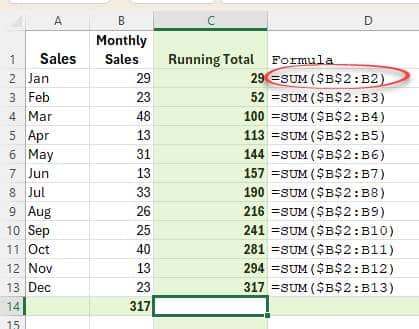
Two ways to make a running total in Excel
Here’s two ways to make a running total column in Excel. The way you were probably taught and a much better and more flexible choice. Running or Accumulative Totals are a very common thing in spreadsheets. Here’s a really simple example in columns C and E. Here’s two ways to make those totals, using Sum() […]
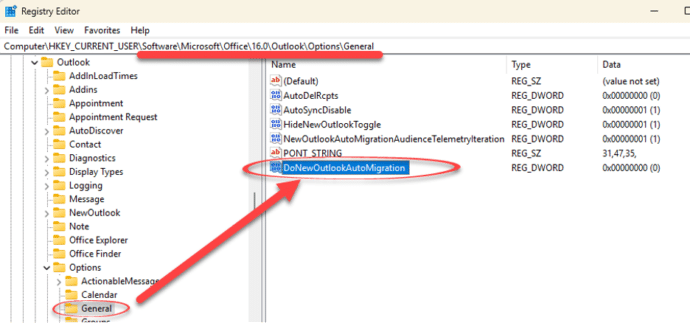
How to stop migration to new Outlook
How to prevent Microsoft from pushing a change from classic Outlook for Windows to their new and incomplete Outlook (new). Microsoft is pushing customers to use Outlook (new) even though the software doesn’t have basic features like proper offline support or interactions between mailboxes. New Outlook also has a serious privacy breach for anyone using […]
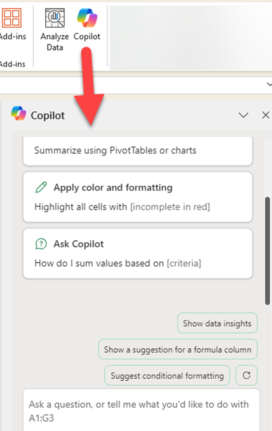
Copilot comes to Microsoft 365 with many limits and a high price
Microsoft 365 Family and Personal plans are getting Copilot AI integration into their Office apps but it comes with a big price increase and many limits to what people get for the extra cost. Customers in Australia, New Zealand, Malaysia, Singapore, Taiwan, and Thailand have seen massive prices rises in Microsoft 365 Family and Personal […]
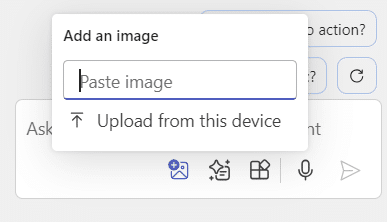
Add pictures to Copilot questions
You can now add images to your Copilot prompts / questions in Word and PowerPoint. Why bother with images? Well, they can save you time, help Copilot understand your requests better, and improve the accuracy of its responses. Whether you’re asking about a specific object or scene, images can clarify details that might be ambiguous […]
Too Many Microsoft Outlooks? Clear Up the Confusion in Simple Terms
If you’ve ever been baffled by all the different things Microsoft calls Outlook, you’re not alone. Microsoft uses the “Outlook” name for multiple apps, web services, mobile clients and desktop programs. From Outlook (classic) for Windows to Outlook.com and the Outlook mobile app, making it hard to know which version you’re actually using or talking […]









