Microsoft 365 – the subscription / annual fee plan for Microsoft Office on Windows, Mac, iPhone, iPad and Android.
Includes Word 365, Excel 365, PowerPoint 365, Outlook 365 and many other ‘365’ programs, apps and services.

Exploding Head 🤯 emoji in Word, Excel, PowerPoint and Outlook
Insert the Exploding Head 🤯 emoji into Microsoft Word, Excel, PowerPoint or Outlook. Both in Office for Windows and Office for Mac. How Exploding Head 🤯 emoji looks Windows only has Exploding Head 🤯 in the Segoe UI Emoji font, either color or black. To me the black version looks more like a bowl than […]

Three ways to understand part of an Excel formula
Excel has three different ways to see a partial formula result to help you locate and fix a problem or understand how a formula works. Two methods have been in Excel for some time and there’s a new tooltip feature. Evaluate Formula The full Evaluate Formula has been around since at least Excel 2007. It […]

Understand or fix an Excel sheet with Evaluate Formula
Excel has a simple way to understand or fix a complex formula. Evaluate Formula lets you calculate parts of a formula and see interim results that make up the final value that appears in the cell. It’s on the Formulas tab under Formula Auditing. Evaluate Formula isn’t new, just little mentioned despite its usefulness. We […]
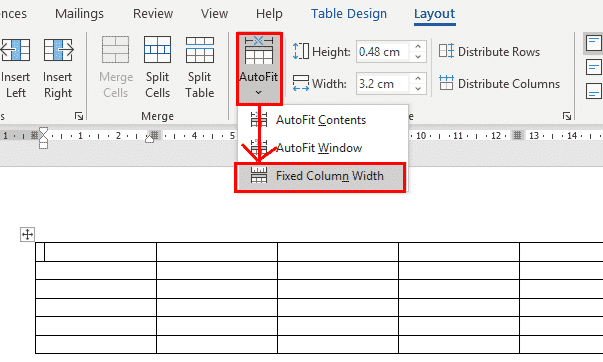
Fixing AutoFit Table Columns in Word
Word will automatically adjust or Autofit the width of table columns and the space within cells to fit the content that you are entering. Sometimes you don’t want this and want to be able to control the column widths yourself. AutoFit for Word tables is great but sometimes gets too enthusiastic. Tables get pushed beyond […]

Two ways to make Diagonal Text in Word
Microsoft Word has two ways to put text at any diagonal angle you like from a slight tilt to a steep incline for both regular text or a ‘watermark’ effect. It’s a simple trick to enhance a graphical presentation, make your Word document more appealing, Look no further, in Microsoft Word, a text box can […]

All about Quick Actions in Outlook for Windows
Quick Actions in Outlook for Windows (365/2021/2019) we’ll explain how to use it, why the name is wrong and the many limitations. From a quick look (no pun intended) Quick Actions seems like a good idea. Alas, it’s not been well developed or integrated properly into Outlook. Quick Actions only leaves customers wanting more. Still, […]

OneNote gets “speech to text” Transcribe
The Transcribe option in OneNote for Windows lets you get a “speech to text” written transcript of either a live recording or an already saved audio file. It’s an extension of the existing Transcribe feature in Word on the web (in a browser) and works the same way. That’s not entirely a good thing because […]
Microsoft Word’s Transcribe Tool: Instantly Turn Recordings into Text
Microsoft Word’s Transcribe feature makes converting recordings into text faster and easier than ever. Whether you’re documenting meetings, lectures, or interviews, this built-in speech-to-text tool automatically transforms your audio into an editable Word document. Learn how to use Transcribe in Word for Windows or Word Online, its supported formats and languages, tips for editing your […]
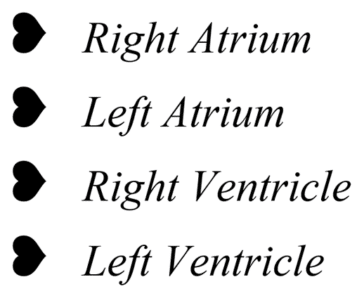
Rotated Heavy Black Heart Bullet ❥ symbol in Word, Excel, PowerPoint and Outlook
Insert the Rotated Heavy Black Heart Bullet ❥ into Microsoft Word, Excel, PowerPoint or Outlook. Both in Office for Windows and Office for Mac. As the term ‘bullet’ suggests Rotated Heavy Black Heart Bullet ❥ symbol is intended for bullet lists. Looking for other heart symbols? Five+ heart ❤ symbols in Word, Excel, PowerPoint and […]

More interesting bullets to Word and PowerPoint lists
Create more interesting and engaging bullet lists in Microsoft Word or PowerPoint, use symbols or emojis for a touch of creativity and visual appeal. Here are some different symbols that can be used in bullet lists: Define New Bullet Word has some default symbols that are seen in too many documents. That’s a shame when […]

Automatic worksheet/tabs list in Excel – the old way
Here’s the ‘old-fashioned’ way to make a list of worksheet tab names. It’s old because the formula uses ” Get.Workbook() ” which is an Excel 4 macro function that’s now blocked in modern Excel for security reasons. See Excel 4 macros are now blocked and about time tooWe’re including this older method for the sake […]

Get more Weather info in Outlook
Outlook can show weather details and, as usual in Office, there’s more available than most people realize on the Weather Bar. Calendar views display the weather forecast and current weather for up to five cities or locations. Available in Outlook 2013 and later including Outlook 2021/2019, Outlook 365. The forecast appears above the calendar. Hover […]
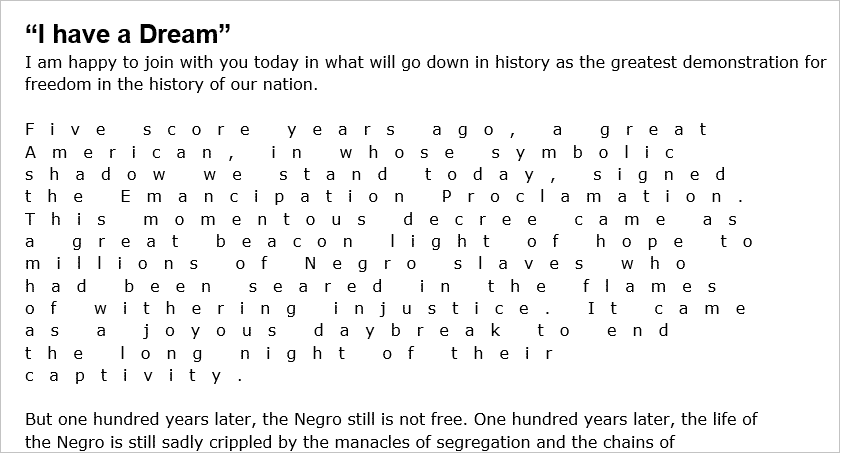
Character Spacing options in Word
Deep in the bowels of Word’s setting is a way to increase or decrease the spacing between letters. Character Spacing | Spacing lets you stretch or compress text. It’s a handy trick for headings, it makes them look bigger without increasing the font size. Or compress text so more words fit into limited space. Character Spacing settings To […]
Four ways to get Microsoft Office on Linux
Get real Microsoft Office running on Linux in four different ways – a virtual machine, remote access, browser apps or Wine. There’s no ‘Microsoft Office for Linux’ and unlikely there ever will be. That doesn’t mean a Linux machine can’t access the full power of Office for Windows or Mac with a little geeky trickery. […]

The real National Park font is now available for Office
There’s a proper digital font version of the typeface used on US National Park signs. It’ll work with Office for Windows or Mac. The original signs were hand-carved with a router bit. At https://nationalparktypeface.com/ there are four options available: Light, Regular, Heavy and Outline. They are available as a free download under a SIL License. […]
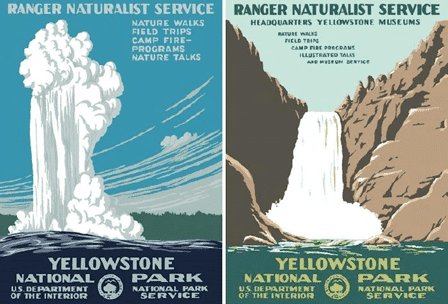
Art Deco font from National Park Posters in Word and Office
The famous Art Deco font used in US National Park posters is available free for Word, Excel or PowerPoint. National Parks Traveller has an interesting article on the history of US National Parks posters. Original posters now sell for four figure prices, not bad for things that were once thrown out as useless pieces of […]









