
Predict the future value of your investments with Excel
Excel can calculate the future value of your investments, such as finding out a return you’ll get on a Certificate of Deposit (CD) or Term Deposit. There’s an inbuilt Excel function to make the task very simple. It’s just one way Excel can make your financial decisions a whole lot easier. Future Value of a […]
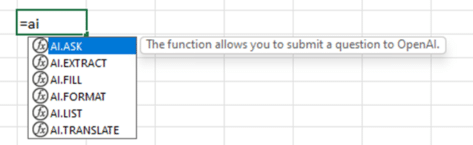
FIRST LOOK: Excel’s six new AI Copilot functions
Excel’s new AI functions, under the Copilot branding, have started to appear in some public releases. Here’s the full list with syntax of all six AI functions. The functions have started appearing in some Excel 365 for Windows, Insiders Beta (version 2308 build 16708.20004). Not all Insiders see the same functions because Microsoft sometimes does […]

Make better Excel Charts by adding graphics or pictures
Add some extra flair to your plain Excel charts by inserting pictures or graphics within the chart. It’s remarkably easy and enhances charts a lot. You can simply enhance your graph by inserting a business logo in the chart area. Or you might want to add images to replace the text labels. You may want to insert an image of money to represent dollars spent, or a car to represent […]

Check out the winner and other new fonts in Microsoft 365/Office 2021
Here are samples of the five new fonts available for Microsoft 365 and Office 2021 customers one of which has become the new default font, but under a different name – Aptos. Did we say five? … there are really 10 new sans-serif fonts. Each of the five newbies come in two versions, normal for […]
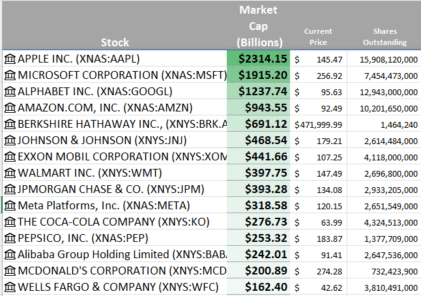
Track the largest companies market caps, real time, in Excel
The Excel Stock data type lets you track the largest companies market capitalization in real-time. It’s strangely compelling to watch the market caps change by billions in the blink of an eye. Excel 365’s Stock data type has the essential information to calculate market capitalization with changing values in real-time. Stock data type has fields […]

Make your own Worlde in Office and Word
Make your own Wordle grids in Microsoft Office, Word, PowerPoint or Excel. Choose the right font, colors (the exact green, yellow or grey) plus grid details including blank or unfilled boxes. Wordle was originally a standalone app, created by Josh Wardle . It’s now owned and run by The New York Times, though the look […]

Grinning Face 😀 emoji in Word, Excel, PowerPoint and Outlook
How to insert the Grinning Face 😀 emoji into Microsoft Word, Excel, PowerPoint or Outlook. Both in Office for Windows and Office for Mac. Grinning Face 😀 emoji is usually depicted as a yellow face, with open eyes and a wide smile. Conveys good cheer or humor, often to make it clear that the sentence […]

Three Microsoft 365 features have disappeared
Some features have been dropped from Microsoft 365 Family, Personal and other plans. Wolfram data types in Excel and so-called ‘Partner Benefits‘. As usual the announcement was full of marketing euphemisms and didn’t tell the whole story because a third feature (Excel’s Money template) discontinued on the same date. Three Microsoft 365 features were dropped on […]

Get the right Barbie color for Word, PowerPoint and Office
Barbie (the doll, not the Aussie BBQ) is everywhere at the moment so we’ll explain how to select Barbie Pink in your Word documents, Excel sheets and PowerPoint slides. There’s no one Barbie Pink but a selection to choose from. We looked around various official sources for the toys and movie trying to find the […]

More Word Find / Search tricks
Some more Microsoft Word Find tricks. Select and Find, finding blank lines, search for special characters/emoji, find a certain font or formatting plus wildcard options. This article follows on from our introduction Find pane search secrets in Word Select and Find If you select some text in a document then use the Ctrl + F […]

Easy charts and summaries in Excel
There are many ways to visually explain a list of values with different types of Excel Charts and other trickery. We’ve already looked at the numerical or statistical ways to summarize a list of values. Now let’s visualize the data in various ways available easily in Excel. There are various charting options available which can […]

Eight SUM functions in Excel … and more
Everyone knows the SUM function in Excel but that’s just the start, there are eight SUM() functions (and more) for adding up numbers in different ways. SUM() SUM is one of the first functions taught to newcomers. It’s as old as Excel itself (older because SUM was in the first spreadsheet program, Visicalc) In its […]
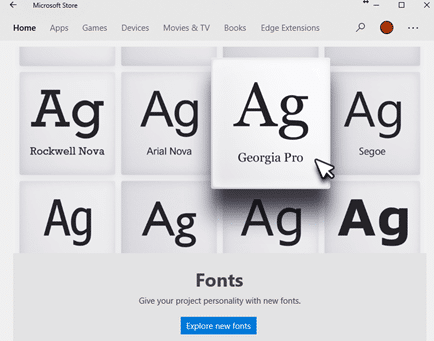
Why there’s three font locations in Windows 11 and 10
With the sale of fonts via the Microsoft Store and cloud fonts there’s now a complication in the familiar way fonts are managed in Windows 11/Windows 10 and how Office for Windows handles new fonts. There are now three different locations that fonts can be saved. For as long as anyone can remember, all Windows […]

Images in Excel Cells – at long last
At long last, there’s a way to insert an image into a single Excel cell called Place in Cell. No problems with floating images etc, just a cell with a picture which resizes with the cell size. Adding images to Excel sheets has always been confusing because they weren’t directly related to a single cell. […]

Telephone receiver 📞 emoji in Word, Excel, PowerPoint and Outlook
Insert the Telephone receiver symbol 📞 into Microsoft Word, Excel, PowerPoint or Outlook. Both in Office for Windows and Office for Mac. Telephone receiver or handset 📞 symbol can be used on a letterhead or sign where a phone number is shown. There’s an emoji in the Unicode standard plus two Microsoft Office Icons. How […]

Get some Excelf-esteem in Edinburgh this August
A comedy show that combines Excel with excess Coffee sounds perfect for Microsoft Office nerds and it’s happening this August as part of the Edinburgh Festivals. I run my professional and travel life on Excel. We’ve heard of sensible women who select and rate their dates on a spreadsheet. But calculating self-esteem? We’ll see … […]









