
What you’ll need to use Copilot with Microsoft Office
Microsoft has released some information about what you’ll need to get their AI tools (called Copilot) when they are eventually released. Copilot is Microsoft’s name for their upcoming AI tools integrated into Office apps (Word, Excel, PowerPoint and Outlook) plus other services like Teams. As with all Microsoft’s Copilot announcements, it’s a strange mix. The […]

Designer Erase is a picture edit opportunity for all Office users
Microsoft Designer now has an image editing tool that’s been missing from Microsoft Office. Erase in Designer lets you edit images in an important way that’s not possible in Word, Excel, PowerPoint or Outlook for Windows or Mac. Picture editing in Office has a lot of features but they mostly effect the whole image, there’s […]

Pushing Hands🫷 🫸in emoji in Word, PowerPoint and Office
Type the ‘pushing hands’ emoji, left 🫷 or right 🫸in Microsoft Word, PowerPoint and other Office apps. Officially the emoji are called Rightwards Pushing Hand 🫸 and Leftwards Pushing Hand 🫷 but can also be used as a ‘High Five’. These emoji can be used separately or together to great effect, here’s the hands as they […]

Search improvements in Word, Excel and PowerPoint
Microsoft is again changing the way Search works in Microsoft 365 and also (surprise!) Office 2021 to expand the results beyond the document or Office features. Now you can search for definitions, media and even web results from the top bar of Word, Excel and PowerPoint. The most recent announcement is about Office 365/2021 for […]

Excel formula: get percentage discount
Use Excel to figure out the percentage discount or increase, for example the difference between the original and sale prices. We’ll show you the Excel formula and some practical tricks beyond the official answer. Percentage discount formula The basic formula is: (Original – Sale) – to figure out the difference between old and new amount […]

All the right pointing hand symbols in Word and Office
Word and Office have several right “pointing hand” symbols available in some fonts. Here’s the Unicode options, index, backhand, sideways in white or black, all explained and shown. Want more arrows or pointers? Check out all 200+ Arrow or Hand pointing symbols and more in a searchable list. Index, Backhand or Sideways? The Unicode system […]

Three ways to run an Office macro direct, from the ribbon or toolbar
There are three main ways to run a macro in Microsoft Office (Word, Excel, PowerPoint or Outlook). From the Macros list, from a button on a ribbon or from the Quick Access toolbar. We previously spoke about how to install an Office VBA macro, here’s how a macro can appear on the ribbon or Quick […]

Make the Office ribbon more useful, add your choice of buttons
Any Office ribbon tab can be more useful for you. By trimming some of the buttons you don’t need, making room for the buttons you want. We’ll show you how to remove some of the less needed ribbon sections (likely from the Developer tab) to make more room for your own buttons. Previously we’ve explained […]

Add Chess Piece symbols to Word, PowerPoint and Office
Insert any of the chess piece symbols available in Word, Excel, PowerPoint and other Office apps. King, Queen, Bishop, Knight. Rook and the lowly Pawn all with different looks, depending on the font plus three pieces available in Microsoft Office icons and the single chess piece emoji. Chess Pieces – the full list Here’s the […]
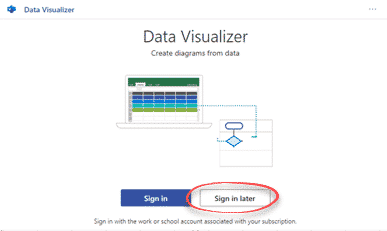
Visio Data Visualizer converts Excel into a diagram
A new Excel add-in converts an Excel 365 worksheet into a Visio diagram. You don’t need to buy Visio to use the Microsoft Visio Data Visualizer in its simple form, just Excel 365 for Windows/Mac or Online. It’s an interesting tool and worth checking out if you make diagrams or flowcharts. The add-in inserts example […]

Easily install an Office VBA macro
Here’s how to easily install VBA code or macro in Microsoft Office. Adding some code you’ve seen on a web site or been given is simple once you know the little tricks. Often people are given some Office VBA code to use with Word, Excel, PowerPoint or Outlook but without instructions for how to install […]
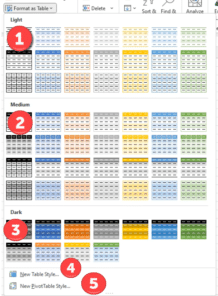
New Keyboard shortcuts for Office menus
New shortcuts are coming to Microsoft Office 365 for Windows which will help navigate larger pull-down menus with keystrokes. Plus the screen-reader labels are being improved. In short: the Tab key moves between sections/blocks of a pull-down menu.That’s it … so simple and perhaps surprising that it’s not there already. Unfortunately, Microsoft’s description of these […]
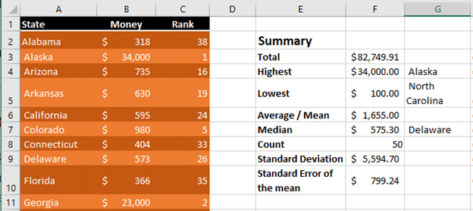
Nine easy statistics in Excel
There are at least NINE simple statistics formulas and functions in Excel that can summarize a list of numbers into something easy to understand. Often Excel has lists of numbers or money that makes little sense until you add a summary like this: We have a table called CountbyState and want to know something about […]

Thumbs Up👍emoji in Word, Excel, PowerPoint and Outlook
Insert Thumbs Up or Like👍symbol into Microsoft Word, Excel, PowerPoint or Outlook. Both in Office for Windows and Office for Mac. Thumbs Up / Like👍emoji is typically used when you ‘like’ something or have approval/agreement. It’s commonly used as a quick response to a comment on Facebook, Twitter and it’s coming to Office Comments too. […]
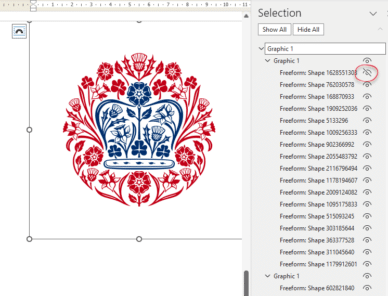
All 20 Coronation emblems and how to use them in Microsoft Office
All 20 (yes, twenty!) emblems for the Coronation of King Charles III, the exact colours required and how to use them in Microsoft Office like Word documents and PowerPoint slides. Also how to get an SVG/icon version of the emblem, ideal for modern Office apps and show just the parts you want (e.g. no text, […]
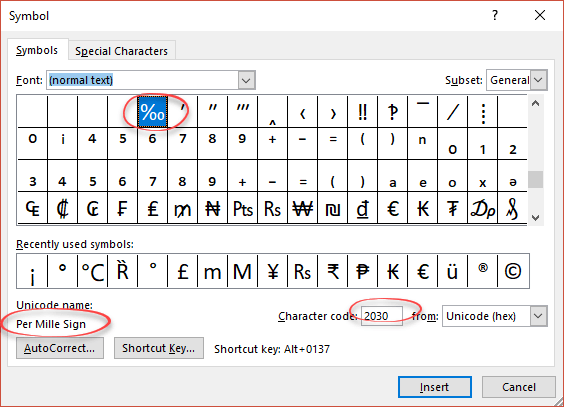
Per Thousand / Per Mille sign ‰ in Word, Excel and PowerPoint
How to type the Per Thousand ‰ (or it’s official name ‘Per Mille‘) sign into Microsoft Word, Excel or PowerPoint. Per Thousand / Per Mille ‰ means ‘parts per thousand’ and can be used for values below 1%. It’s not regularly used in English. How Per Thousand ‰ looks in different fonts Per Thousand / […]









