
“Something went wrong” fixing a bad Office 365 update
If you get an error message when installing or updating Office 365 or Office 2019 there’s little help available beyond Microsoft telling you ‘Something went wrong’. What looks like specific error message are general statements that don’t identify the problem. These troubles aren’t any surprise to experienced Microsoft Office users. Install or update of Office […]
Microsoft and others listen to Skype calls … and what else?
Microsoft and some contractors listen to Skype calls but that shouldn’t be a surprise to anyone. And Microsoft’s response was quite typical – they refuse to stop. Microsoft can and does let it’s ‘associates’ listen and read from Office documents and voice data. Word, PowerPoint and Outlook users are also likely spied upon. The choice […]

Center Across Selection vs Merge & Center in Excel
There are two similar text formatting options in Excel. The well-known Merge & Center and the hidden away Center across selection. Both have their advantages, the choice is yours. Merge & Center Most Excel users know ‘Merge & Center’ because it’s atop the Merge list at Home | Alignment | Merge. It does two things: […]
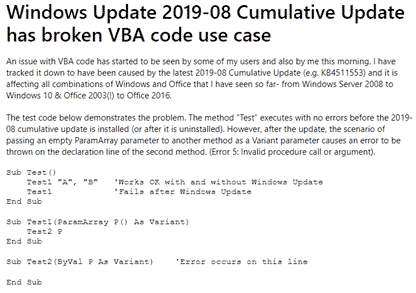
Windows update causes Office VBA to fail
A recent Windows update is causing VBA code to fail in Excel, Access and other VBA parts of Office. The culprit isn’t Office, but the version of Windows that it’s running on. After the 2019-08 Cumulative Update KB4511553 is applied, some VBA code will stop working. The patch bug is in Windows 10, 8.1 and […]
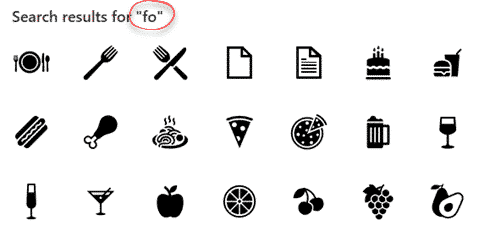
Search for Microsoft Office Icons
The desperately needed feature is coming to Microsoft Office … the ability to search for Icons. Microsoft added Icons to Office 365 and even more a few months ago … 300 more icons in Office, but which ones and where? The problem has always been finding the right icons from the long list. There are […]

Sensitivity settings add security for Office documents
Office now has sensitivity options to label Word, Excel, PowerPoint docs plus emails. Not ‘touch-feely’ sensitivity like ‘loving’ or ‘compassionate’ but instead corporate, privacy labels. It’s a new feature for Office 365 corporate hosted E3 or E5 accounts and the admins have enabled Sensitivity options. Sensitivity appears on the Home tab in Word, Excel, PowerPoint […]

Justify, Fill, Orientation, Shrink to Fit and other Excel formatting tricks.
The Format Cells dialog can be accessed from Home | Alignment | Orientation, or by right-clicking on selected cells and selecting Format Cells. See Excel’s text and number alignment choices Text formatting in Excel with wrapping, line breaks and merging This dialog gives you more detailed options to choose from than are available in the Orientation […]

Excel’s text and number alignment choices
Under Excel’s Home | Alignment ribbon you can change the indents, alignment or angle of the text in selected cells. As usual, a seemingly simple set of buttons have some hidden tricks. See Text formatting in Excel with wrapping, line breaks and merging Alignment Adjust alignment of the text, both across and up/down, use the […]
Office 2016/2013 bug fixes and updates for August 2019
Here’s this months list of bug fixes and updates for Office 2016 and Office 2013. These apply only to the older ‘MSI’ Windows installs not the modern ‘Click to Run’ Office including all Office 365. For most people, these patches will be installed automatically via Microsoft/Windows Update. PowerPoint 2016 – KB4464577 Morph now gives you […]
Using Excel to make a better burger
It’s amazing to see how people use Excel in ways probably not dreamt of by the programs makers. We usually think of Excel as a financial tool either for businesses or personal budgeting or managing lists. Anything to do with numbers or lists has a place in Excel, like a guy in Singapore with a […]
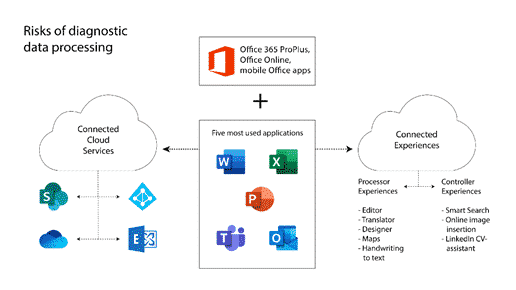
Dutch report warns about privacy leaks in Office Online and apps.
A report commissioned by the Dutch Ministry of Justice and Security warns government departments NOT to use Microsoft Office Online or the apps for Apple or Android. The Privacy Company report was made public with the Ministry’s permission via two blog posts short and long. Many governments and organizations have legitimate concerns about the amount […]
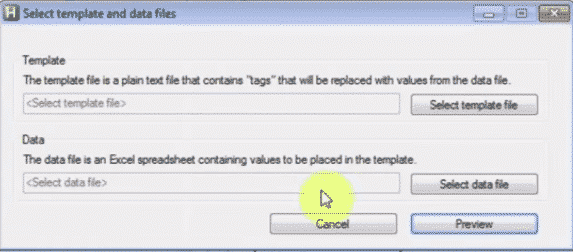
EmailMerge.cc Add on for MS Outlook
Office-Watch.com reader Jeffrey J. offers this look at Emailmerge.cc an add-on that fixes some limitations in the Word/Excel/Outlook mail merge system. “ Outlook email merge function does not allow multiple To line addressees, nor allows creating any cc or bcc addressees. And you cannot customize the Subject line. Manually adding/modifying each required email is labor […]

Inserting or linking other files into Word documents
Word allows you to insert other files with data and functionality from another document or program directly into your Word document. Microsoft calls these additions ‘Objects’ which makes it sound overly technical and difficult but it’s not. Don’t get fazed by all the nerd talk about ‘objects’, that’s programmer speak that’s leaked out into the […]

Where is Stock data in the latest Excel 365?
The latest release of Excel 365 for Windows is a right mess with missing Dynamic Arrays and, for a while, Stock and Geography data types disappeared too! We received some reports late Friday, US time that Excel 365 for Windows v1907 build 11901.20176 wasn’t showing Stock or Geography data types on the Data ribbon. The […]

Do you have Dynamic Arrays in Excel 365?
It’s quite easy to tell if your Excel 365 has the new Dynamic Arrays. No need to setup a table and use the new feature – just three keypresses are enough. Some people are reporting that they have the right Excel 365 but with no dynamic arrays. Checking the program/app version is possible, see below. […]

Where’s my Excel with Dynamic Arrays?
Microsoft says that Dynamic Arrays have arrived but Excel 365 users beg to differ. Despite the company’s written assurances, the promised feature is nowhere to be seen. Plenty of reports that Excel 365 for Windows version 1907 (Build 11901.20176) does not have the important new feature Microsoft says it should. What’s new in Office 365 […]









