
Excel now has Dynamic Arrays – Windows, Mac and more …
After many months of testing, all Excel 365 apps now have dynamic arrays (except Excel Online) though some are just for Insiders at present. Dynamic Arrays are a major and powerful expansion of Excel’s powers. The new abilities, functions and error messages might seem scary but are a great leap forward for Excel. All Excel […]
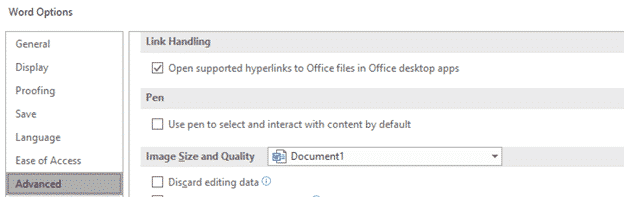
Opening Office file hyperlinks in Office desktop apps not browser
A new option in Office 365 for Windows is the ability to choose how hyperlinked Office files are opened. Inside Word, Excel or PowerPoint or in the default browser. The new option is at File | Options | Advanced | Link Handling Open supported hyperlinks to Office files in Office desktop apps. An Office document […]
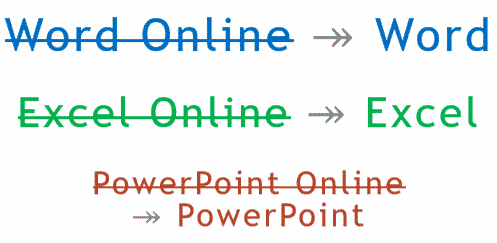
Office Online becomes ‘Office’, just to confuse everyone
Microsoft says we should stop calling the browser-based version of their apps ‘Office Online’. It’s now just ‘Office’. ‘Word Online’ is now just ‘Word’. ‘Excel Online’ is ‘Excel’, ‘PowerPoint Online’ is merely ‘PowerPoint’. Make sense? No, we don’t understand either. Microsoft’s explanation of the name change doesn’t help. According to Microsoft they are doing this: […]

Apollo 11 mission timeline in Excel
Here’s the enhanced Apollo 11 mission timeline as an Excel worksheet. Office Watch newsletter readers asked for it after last weeks articles using the NASA web page as a data source. Complete Apollo 11 timeline in Excel Things to do with the Apollo 11 timeline in Excel Apollo 11 suggested viewing and reading The full […]

Things to do with the Apollo 11 timeline in Excel
An Excel worksheet with Apollo 11 timeline can be used to analyze and breakdown the astronaut’s movements plus answer the big question: what time was it when Armstrong walked on the moon? See how we put the Apollo 11 timeline into Excel using Get & Transform or the older Copy/Paste method. Also Add Apollo 11 events […]

Complete Apollo 11 timeline in Excel
NASA has a detailed web page with the timeline of the Apollo 11 mission from before liftoff to well after splashdown It’s an example of the two ways to put a web table into an Excel worksheet. Newer Excel (365, 2019 and 2016) has PowerQuery with ‘Get and Transform’ which is much better. The older […]

Copy and Paste web pages & tables into Excel – Apollo 11 Timeline
One way to get a web table into Excel is simply to copy the page from your browser into an Excel workbook. This method works for all versions of Excel back more than a decade. It’s been superseded by Get and Transform with PowerQuery which does a much better job of conversion. See Complete Apollo 11 […]
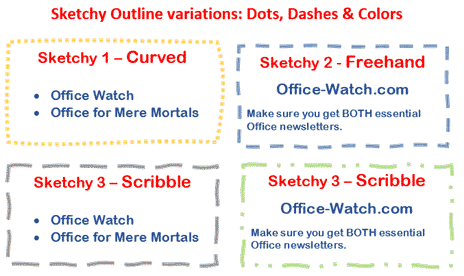
Now … Sketchy Shapes the video!
Sketchy Shapes, the new line option in Office 365 now has a little video to go with it. Sketchy line option in Office for Windows and Mac Sketchy or wriggly lines in Icons and SVG graphics Source: Microsoft

July security bug roundup and documentation errors
It’s time for the July roundup of patches for yet more security bugs in Microsoft Office including Office 365 and Office 2016 for Windows plus Office 2013 and 2010. Plus the latest example of confusing documentation errors. Office 365 and Office 2019 A bug which lets Office Javascript doesn’t check the web page requesting details […]
Office 2016/2013/2010 bug fix lists for July 2019
Here’s a summary of the July non-security updates for Office 2016, Office 2013 and Office 2010. These updates should be automatically installed via Microsoft Update or you can apply them manually. Install them now if there’s a listed bug you need fixing, otherwise play it safe. Leave some time for any bugs in the patches […]
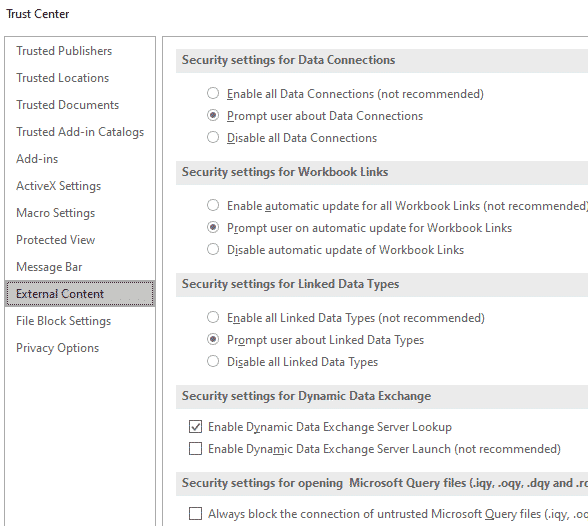
Excel’s Power Query security exploit is a worry, but not a big worry
The Power Query exploit in Excel is a concern but one that most Excel users are already protected from. Look past some of the shock headlines (e.g “120 million users personal information at stake due to Microsoft Excel flaw”) . Mimecast did a good job tracing this security bug in Power Query which has existed […]

Lame Icons in Office 365 isn’t helped by adding 300 more
Microsoft is hyping the addition of 300 more icons to Office 365 perhaps hoping to distract customers from the many problems finding and using the Insert | Icons feature in Office 365. We like the addition of SVG graphics (Icons) into Office because it opens up a much wider range of scalable graphics. Office lacked […]

300 more Icons in Office, but which ones and where?
Microsoft is boasting that the Office 365 ‘Icons’ collection now has 300 more graphics but no information on what they are and no help finding them. The release of more Icons just emphasizes the problems with this cloud feature. Icons is a cloud service that delivers SVG graphics to Word, Excel, PowerPoint and Outlook for […]

Simple Yes, No drop down list in Excel
Drop-down list boxes are useful in Excel but, like many things in Office, there’s more than one way to do it and more to know that the simple examples often given. Making a pull-down list is easy and there’re many tips showing the basics. In this article we’ll go beyond that. We’ll show that simple […]

New Outlook Dark Mode feature and other Insiders news
The 21 June 2019 Office 365 for Windows Insiders release 11815.20002 has a new Dark Mode feature in Outlook plus some fixes. Here’s the details including Microsoft’s report on ‘Notable Fixes’. Outlook New features Outlook 365 for Windows now has a Sun/Moon button when using Dark mode and the black theme, Sun/Moon switches the reading […]

Office 365 for Windows: Straight Talk
We’re delighted to announce a new ebook from Office Watch — all about Office 365 for Windows: Straight Talk. In-depth with Word, Excel, PowerPoint and Outlook 365 plus buying and configuration. For anyone with Office for Windows on an Office 365 subscription. It’s a truly independent guide to Office 365 for Windows. We take the […]









