All about Microsoft Office for Apple Mac. Word, Excel, PowerPoint, Outlook on macOS, Microsoft 365 for Mac, Office 2021 for Mac and earlier versions.

Which Microsoft 365 plan have you purchased or using?
How to tell which Microsoft 365 plan (Personal, Family/Home, University etc.) you’ve bought and the expiry date. Or maybe you’re sharing a Microsoft 365 Family/Home plan. The Microsoft 365 plan, status and expiry doesn’t appear in the Office software (that would be too easy). See: Microsoft 365 which email address am I using? Instead, go to […]
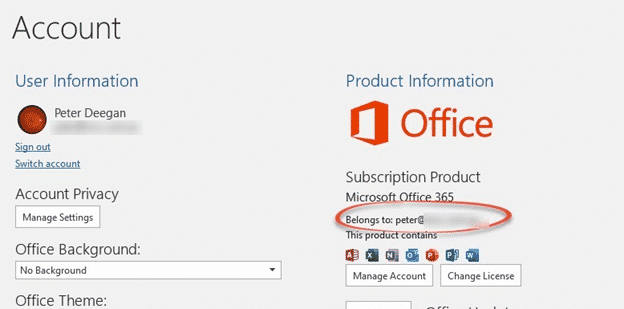
Microsoft 365 which email address am I using?
Each Microsoft 365 (aka Office 365) account is linked to a specific email address, how can you find out which address you’re using for your Microsoft 365 login? This might seem like a strange question but we hear it quite often. Most of us have multiple email addresses and it’s easy to get confused about […]

Use PowerPoint to make a quick photo collage
Powerpoint is a quick way to make a photo collage or presentation that you can use as a separate photo for any purpose, including as a virtual background! Today is the 80th birthday of an amazing man. We’ll be meeting up on Zoom to celebrate the big day and we’d like to make a special […]

Does an Office licence work for two users on a computer?
Microsoft Office rules might let two users or more use the same copy of Office on a computer. It depends on which type of Office you have on a Windows or Mac computer. Office can work for multiple separate users on the one computer. Most commonly, there are separate Windows or Mac logins for the […]

Outlook Profiles, important, useful but little known
Outlook profiles is one of the most important but least known parts of the program. Profiles can be very useful, sometimes essential to getting Microsoft Outlook working. An Outlook profile is a group of settings for connecting to the email server, and where to store the emails and other data. A profile is created when […]
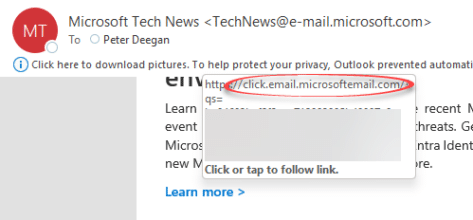
Make sure an email link is real not phishing, why does Microsoft makes it easier for criminals?
There’s a simple trick to ensure that an email is real, not a phishing trick to get your personal information. But Microsoft makes it easy for phishing attacks to pretend that are the real thing.. Hover over a link in an Outlook email to see the real url that you’ll visit if you click. Look […]

Reuse slides in PowerPoint, the good and the annoying
There’s a faster way to clone or reuse slides from existing PowerPoint presentations. Reuse Slides lets you pick a slide and copy it in a flash. Which sounds great unless you’re an unlucky person who hits a useless and unhelpful Microsoft error message. Reuse Slides is mostly promoted as a tool for organizations with shared […]
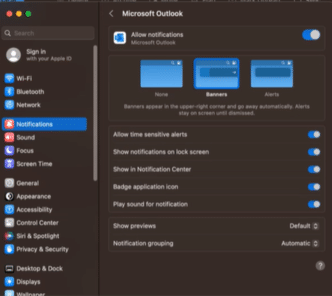
Choose meeting reminders style in Outlook for Mac
Choose from two ways to display event notifications or reminders in Outlook for Mac. Either familiar Outlook display or integrated with macOS Notifications. There’s a catch which Microsoft buries in their fine print. You have to use the ‘New Outlook 365 for Mac’ which is still very much a crippled ‘work in progress’ and the […]

New way to switch apps in macOS Ventura and Office for Mac
The 2022 ‘Ventura’ release of macOS has a new way to switch between apps called ‘Stage Manager’. It works well with Office for Mac, making it easier to see what’s open and available. But Stage Manager has its frustrations in this first release. Stage Manager appears on the left side, showing the most recently used […]

Make your Word document more readable
Word’s Readability check is a great extension to the familiar Microsoft Word Spelling & Grammar. Word can check the complexity of your writing and give you an idea of whether your text will be readable, meaning understood, by your target audience. We’ll show you how to see Word’s Readability Statistics, what they mean and how […]

PowerPoint gets a Portrait mode for iPhone and iPad
PowerPoint is getting a Portrait or vertical orientation option for PowerPoint mobile on Apple iPhone and iPad. Portrait mode is already in PowerPoint desktop (Windows/Mac) though it’s hidden. Portrait mode for slides and videos is quite common these days (TikTok and similar are all portrait) even though it offends purists like your humble correspondent. Design […]

Outlook’s upside-down or flipping image rotation problem
Why does the same picture appear rotated sideways or flipped in Outlook for Windows/Mac but right side up elsewhere? It’s an image annoyance in older versions of Microsoft Outlook which we’ll explain. Outlook for Windows or Mac lets you preview a picture by clicking on the attachment icon but sometimes the preview is the sideways […]
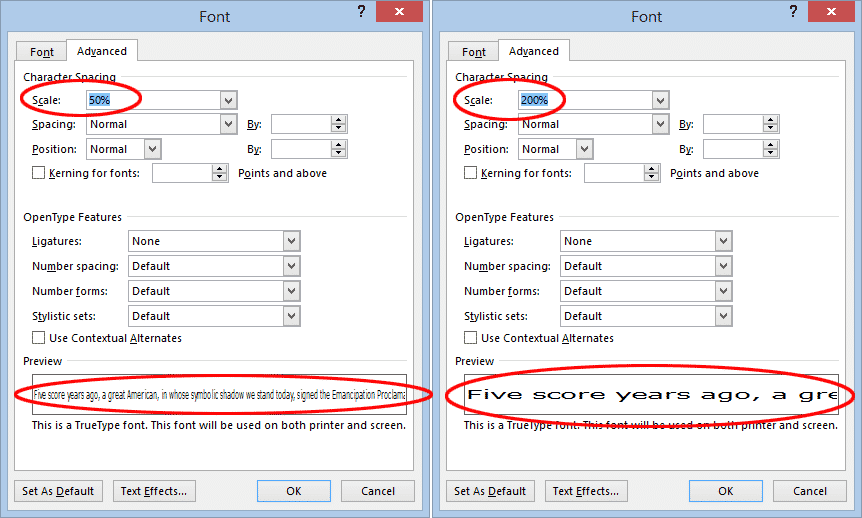
Scale text, larger or smaller, in Microsoft Word
Scaling Text in Word is another Microsoft Word text effect to make the text larger or smaller. Specifically, the Scale option stretches or contracts the horizontal width of the characters and spaces between. Here’s an example of normal, 150% and 66% scaling. To change the scaling of text in Word, select the text you want to change and either: On the […]
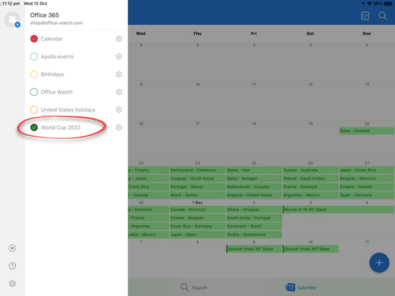
Outlook for Mac: Add 2022 FIFA World Cup calendar
Here’s how to keep track of your 2022 World Cup football team and when the live broadcasts will be in your time zone – all by adding a calendar to show in Microsoft Outlook for Mac, iPhone or iPad. Here’s all the 2022 World Cup fixtures in Outlook, on the left we’ve added two time […]

Complete Christmas emoji, fast find and copy
Need a Christmas emoji or symbol? Here’s a quick and searchable list of all the Xmas emoji for documents, sheets, slides, emails or messages that you can use or copy. This list has all the Christmas related emoji we can think of, the broadest sense both secular and religious. These emoji are supported (with different […]

6 Outlook tricks for Soccer World Cup fans and ‘normal’ people
Here’s some Outlook tricks to help planning for the Soccer World Cup or any other event. (Obviously, we’re joking about ‘normal’ people😄. Our football ⚽ loving friends are sure they are normal and pity humans with no interest in the round-ball game.) We’ve already looked at how to import a list of all World Cup […]









