All about Microsoft Office for Apple Mac. Word, Excel, PowerPoint, Outlook on macOS, Microsoft 365 for Mac, Office 2021 for Mac and earlier versions.

Up Down Arrow ↕ symbol in Word, Excel, PowerPoint and Outlook
Type the Up Down Arrow ↕ into Microsoft Word, Excel, PowerPoint or Outlook. Both in Office for Windows and Office for Mac. Up Down Arrow ↕ symbol is a vertical line with arrowheads on both ends, pointing up and down. How Up Down Arrow ↕ looks in different fonts. Here’s some examples of how Up Down Arrow ↕ looks in common Office fonts. Up Down Arrow ↕ codes These are the […]
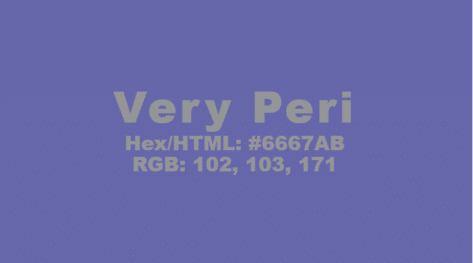
Pantone 2022 color in your Word, Excel and PowerPoint
Pantone has announced their “Color of the Year” for 2022 and, as usual, we’ll explain how to use those exact colors in Word, Excel, PowerPoint and Outlook. For 2022, the new color will also be appearing in Microsoft products with a nice PowerPoint template with extra color palettes. The color of 2022 is … Very […]

Black Chess Queen ♛ symbol in Word, PowerPoint and Office
Insert the Black Chess Queen ♛ into Microsoft Word, Excel, PowerPoint or Outlook. Both in Office for Windows and Office for Mac. Black Chess King ♛ symbol is useful for users that want to represent the chess piece as a symbol, rather than an image. Or just a generic crown icon. How Black Chess Queen ♛ looks in different fonts. Examples of how Black Chess Queen ♛ looks in common […]

Great Word style renaming and alias tricks
Rename Word styles or give them alternative names/aliases. Sometimes you’ve got no choice but to make an alias because the original style name is fixed. Any style can have an alternative name which appears in the Style Gallery. That’s a useful trick because there’s limited space for the style name on the Gallery and the […]

Make the Style Gallery work better for you in Word
The Word Style Gallery doesn’t have to be left the way Microsoft supplies it. Fix the Gallery to make it work better for you. Microsoft Office often has menus and options aren’t designed for the customer. Instead they are setup for Microsoft’s needs in ‘out of the box’ demonstrations or to showcase as many choices […]

Approximately Equal To ≅ symbol in Word, Excel, PowerPoint and Outlook
Type the Approximately Equal To ≅ into Microsoft Word, Excel, PowerPoint or Outlook. Both in Office for Windows and Office for Mac. Approximately Equal To ≅ symbol with a curvy line above the usual = symbol is commonly used within Mathematics to refer to approximate equality between two values, congruence or isomorphism. Not to […]

Thunderbirds are go, get the look in Word and Office
Thunderbirds are go! They live on in Microsoft Office, ready to serve as a retro look in your Word documents or PowerPoint slides. The passing of Gerry Anderson was sad news. Mr Anderson enthralled millions of kids (and more than a few adults) with his groundbreaking shows like Captain Scarlet and the Mysterons, UFO and, […]
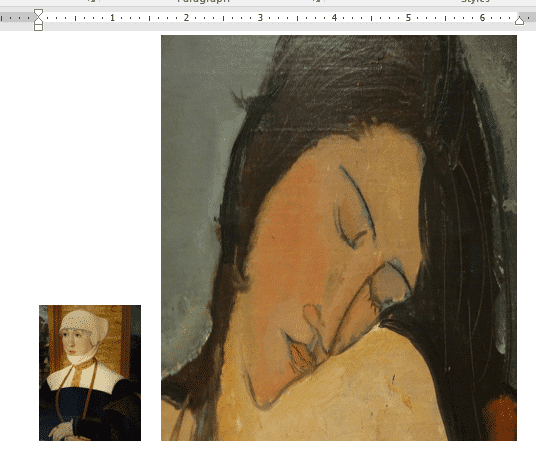
How to make a smaller email or document
Here’s some suggestions for making a Word, Excel or Powerpoint document smaller. Also useful for Outlook emails. We’ve had readers occasionally asking how they can ‘shrink’ a document until it’s under some arbitrary size limit. Why even worry about the file size of documents? Much of the time, the file size isn’t a concern. Modern […]
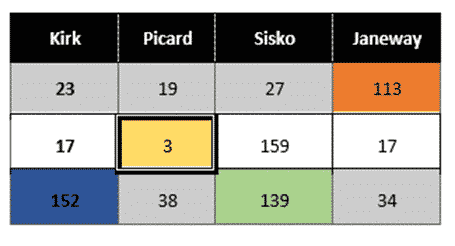
Workaround for styles with table cells in Word
There’s a limitation in Word’s Table Styles; no individual cell styles within a Word table We’ll explain the problem and several options to workaround it. Along the way it’s a chance to dig into some interesting parts of Word and Office and make them do things that might not have occurred to you. There’s a […]

Simple Drop Caps in Word
The Drop Cap function in Microsoft Word provides a simple way of capturing the ornate look of an old book or manuscript. There are many options that can be used to change the look, positioning and behavior of any drop cap to suit your formatting needs or taste. Drop Caps have been in Microsoft Word for many versions, at […]
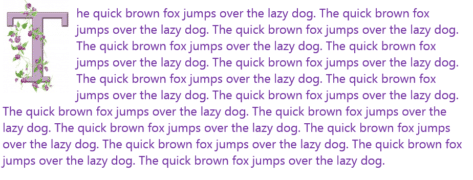
Extra Drop Cap trick using online pictures in Word
If you want even more flair with your Microsoft Word drop cap letters, why not take advantage of the Microsoft online images range? See Simple Drop Caps Word for the basics of Word Drop Caps and Fancy Drop Caps in Word for a lot more. Click where you want a drop cap letter to appear and navigate to “Insert […]
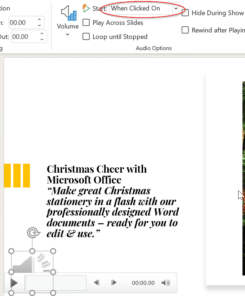
Play audio only when clicked on a PowerPoint slide
Audio on a PowerPoint slide can be played when you click on the audio icon on a slide. Choose the audio icon then on the Playback pane, choose Start: when clicked on. You can have multiple audio tracks on a slide, each one plays when you click. This slide has two sound effects for either a correct or […]

How to save $50 buying Office 2021 Home and Student
Amazon is selling Office 2021 Home and Student for $50 off the regular price. There’s also a discount on Home and Business (including Outlook). Office 2021 is the latest perpetual licence or non-subscription version of Microsoft Office. It was released only a few months ago. Office 2021 Home and Student The Home and Student bundle […]
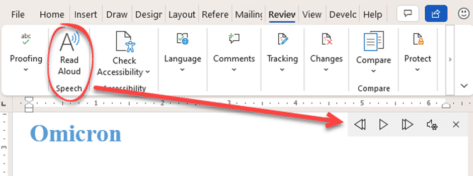
How do you pronounce Omicron? Ask Microsoft Office!
The Omicron variant is spreading across the world and so are questions about how to pronounce the word. A simple job for Microsoft Office 365’s Read Aloud. Just type Omicron into Word then go to Review | Read Aloud or choose the word and press Ctrl + Alt + Space … either way will start […]
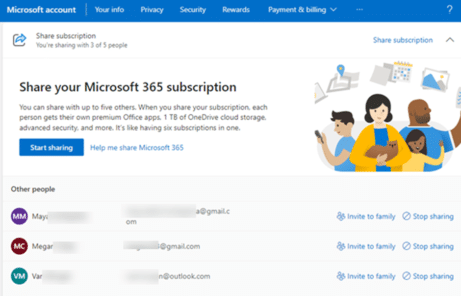
Discover who is sharing your Microsoft 365 Family plan?
If you’re the owner of a Microsoft 365 Family plan how can you find out who the plan is shared with and control their access? Microsoft 365 Family plans can be shared among six people, after a while it can be hard to remember who you’ve shared with and exactly which email address (Microsoft account) […]
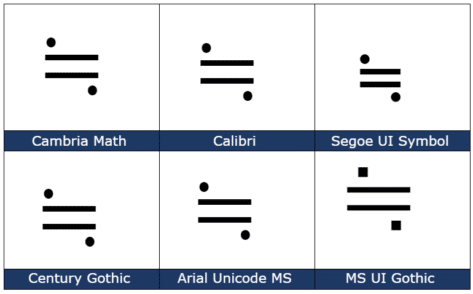
Approximately Equal or image of ≒ in Word and Office
How to insert the Approx Equal or the image of symbol ≒ into Microsoft Word, Excel, PowerPoint or Outlook. Both in Office for Windows and Office for Mac. Approximately Equal To or the Image Of ≒ symbol is commonly used Japan, Korea and Taiwan to indicate two values are approximately equal, but not exactly equal. How Approximately Equal ≒ looks in different fonts. Here are some examples […]









