All about Microsoft Office for Apple Mac. Word, Excel, PowerPoint, Outlook on macOS, Microsoft 365 for Mac, Office 2021 for Mac and earlier versions.

There are two official document standards – why?
Here’s what you need to know about the two official international document formats, Microsoft’s OpenXML (.docx .xlsx etc) and Open Document Format (.odt .ods etc) both supported in Microsoft Office and most other office suite software. Each format has been recognized by international bodies so there are two ‘official’ document standards for Planet Earth. Both […]

Make a new Office file within Microsoft Teams
Not only can Teams share Word, Excel or PowerPoint files, but you can also make new documents right in Teams or upload existing documents. Create a New File You can easily create a new file within Teams for Word, Excel, PowerPoint or OneNote from the New pull-down list at left. Or make a new folder. […]

How to Filter Data in a PivotTable
Excel’s PivotTable allows you to evaluate trends, comparisons, and patterns within datasets. Once a PivotTable is setup, you can filter “Drill down” into it to focus on key information. These days there are several ways to filter a PivotTable, Slicers (which Microsoft loves to boast about), AutoFilter and by Field List. All these options mean […]

Warning! Older Outlook soon stop links to Microsoft mailboxes
Soon older versions of Outlook won’t be able to connect to Microsoft hosted mailboxes, even though both the software and service come from the same company. Here’s what’s happening, why, who is affected and what to do. Microsoft is finally ending older, insecure, ‘Basic’ authentication connections to their Microsoft 365 mailboxes including Outlook.com. The change […]

How to open Office files with Microsoft Teams
Teams makes it simple to share files and collaborate. If you are working with Word, Excel, PowerPoint, or Visio files, your coworkers may read, edit, and collaborate on them directly from Teams. The different ways to open a document in Teams. Files Access Within Microsoft Teams, each Channel has a Files folder where you can […]

Microsoft 365 get 20% saving with an * asterix
Office Depot in the USA has a good deal available now for both Microsoft 365 Family and Personal, but with an important limitation buried in the fine print. Both offers are for 15 months of Microsoft 365 for the price of 12 but you must buy a ‘qualifying product’ to get that price. “*Qualifying products […]
Understanding all the parts of OneNote
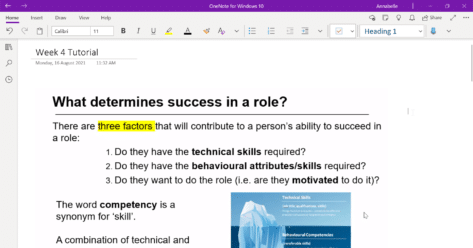
While OneNote is very flexible, especially with pages, there’s an overall structure from Notebooks to Sections, Pages, sub-pages and containers. NOTEBOOKS OneNote is based on a series of notebooks. You can make notebooks for any topic you like. One for personal or diverse notes. Others for work, a hobby, subjects you’re studying, special projects like […]

A start-up guide to OneNote
Since 2003, OneNote has been available to many Office users as part of their Office suites or subscriptions. It features free-form note-taking and multiuser collaboration, plus it’s fairly straightforward and user-friendly, so why not give it a try? What is OneNote? OneNote is a place to keep notes of all kinds and serves as a […]

All the goodies inside OneNote Pages
Pages can contain all manner of things, it’s as simple as ‘click on the page and type’. A container is automatically created for you. Of course, you can copy things from elsewhere (web pages, documents etc) and paste into OneNote. The real power of OneNote is to include lots of different content types. Here’s a […]

Share and collaborate on Office files with Teams
Teams makes it simple to share files and collaborate. If you are working with Word, Excel, PowerPoint, or Visio files, your coworkers may read, edit, and collaborate on them directly from Teams. Co-edit files Each team member has access to files that have been uploaded and shared on Teams. You and your team members can […]

Get Microsoft 365 free in 4.5 different ways
If you’re not willing or able to spend the money, there are several ways you can access Microsoft Office for free. These tips are just good for saving money. Some are useful standby’s to keep in mind if you can’t use the full Microsoft 365 desktop programs. Maybe your computer is playing up or you’re […]

Free ways to convert WAV and other formats to MP3 audio for PowerPoint
Simple, easy and free ways to convert audio files like WAV, FLAC and many others into a format that PowerPoint or your smartphone prefers such as MP3, MP4 or AAC. The BBC Sound effect downloads are in WAV format. That’s a good, high-fidelity and uncompressed format that works in PowerPoint for Windows but it also […]
Make Outlook’s spam filter allow Office Watch newsletters
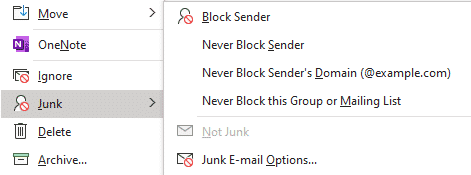
How to stop your Office Watch newsletters going to the Junk E-mail folder. To make sure your Office Watch newsletters don’t end up in your Junk Email folder you need to set us up as a ‘Safe Sender’. Here’s how to do that in Outlook. Keep in mind that Outlook software is NOT the primary […]
Why font selection is important for lawyers
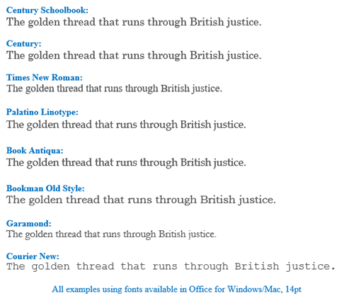
If you think font selection is hard, spare a thought for lawyers who have to deal with different official rules, recommendations and accepted practice for court submissions. Jason Steed at JDSupra sets out the complications for US lawyers. The D.C Circuit court started ‘discouraging’ use of Garamond font but no change in the actual rules. […]
Clever ways to use Checkboxes in Excel
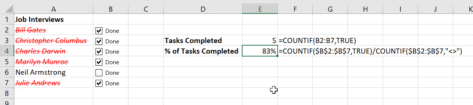
Now you know how to insert checkboxes in Excel, here are some ways to use check box cells in Excel. Counting the checked/unchecked boxes, calculate percentage checked and even showing a separate list of items based on their checked status. A cell with a check box has two values: TRUE – checked FALSE – UNchecked You can use the values […]

Office now supports ODF version 1.3 documents
Microsoft has updated the Office programs to support the OpenDocument format (ODF) to version 1.3. Most people use Office Open XML format (OOXML) which is the official name for what is usually called the ‘new’ Microsoft Office formats, .docx .xlsx .pptx etc. OpenDocument files .odt .ods .odp etc are also supported in Office 365 and […]









