All about Microsoft Office for Apple Mac. Word, Excel, PowerPoint, Outlook on macOS, Microsoft 365 for Mac, Office 2021 for Mac and earlier versions.

Inside Excel’s newer and better Linked Data Types
Excel 365 for Windows is getting an expanded Linked Data Types feature with more categories of data and extra features. Here’s what’s possible and the traps that Microsoft doesn’t mention. Stock, Currency and Geography data types have been in Excel 365 (Windows and Mac) for some time. Now it’s expanding into other areas via Wolfram […]

Be careful with Excel 365’s Linked Data Types
Sometimes Excel 365’s Linked Data Types are great (Stock and Currencies) and other times they’ll drive you crazy or lead you to use wrong statistics. Here’s some problems we found trying out the, supposedly, simple City data type compared to the similar Geography and Location data types. Just getting the right data can be a […]

Excel 365 now has Nested Linked Data Types
Something new in Excel 365 Linked Data Types is nested data types. If a data field can itself be linked to another data type, Excel will add it automatically. See the ‘Director’ names (from the Movie data type) have little icons next to them? That’s because Excel has added the People data type when we […]
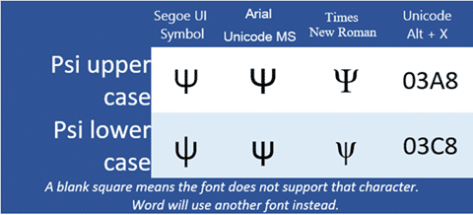
Psi upper Ψ or lower ψ symbols in Word and Office
How to insert the Psi upper case Ψ, and Psi lower case ψ symbols in Microsoft Word, Excel, PowerPoint, or Outlook. Both in Office for Windows and Office for Mac. Psi (uppercase Ψ / lowercase ψ) is the 23rd letter of the Greek alphabet. The symbols are commonly used within physics to represent wave functions in quantum […]

Xi upper Ξ or lower case ξ symbol in Word and Office
Insert the Xi upper case Ξ, and Xi lower case ξ symbols in Microsoft Word, Excel, PowerPoint, or Outlook. Both in Office for Windows and Office for Mac. Xi (uppercase Ξ / lowercase ξ) is the 14th letter of the Greek alphabet. The symbols are used within various contexts. The uppercase letter is often used in pure […]
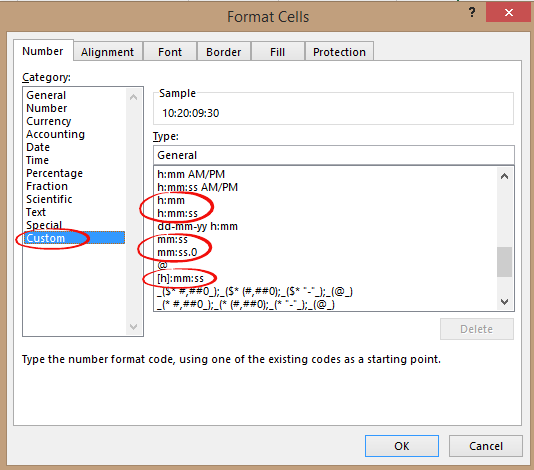
Time durations are possible in Excel
” How can I enter a duration in Excel with the format days:hours:minutes:seconds ? If I enter 5:32 Excel converts that to 5:32am but I want to record 5 hours and 32 minutes.” Time durations aren’t very clear in Excel, but they are possible. The time features are mostly aimed towards date and time so […]

Bad bug week for Microsoft email and Outlook.com
Microsoft hasn’t had a good week with their hosted email with two breakdowns of Exchange Online and Outlook.com services. One stopped emails in and out, the other prevented messages from being read. Both Exchange Online (Microsoft 365 hosted email) and Outlook.com run on the same or very similar systems. Usually a reported problem with one […]
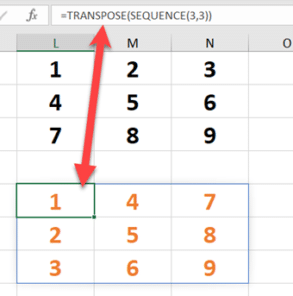
Sequence() for ordered numbers in Excel 365
Use Sequence() to get an ordered list of numbers either increasing or decreasing and with your choice of increments. Sequence is possibly the least understood of the dynamic array functions but combined with other functions it greatly extends Excel’s power. Sortby(), Filter(), Unique() and RandArray() all have obvious uses but Sequence() seems almost pointless. Here’s […]

Understanding the strange FollowedHyperlink style in Word
There are a few strange, non-standard, behaviors to the FollowedHyperlink style that Word uses for visited links. FollowedHyperlink is a hidden style which Word uses for any link which has been clicked or visited by the current user. Because it’s automatically applied it has some peculiarities that don’t apply to other styles, including its partner […]

Hyperlinks and link styles explained in Word
Word has special styles for hyperlinks which you can change from the standard blue, underlined look. Word link styles have some special behaviors to keep in mind. Word links can look very different or appear no different to regular text. All these are hyperlinks, believe it or not. Hyperlink and FollowedHyperlink Links have two modes […]
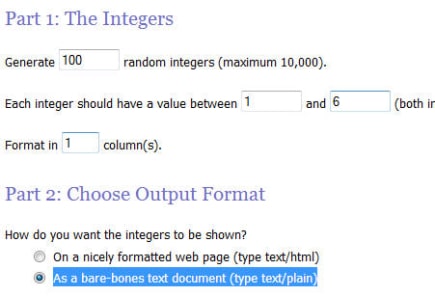
Truly random numbers are possible in Excel
With Random.org you can get truly random numbers for Excel plus options not available in the spreadsheet program like random but unique numbers with no repeats and random dates. Using ‘True’ Random numbers in Excel Our article on Random Numbers in Excel continues to surprise us by being one of the most popular pages on our […]

What’s so special about the Bahnschrift font?
Bahnschrift is a Windows font which is a little special and not fully compatible within Office. We’ll explain why it’s special, the extra care needed and the workaround. While it’s listed as an Office Cloud Font, Bahnschrift was originally included with the 2017 ‘Creators’ update of Windows 10. So, it might already be installed for […]

Unique filters in Excel – the manual ‘one-off’ options
There are two a simple ways to make a list of unique or non-duplicate entries from a longer list. Unlike the many automatic ‘unique’ options in Excel, these options work only once but it’s available in many Excel releases, old and new. Advanced Filter One is hiding at Data | Sort & Filter | Advanced […]

Star Wars in the Office dictionary
Since we’re talking about Star Wars, how does Microsoft Office 2016 for Windows handle the words and names from the famous films? A mixed bag. Most of the common names are in the MS Office dictionary but some surprising omissions. The evil Emperor isn’t included. Planet Tatooine has a major part in the movies but […]

Unique() makes a once difficult task really easy in Excel
The new Unique() dynamic array function doesn’t let you do anything new in Excel, but it makes a once-complicated task into simplicity itself. Unique or distinct, no-duplicate lists, counting and sorting the results are all possible with easy formulas that won’t confuse. For as long as there’s been Excel, people have wanted to get ‘unique’ […]

Extend UNIQUE() for distinct values that appear more than once
Excel’s Unique() function itself can’t show distinct values that appear more than once in a list. Repeated only items in a distinct list are possible with a simple extended formula. We’ve already shown the basics of Unique() either getting a list of Distinct values or values that only appear once aka Unique. But Unique() doesn’t […]









