All about Microsoft Office Word, Excel, PowerPoint and Outlook, Microsoft 365, Office 2021 and earlier versions.
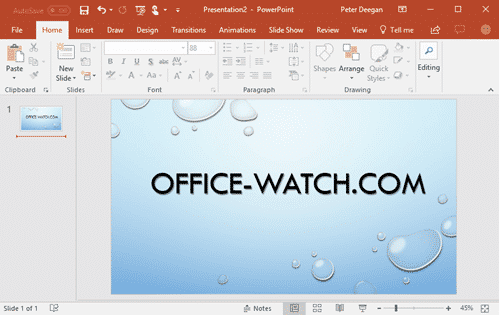
PowerPoint is 30 years old, can you believe it?
Can you believe it, PowerPoint is 30 years old? Originally called ‘Presenter’, in 1987 it was renamed to ‘PowerPoint’ by Robert Gaskins. Later in 1987, Microsoft bought the software out of petty cash (i.e. $14 million). 22 May 1990 was the first release of Microsoft PowerPoint for Windows, the birthday that Redmond officially recognizes. In […]

Office Championship winners 2017 – the full list
The Microsoft Office Championships are done for 2017 with talented young people from all over the planet among the winners. We have the full list of winners. The competition is for students 13-22 years with categories for Word, Excel and PowerPoint in 2013 or 2016 versions. Outlook, Access, Visio and Publisher don’t get a spot. […]

Office 365 prices go up 18% in India
India has seen Office 365 prices go up by almost 18% since the start of this year, a combination of both Microsoft and the Indian government grabbing some money. According to ndtv.com Office 365 Home cost 4,199 rupees last year, now the same product costs 5,450 rupees! How did that happen? Microsoft takes 10% more […]

British Library images for your PowerPoint presentations
The British Library has a collection of over a million copyright free images for use in Word documents and PowerPoint presentations. They are on Flickr and a good place to start is the albums. A few that caught our eye are: Women of the World Illustrated Letters and Typography – perhaps for unique Drop Caps? […]

Converting between Word and Ebook formats Mobi and Epub
Calibre, the invaluable ebook and e-reader management software, has improved. It now has Microsoft Word document conversion to and from MOBI, EPUB and other ebook formats. Until recently, Calibre could convert from Word .docx files to make .mobi (Kindle) or .epub (other readers) or many other formats. With version 3, Calibre can now convert ebook […]
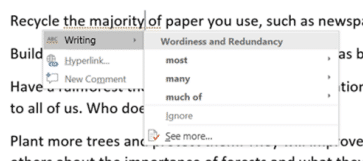
How Word makes you a worse writer
Jacob Brogan launches a deserved broadside on Microsoft Word’s grammar checker in Slate. ” Microsoft’s grammar and style tools aren’t helping writers understand their work, just arbitrarily imposing anemic pedantry on them. “ He gives practical examples of mistakes in the latest ‘Editor’ English grammar checker. Replacing ‘the majority of’ with ‘most’ is OK but […]

LibreOffice 5.4 has improved MS Office document compatibility
The free office suite, LibreOffice, has released with better Microsoft Office compatibility and a sly dig at their bigger rival. LibreOffice 5.4 has its own Open Document Format (.odt etc.) which is similar to Microsoft’s .docx format. LibreOffice can work with both formats. v5.4 has improvements in the Microsoft Office document compatibility. They’ve also streamlined […]

Your key to fixing Windows / Outlook Indexing problems
If Windows / Outlook indexing isn’t working properly, there’s a buried tool that should help identify the problem. We’ll show you where this tool is and what to do with the information it has. It’s the Event Viewer, Windows logging of what happens on your computer. Windows Search notes its actions in the Event Viewer […]

Visio Online goes public, sort of
Microsoft has released Visio Online, a browser based version of Visio to what they call ‘public preview’. Visio is the diagramming component of Microsoft Office. It’s goes way beyond the simple SmartArt flowcharts and graphics possible within Word, Excel or PowerPoint. Source: Microsoft Visio automatically links shapes and connectors. As you move a shape the […]

Make your WhatsApp portable between numbers and devices
WhatsApp can still work on the same account if you change the mobile number or SIM card. You can even move your WhatsApp account to a different smartphone. You might think that a WhatsApp account is tied to your phone number, but that’s not true at all. WhatsApp (like other messaging services) sends an SMS […]
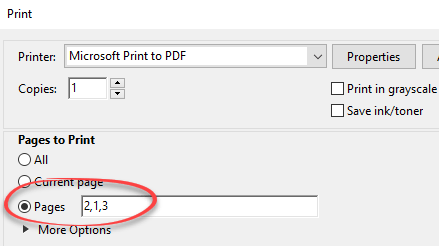
Delete or reorder PDF pages – free!
Here’s how to delete whole pages or rearrange the page order from a PDF document without paying for PDF editing software. A lot of people never need PDF editing software. Making PDF’s is easy using Microsoft Office or the ‘Print to PDF’ feature in Windows. Simple editing, like deleting pages or rearranging the order of […]

Put WhatsApp on your PC, Mac or tablet
Typing on a little Smartphone screen is a pain and happily there are PC desktop, Mac and tablet extensions for both WhatsApp and Signal. There are ‘big screen’ options to read and send WhatsApp and Signal messages from a larger screen. A Windows PC, Mac computer or a tablet device (iPad, Android etc). Source: WhatsApp […]
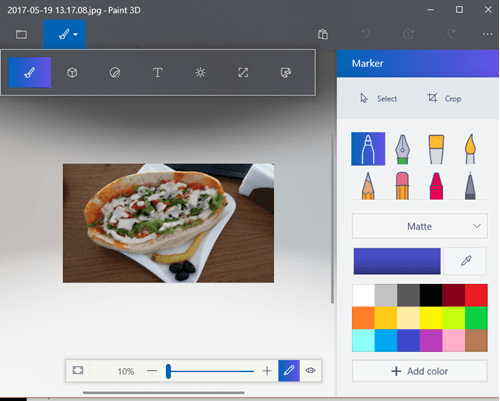
MS Paint, take a deep breath and relax
Paint is gone, it’s not gone yet and then it’ll survive – Microsoft Paint spent some time in limbo. The headlines were confused and sometimes downright wrong. After the dust had settled, Paint was given a long term life. Microsoft Paint has been around for over 3 decades. There are many, better, drawing programs out […]

Is Word too complex for us mere humans?
“Word Processing is Dead” makes for a snappy op-ed headline but it doesn’t tell the whole story. The Australian Financial Review has tales of Word woe from the legal community. Badly formatted contracts, especially inconsistent numbering, is the bane of many organizations. “…work was done by dedicated operators with expert training. But this is 2017, […]

Make Microsoft Office speak or read aloud
Microsoft Office can read aloud, talk or speak the text of documents to you. It’s possible in Word, Excel, PowerPoint, Outlook and OneNote. Computer speaking text is mainly suggested for various disabled users under the ‘Accessibility’ name. But ‘Speak’ is also useful if you’re just tired of reading the screen or are proof-reading from another […]
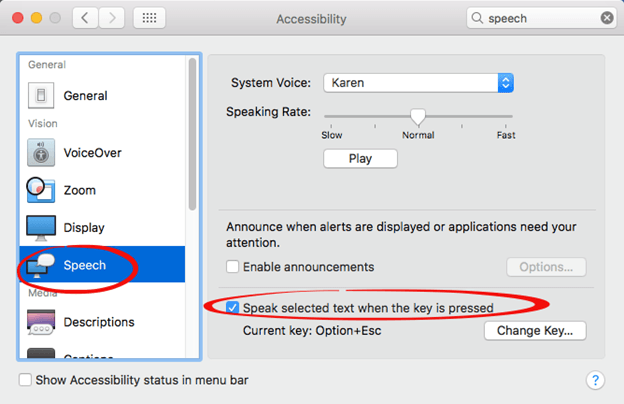
How to make Office for Mac speak
On Macintosh computers, the speaking is entirely done by the macOS not Office for Mac To enable speech to text, go to System Preferences | Accessibility and look for the Speech option. Speak selected text when the key is pressed – lets you choose a shortcut key.









