All about Microsoft Office Word, Excel, PowerPoint and Outlook, Microsoft 365, Office 2021 and earlier versions.
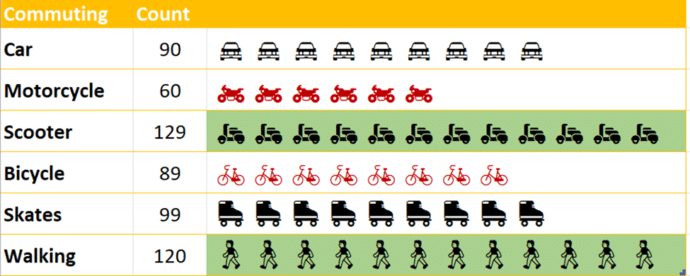
Building In-Cell Bar Charts in Excel
In-cell charts in Excel provide a powerful method to visualize data trends and patterns. They allow you to quickly derive insights within a worksheet, making information interpretation more straightforward without fussing about with full charts. We’ll explain how to make in-cell charts and then go further and show how to make them look better by […]
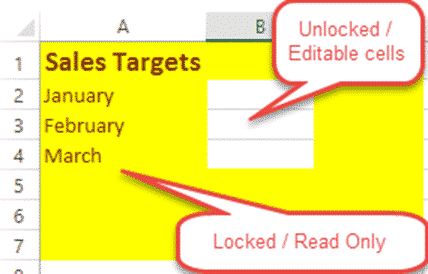
Lock up and stop editing of Excel worksheet or cells!
How to lock your Excel worksheet from editing – the whole thing or some cells. Allow some people to edit a few cells, leaving the rest of the cells and formulas untouchable by others using the worksheet. Here’s a very simple example: Anyone opening the worksheet can enter a US dollar amount to see the […]

ActiveX ending soon in Microsoft Office – and good riddance
An old and unsafe Microsoft technology, ActiveX is finally being dropped from Microsoft 365 and Microsoft Office. As usual, there are details and niceties behind the major announcement. For starters, ActiveX isn’t really being discontinued. Microsoft is disabling ActiveX as a default. If you need ActiveX, a menu, registry or Group Policy change will turn […]
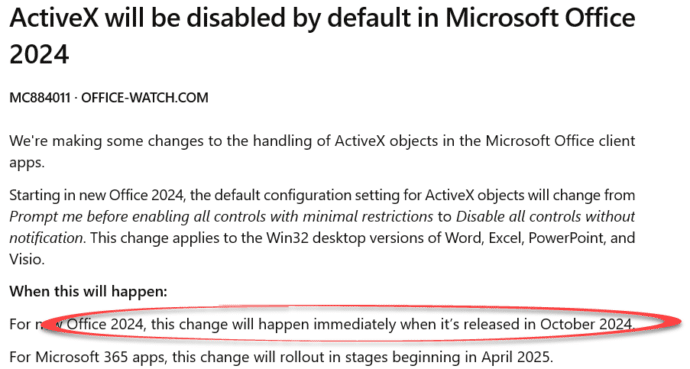
Office 2024 release date is in October
Microsoft has announced (indirectly) that Microsoft Office 2024 will be released in October 2024. Don’t buy Office 2021 now, better to wait until Office 2024 is released to get some more features for the same price. This nugget of news came via a Microsoft update announcement to administrators about the end of ActiveX support generally. […]
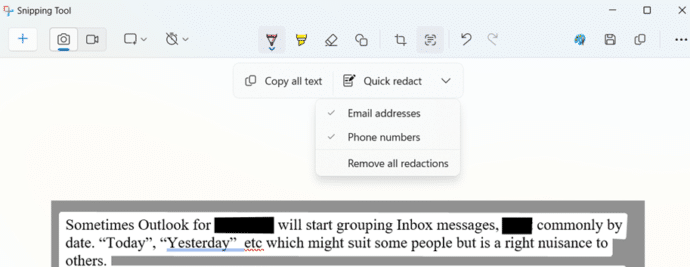
Snipping Tool has a secret redaction shortcut
The Windows Snipping Tool has a nifty little redaction shortcut that’s an undocumented secret. The Snipping Tool is available in Windows 11 and 10, the redaction feature (Microsoft calls it “Text Actions” is in Snipping Tool v11.2308.33.0 and later. Use Microsoft Store | Library | Updates to get the latest version. Text Actions aka redaction […]

Busting the myth of Word’s Language Defaults
An often-repeated myth says that Word’s spelling or proofing language default is locked into the Windows language setting. Officially that’s not true and never has been since the first Word for Windows in 1989. In practice there’s a bug in Word which is why this persistent myth keeps being repeated. Changing the Word language default […]
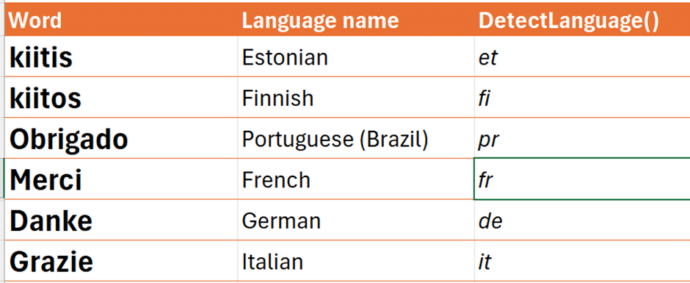
Inside the new translation functions in Excel
Excel 365 has two new translation functions to identify language from text or translate text from one language to another. Let’s see how the work, some problems and unknowns. New in Excel 365 are: DetectLanguge() to identify the language of the text supplied, hopefully correctly (see below) Translate() converts text from one language to another. […]

Microsoft 365 Insiders blog to end .. sort of
The Microsoft 365 Insiders blog is ending, sorta. kinda. Really, it’s just moving to another part of the Microsoft.com web site. For the last five years, the Microsoft 365 Insiders blog has been the place where the company boasts about new and changed features in the Insiders or beta versions of Word, Excel, PowerPoint and […]

Effortlessly Migrate Your Notes from Evernote to OneNote
Many people are moving away from Evernote due to the high prices. Here’s the simple way to migrate all Evernote notebooks to Microsoft OneNote. Why move from Evernote? Evernote’s pricing has risen to unrealistic levels. The cheapest paid plan “Personal” is now US$129.99 which is more expensive than Microsoft 365 Family plan for six people. […]

The ultimate way to change Microsoft Word defaults.
Having trouble changing Microsoft Word defaults? The ultimate way to change defaults is sure to work. It’s has been around since the very early days of Word and works for Outlook too! We often hear from people having trouble changing Word’s opening (default) settings for a new document. Various places in Word have ‘Set as […]
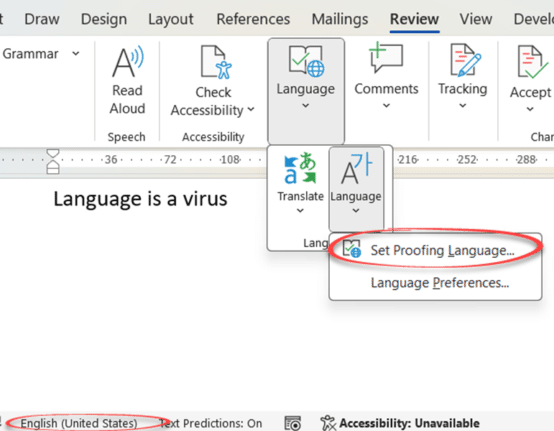
Three ways to switch language in Word and one way to turn it off
Word can spell and grammar check in many languages, here are three ways to switch the language settings plus how to turn off the pesky automatic language switching. Microsoft Word has language settings that can apply to a whole document or just selected text. This is vital for multi-language documents but also has an important […]

Grouping values from an Excel list
There’s a simple but not so obvious way for Excel to take a list of values and show them grouped into segments or groups. As an example, here’s the results of a class exam with their scores grouped into blocks of 20. It’s done with a tricky use of PivotTables and one of the somewhat […]

Koalas galore in Microsoft Office
We went hunting for koalas in Microsoft Office. Found more than 18 of the cuddly marsupials for Word, PowerPoint or Outlook. There are emoji, Office icons, SVG, online images and more making a colony or cling of koala (either can be the collective noun for koala). None of the endangered species where harmed in the […]

Backstage at a popular show using Microsoft Office
“Temping” is a staple and sell-out each year at the Edinburgh Fringe Festival. It makes clever use of Microsoft Office, and we were lucky enough to get a ‘behind the scenes’ look. The show is a unique blend of interactive technology and narrative storytelling, where the solo audience member takes on the role of an […]

Copilot gets Make Changes inside Word 365
Paid Copilot plans have some innovations in the Word 365 interface with a better way to Make Changes to text plus more paste options too. These changes are in Word 365 public releases linked to a paid Copilot plan. We found them in v2407 build 17830.20138 with Copilot Pro. Auto Rewrite Paid Copilot in Word […]
Beware variable fonts with Office and PDFs
A PDF file made from Microsoft Office or Windows may not look right because of an ongoing PDF bug with variable fonts. It’s been around for years with no sign of a fix. The problem arises when variable fonts are in documents exported to PDFs (either Save As … or Print to PDF). The font […]