All about Microsoft Office Word, Excel, PowerPoint and Outlook, Microsoft 365, Office 2021 and earlier versions.
Office crashes while typing – the problem and workaround
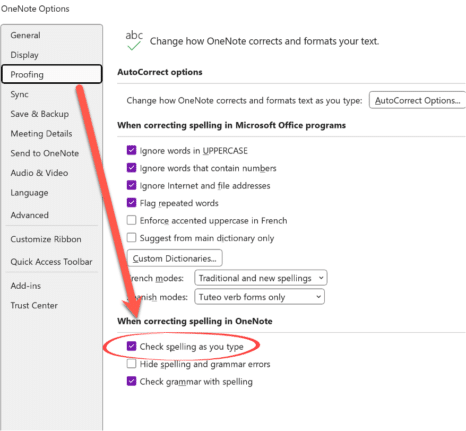
Microsoft 365 for Windows might crash while someone is just typing (you read that right). All the Office apps, Word, Excel, PowerPoint, Outlook or OneNote can be affected according to Microsoft, which knows about the problem and offers some workarounds. The problem is caused by an out-of-date language pack which has all the spelling and […]

Clipchamp gets background removal with some gotchas
Clipchamp, Microsoft’s video editor is now boasting background removal which is great for tricks like adding a watermark or ‘bug to a video. But there’s some limitations or ‘gotchas’ to watch out for. Add an image to a Clipchamp timeline, right-click then choose ‘Remove Background’. Wait a few moments and the background will be made […]

Quicker ways to Zoom in Microsoft Office
There are quicker ways to use the View Zoom slider in Microsoft Word and one little-known trick that works in other Microsoft Office apps, Excel and PowerPoint. Plus a related Windows volume tip. Scroll to View Zoom Hover the mouse pointer over the Zoom slider (bottom right in Word, Excel and PowerPoint) then use the […]

Change Word Zoom to custom fixed settings
This is how to change Word’s Zoom to your preferred Zoom settings instead of the defaults. Ray R writes … “I have been having some vision problems lately and have found that using Word’s zoom dialog to increase the displayed font size without changing it in the document or email (I use Word as my […]

British Isles, United Kingdom etc. explained in a simple diagram
Understanding the difference between the United Kingdom, Britain, and England can be quite confusing. Here are some “simplified” “diagrams that might clarify things. Use this or make a SmartArt version for your PowerPoint or Word document. The late Michael Flanders had warning about usage of the terms. If it’s something good then it’s “Another triumph for Great […]
Don’t trust Excel’s Linked Data Types, always verify
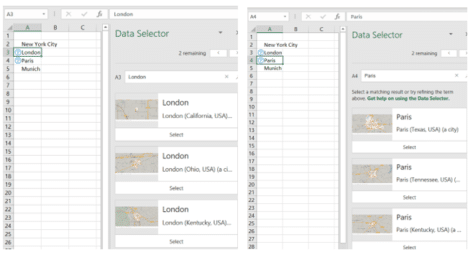
Excel 365’s Linked Data Types are technically impressive. However, the reliability of the data is a problem Microsoft doesn’t talk about. We discovered mistakes with the data without actively looking for them. In general, the data sources are ‘scraped’ from sites like Wikipedia which explains some, but not all, of the omissions and oddities. Stock […]

How to fix an imported appointment in Outlook
Some imported Outlook calendar items can’t be changed, here’s why and how to make the imported appointment editable. Understanding issues with an Outlook imported appointment can help you manage calendar inconsistencies. Usually an imported appointment (via a downloaded .ics file) can be edited just like most Outlook calendar items. Often that’s necessary to add more […]
Zoom Docs adds a word-processor with a Magical Key
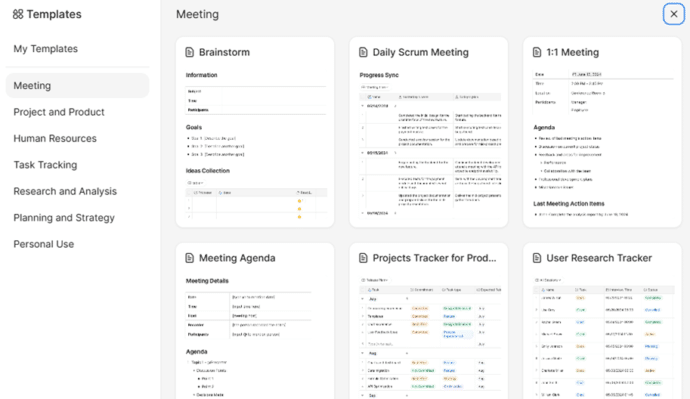
Zoom has a browser-based word processor to their Workplace range with some interesting features including what they call the Magical Key. Zoom Docs word processor aims to enhance productivity within its collaborative environments. Zoom Docs is designed to be used within Zoom group calls and many of the templates reflect that. Brainstorming, meeting agendas, checklists […]

Outlook (new) is NOT ready, ignore what Microsoft says
Microsoft says that the new Outlook for Windows is now generally available, but everyone should ignore that. Outlook (new) isn’t truly ready. It lacks vital features and has serious security shortcomings which are likely to frustrate anyone who relies on it. On 1 August 2024, Microsoft declared that Outlook (new) for Windows is now ‘generally […]

Beware the privacy trap in the Outlook (new)
Microsoft’s eventual replacement Outlook (new) for Windows supports Gmail, Yahoo and other accounts but there’s a privacy trap that Microsoft does its best to hide. Outlook for Windows privacy is a major concern. According to Microsoft, it’s easy to add Gmail, Yahoo and other accounts to the new Outlook, all they show is entering an […]

Does Microsoft Word think ‘Walz’ is a spelling error?
Can Microsoft Word handle a newly famous name “Walz” or does Word think it’s a spelling error? What about the other VP candidate, “Vance”? In the last few hours, we’ve seen social media posts like this: “ Okay, word people, now would be a great time to put a “Walz vs. waltz” sticky note on […]
Olympic medal comparisons in Excel
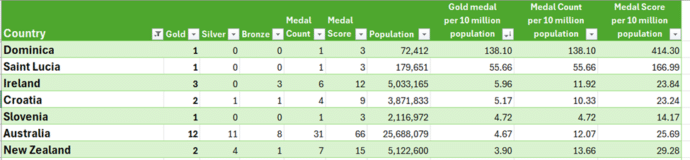
We’ve expanded our live Paris Olympics medal table to compare countries’ performances to their population or wealth. Along the way we explain how to cope with some problems that can arise when Excel theory hits the Real World. Our newsletter readers get a working example workbook to try themselves. We compared population and GDP (Gross […]

Microsoft Office highlights in latest company results
Microsoft shareholders should be happy with the company’s latest financial results for the quarter ending 30 June 2024 (Q4). Here’s a few highlights from an “Office Watch” point of view. Office 365 Commercial Revenue growth was up 13% possibly due to the new Copilot for Microsoft 365 fees. (All these % figures are comparisons with […]
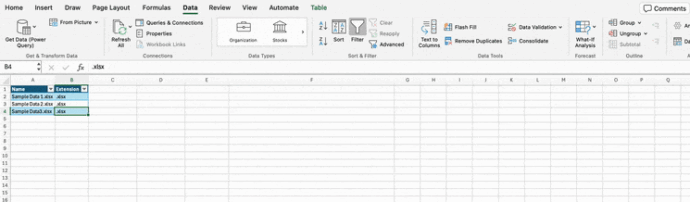
Excel for Mac gets PowerQuery ‘from folder’ updates
Excel for Mac is now getting the ‘From Folder’ option in PowerQuery. An important part of the PowerQuery puzzle. PowerQuery’s ‘From Folder’ lets you add more data to a query simply by adding data files into a folder. PowerQuery will then scoop up all the data and add it to Excel. Among the many choices […]
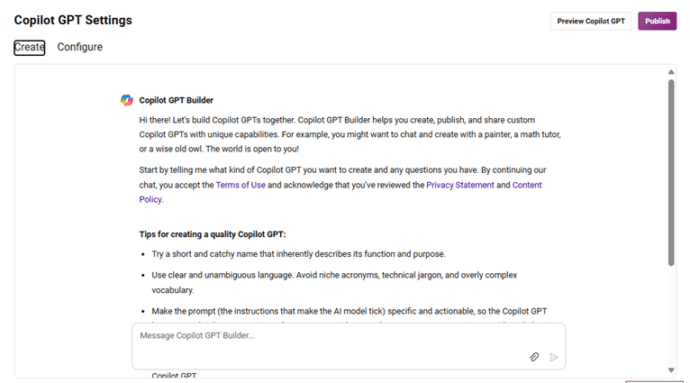
Major benefit removed from Copilot Pro
Paying Copilot Pro customers have lost a major part of what they pay for. Say goodbye to Copilot GPT Builder in early July 2024. It’s only been a few months since Microsoft launched their paid AI plans including Copilot Pro and they are already removing a major component. Copilot GPT Builder was being dropped from […]
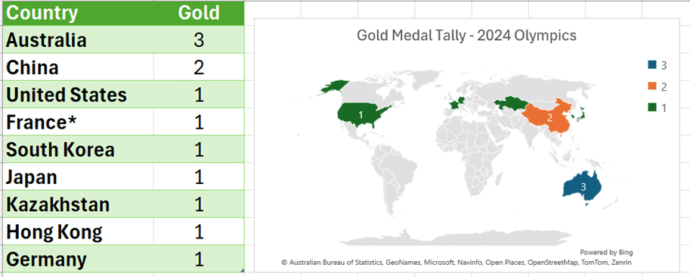
Make your own Medal Table for the 2024 Olympics
Use Excel to get your own automatically updating Medal Table for the 2024 Paris Olympics then make charts and maps too. Our newsletter readers get a working example workbook to try themselves. Not interested in the Olympic medal count? This article and download are a good, working example of how to automatically download from a […]









