All about Microsoft Office Word, Excel, PowerPoint and Outlook, Microsoft 365, Office 2021 and earlier versions.

Easter images and icons in Microsoft Office
Drop in some Easter flavor to your documents, slides or emails from right inside Word, PowerPoint, Outlook and Excel. Either religious (Ascension, Crucifix etc) or secular (eggs, chocolate, bunnies) images and graphics are available. Modern Office, especially Microsoft 365 have stock images and icons from a large collection compiled by Microsoft. Stock Images, Icons and […]

Credit Card 💳 symbol in Word, Excel, PowerPoint and Outlook
There’s more than one Credit Card 💳 image available in Microsoft Word, Excel, PowerPoint or Outlook. Both in Office for Windows and Office for Mac. How Credit Card 💳 looks in different fonts. Only two standard Windows fonts have the credit card symbol; Segoe UI Emoji and Segoe UI Symbol. The Apple device version is […]

Yes, there will be a new version of Microsoft Office
Here’s what Microsoft has confirmed for the new version of Office. Strictly speaking two new Microsoft Office, a consumer version Office 2024 and Office LTSC 2024. The next single payment “perpetual licence” version of Office will be Office 2024 (for consumers) or the very similar Office LTSC 2024 (for volume licences). LTSC = Long-Term Servicing […]

Start Grouping in Excel for better looking sheets
Grouping in Excel lets you collapse or expand sections of a sheet so you can see the ‘big picture’ but still drill-down to how totals were made. Another use for grouping is hiding rows or columns from view. You can organize and manage data more effectively by grouping together rows or columns. This feature is […]

Three more Word features reach the web version
Three more familiar Microsoft Word features have reached the ‘on the web’ or browser based version of Word. Editing header/footer, columns and line numbering. Headers/Footers Word for the web has been able to view headers/footers for some time but now they can be added or edited as well. Go to Insert | Header & Footer. […]

Turn Excel into an AI / LLM wonder
GPT-2 can be squeezed into a Microsoft Excel spreadsheet, providing a functional demonstration of the Transformer architecture used in large language models (LLMs). GPT-2 is an older version of the AI system – Microsoft Copilot and ChatGPT use GPT-4. Ishan Anand made the 1.25GB Excel file as a low-code introduction to LLMs (Large Language Models), […]

Don’t trust any text message
The safest thing to do is NOT trust any text/SMS message from a bank, delivery company etc. The message might be real but could be a scam and you can lose thousands. Fake bank text messages, usually designed to make you panic and call immediately, are still catching thousands of people every year. This report […]
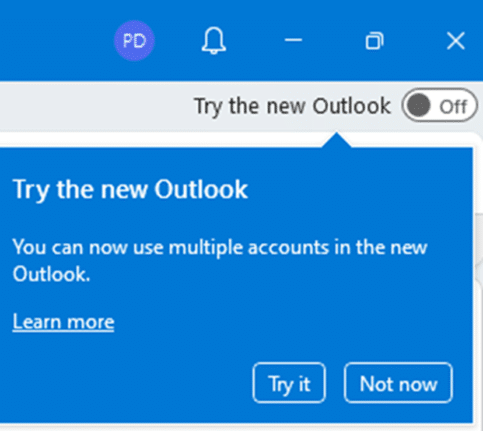
How the change to new Outlook for Windows will work
Microsoft has announced some of their plan for the changeover to the newer, totally rebuilt, Outlook for Windows. The changeover plan will be in four stages; Opt-in, General Availability, Opt-out and finally Cutoff. There are no specific dates given, just a broad structure but the whole switch from ‘classic Outlook’ to ‘Outlook (new)’ will take […]

Five fast Clear options in Excel
Excel has some nice choices for clearing out cells quickly. You can remove the contents, the formatting only or both contents and formatting plus choices for deleting just notes, comments and cleaning up links. As you can see the drop-down menu Home | Editing | Clear offers options such as: Clear All, Clear Formats, Clear […]
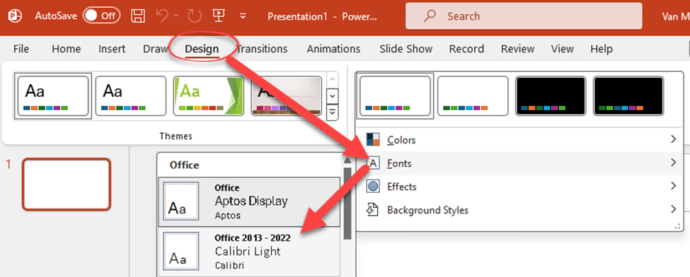
PowerPoint – switch away from Aptos fonts
Here’s how to switch away from the new Aptos fonts in Microsoft PowerPoint and back to the old Calibri fonts or something else. Microsoft has forced a change to Aptos as the new default font in PowerPoint but that change doesn’t suit everyone. In particular, Aptos doesn’t make much (or any) visible difference for bold text. Both the paragraphs […]
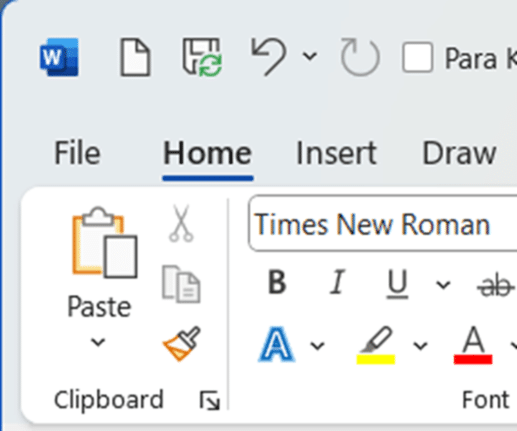
Remove that big AutoSave from the Office toolbar
Get rid of the over large ‘AutoSave’ slider on the Word, Excel or PowerPoint status bar. The Autosave button (strictly a label plus slider) takes up a lot of room on the top row of modern Office apps. That space is quite crowded and you need it to fit as many ‘Quick Access Toolbar’ (QAT). […]

Image restyling in Copilot
Copilot can change the style or look of an AI generated image to make endless variations on the same theme with a few clicks. We’ll show you how it really works and how to make it work even better. Ask Copilot for an image such as “make image of a Koala in the desert”, select […]

Table cells can now Split and Merge in PowerPoint for iPad
Cells in a PowerPoint slide table can be split or merged (combined) in PowerPoint for iPad. Word for iPad can already combine or split table cells and now the PowerPoint app works the same way. Select two or more cells in a table and choose Merge | Merge Cells from the table toolbar. Choose a […]
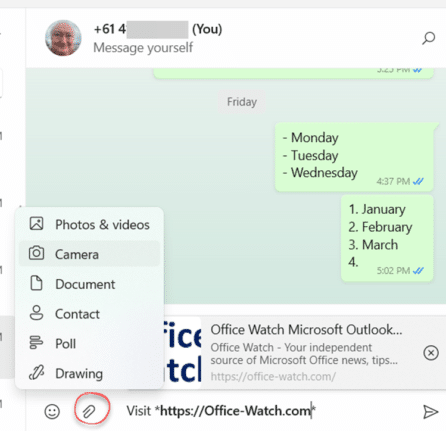
Use WhatsApp to send stuff between your devices
WhatsApp can send any file, photo, video or text notes to yourself, in other words between your computers or devices. Files up to 2GB can be moved quickly and securely between machines. Sometimes you need to copy something between two computers or devices you have. That could be a little text (a password or web […]

Print selection, sheets or tables in Excel
Excel has some useful options for printing less than an entire workbook. Printing a selection, active sheets or just a table. As Office-Watch.com has discovered before, there’s a lot more available in Office than a quick look suggests. See Print options are at File | Print then choose the menu that starts with Print Active […]
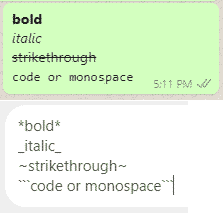
Eight WhatsApp formatting shortcuts including four new ones
There are shortcuts that automatically format bold and italic text in Word. The same shortcuts and more work in WhatsApp texting as well. There are now four more formatting options; bullet lists, numbered lists, quotes and inline code. AutoFormatting Bold and Italics as you type In Microsoft Word and Outlook it’s possible to make words […]









