All about Microsoft Office Word, Excel, PowerPoint and Outlook, Microsoft 365, Office 2021 and earlier versions.
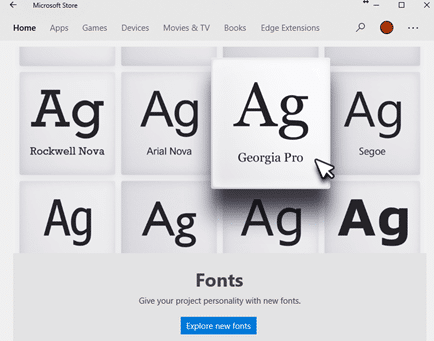
Why there’s three font locations in Windows 11 and 10
With the sale of fonts via the Microsoft Store and cloud fonts there’s now a complication in the familiar way fonts are managed in Windows 11/Windows 10 and how Office for Windows handles new fonts. There are now three different locations that fonts can be saved. For as long as anyone can remember, all Windows […]

Outlook and Office might be blocked by anti-virus software
A Windows 11 update might stop Outlook or other Office apps from working because of a conflict with anti-virus software. The trouble started with KB5027231 a Windows 11 update released 13 June 2023 which, among other things, fixed a file copying bug. 15 days later Microsoft admitted there was a bug in the bug patch. Not […]
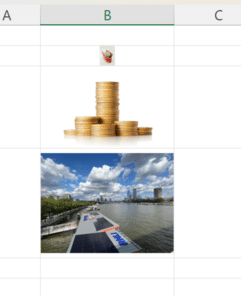
Images in Excel Cells – at long last
At long last, there’s a way to insert an image into a single Excel cell called Place in Cell. No problems with floating images etc, just a cell with a picture which resizes with the cell size. Adding images to Excel sheets has always been confusing because they weren’t directly related to a single cell. […]

Office background noise for you or an online meeting
Here’s a fun web site that will play office background noises to your home office or online meeting. https://imisstheoffice.eu/ is part game, part ambient noises. Hard to believe there’d be a time when you’d miss the ambience and noises of the office? Click on items to see what happens, some tips. Have some fun, leave […]
How Big Can a Microsoft Word Document Really Be? Limits Explained
How large can a document in Microsoft Word actually get? While most users never hit the upper limits, Word does have technical size restrictions that can affect performance, file stability, images, and long reports. Here’s what you need to know about maximum Word document size, file limits, and how to avoid slowdowns or crashes when […]

Telephone receiver 📞 emoji in Word, Excel, PowerPoint and Outlook
Insert the Telephone receiver symbol 📞 into Microsoft Word, Excel, PowerPoint or Outlook. Both in Office for Windows and Office for Mac. Telephone receiver or handset 📞 symbol can be used on a letterhead or sign where a phone number is shown. There’s an emoji in the Unicode standard plus two Microsoft Office Icons. How […]

Find out more about fonts
A clever interactive from The New York Times explains the basics of fonts and how to choose the right font for your documents, slides and sheets. What’s your type? Try these tests to pick the perfect font for you starts with an option to read the whole article in different fonts. One of the fonts […]

Get Copilot AI in Windows now, but don’t expect too much
Microsoft has released a preview of their Copilot AI system for Windows. Here’s how it works, how to enable it and why not to expect too much from it. Copilot is Microsoft’s upcoming AI system that they’ll be adding to almost all their products. It’s still in (rushed) development as the company is desperate to […]

A quicker, easier way to AI expand a graphic or photo
Stability.AI now has a quick and easy way to expand or extend an image. Using AI, it can take an existing image to make a larger version. Unlike other options like OpenAI’s Outpainting, ‘Uncrop’ is quite simple to use. Whatever you call it; Uncrop, Outpainting, extending etc, it’s a useful AI feature for reshaping images […]

What you’ll need to use Copilot with Microsoft Office
Microsoft has released some information about what you’ll need to get their AI tools (called Copilot) when they are eventually released. Copilot is Microsoft’s name for their upcoming AI tools integrated into Office apps (Word, Excel, PowerPoint and Outlook) plus other services like Teams. As with all Microsoft’s Copilot announcements, it’s a strange mix. The […]

Designer Erase is a picture edit opportunity for all Office users
Microsoft Designer now has an image editing tool that’s been missing from Microsoft Office. Erase in Designer lets you edit images in an important way that’s not possible in Word, Excel, PowerPoint or Outlook for Windows or Mac. Picture editing in Office has a lot of features but they mostly effect the whole image, there’s […]

Pushing Hands🫷 🫸in emoji in Word, PowerPoint and Office
Type the ‘pushing hands’ emoji, left 🫷 or right 🫸in Microsoft Word, PowerPoint and other Office apps. Officially the emoji are called Rightwards Pushing Hand 🫸 and Leftwards Pushing Hand 🫷 but can also be used as a ‘High Five’. These emoji can be used separately or together to great effect, here’s the hands as they […]

Designer gets a clever Erase feature
Microsoft Designer now has a nice Erase tool to remove unwanted parts of an image. Finding Erase is a little tricky, we’ll show you where it’s hiding and how to get the most from Erase. Erase lets you remove parts of an image. It’s not on the main image toolbar (with Replace, Remove Background etc.) […]
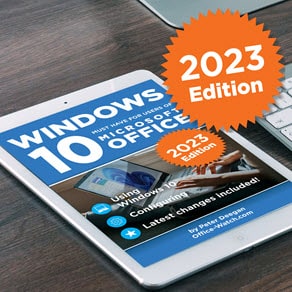
2023 update: Windows 10 for Microsoft Office users
We’ve not forgotten about Windows 10 and have just updated Windows 10 for Microsoft Office users to accompany the latest mid-2023 changes and extras. Windows 10 for Microsoft Office users continues to help people get the most from Windows 10, even in 2023. There’s also Windows 11 (June 2023) for Microsoft Office users. Phone Link […]
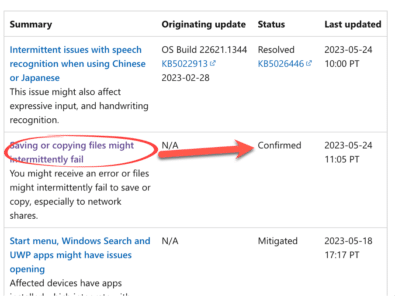
Save/Copy bug in Windows and Office
A newly found bug in Windows 11 & 10 might stop you saving or copying files in many apps including some versions of Microsoft Office. Update: there’s a patch now available for Windows 11 but not Windows 10. The bug appears to have been in Windows for a while but only revealed in the last […]

Updated – Windows 11 for Microsoft Office users
We’re delighted to announce that our popular ebook Windows 11 (June 2023) for Microsoft Office users has been updated to accompany the latest mid-2023 “Moment 3” changes to Windows 11 itself. New Chapters Two new chapters have been added to the 1,000 page book plus other changes to reflect the updates to Windows 11. Moment […]









