Office 2019 for Windows – all the facts, prices and warnings
Here’s all about Office 2019 for Windows – the facts, prices and shortcomings. There’s a matching page about Office 2019 for Mac. Before you get too excited Do NOT buy Office 2019 if you have Microsoft 365 like Microsoft 365 Family (formerly Home), Microsoft 365 Personal or an enterprise plan. In other words, you pay for […]
Office 2019 for Mac – all the facts, prices and warnings
All about Office 2019 for Mac the facts, prices and warnings. There’s a matching page about Office 2019 for Windows. Before you get too excited Do NOT buy Office 2019 if you have Microsoft 365 plan like Microsoft 365 Family (formerly Home), Microsoft 365 Personal or an enterprise plan. In other words, you pay for […]
Office 2021 for Mac, your preview first look
Your first look at Office 2021 for Mac with Word, Excel, PowerPoint and Outlook, which is now out in public preview, showing off some of the new features. There’s only a Mac Office 2021 preview, no Office 2021 for Windows preview. Perhaps because there’s a few more innovations in a comparison of Office 2019 to […]

Office LTSC public preview now available
A public preview of the next perpetual licence Microsoft Office is now available. Called Office LTSC (Long Term Servicing Channel) it’s for volume customers only. Here are the options and how to get the preview. Office LTSC is the clumsily named non-subscription version of Office for organizations with volume licence agreement. See Office LTSC, first […]

Office LTSC, first look images
Here’s a first peek at Office LTSC for Word, Excel, PowerPoint, Outlook, Access, Publisher and OneNote which is now out in public preview showing off some of the new features. Office LTSC in it’s current preview is underwhelming, to put it mildly. But that’s what Microsoft is aiming for. Office LTSC (Long Term Servicing Channel) for […]

Suggested Replies secrets in Outlook for Windows
Suggested Replies are coming to Outlook 365 for Windows. As usual, there are details that Microsoft has ‘forgotten’ to mention but we at Office Watch aren’t so forgetful! In the Outlook reading / preview pane, possible replies can be displayed. Or Microsoft’s cloud systems have scanned the message and offered suggested replies. As we’ve seen […]

About Unicode, fonts and symbol codes
Confused about Unicode, code-points and other techie details about inserting symbols? Here’s how it works and can work for you in Word, Excel, PowerPoint and other apps. Like many things in modern computing, you mostly don’t have to know the details of how things work. But occasionally things don’t work the right way and then […]

April 2021 updates for Office 365, 2019 and 2016 – Windows
Details and warnings about the April 2021 security and non-security updates for Office 365, Office 2019 and Office 2016 for Windows. There are some side-effects to watch out for. All these update will, or have been, pushed to your computer already. We’ve included a tip on how to force an update to the latest release. […]
April updates for Office 2016, Office 2013 and 2010
Here’s all the security and general bug fixes for April, aimed at Office 2016, Office 2013 and Office 2010 for Windows. Most customers will have their Office updated automatically unless you’re one of the cautious who wait a little while to see if there’s any bugs in the bug fixes. See Why updating Office is […]

Double Vertical Bar ‖ in Word, Excel, PowerPoint and Outlook
How to insert the Double Vertical Bar ‖ into Microsoft Word, Excel, PowerPoint or Outlook. Both in Office for Windows and Office for Mac. Double Vertical Bar ‖ symbol is used to represent norms in mathematics, (for example ). It can also be used to signify parallel lines. It can be used as a visual […]
Who is suing Microsoft for millions over Office licencing?
Here’s an interesting switch, a UK company is suing Microsoft over their licencing rules for Office. Usually it’s Microsoft suing others about licences, not the other way around. ValueLicensing is claiming UK₤270 million (US$370m ) in damages from Microsoft for trying to squeeze out the second-hand licence market. Organizations that upgrade their software licences, are […]

Cross of Lorraine ☨ symbol in Word, Excel, PowerPoint and Outlook
Type the Cross of Lorraine ☨ into Microsoft Word, Excel, PowerPoint or Outlook. Both in Office for Windows and Office for Mac. Cross of Lorraine ☨ symbol was originally a heraldic cross. In more recent times it was used in the global distribution systems, Sabre, Apollo, and Wordspan, as a delimiter in a variety of input […]

Can’t send Outlook email? The fix has arrived, at last
Microsoft has finally released a fix for what can only be described as an ‘unforced error’ or bug in Outlook that stopped some messages going out. They’ve left an unanswered mystery. The problem started after an early 2021 public update to Outlook 365 for Windows. Some messages refused to be sent out with only this […]
Why don’t Outlook calendars and contacts show in Windows?
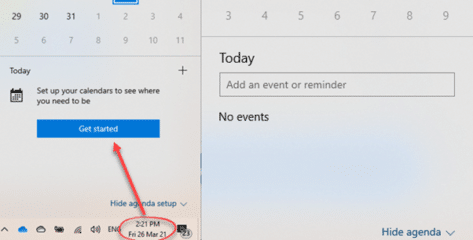
Windows has some nice features for quickly showing your appointments, calendar and contacts/people lists so why don’t they show that information that’s in Outlook for Windows on the same computer? In Windows 10, clicking on the date/time in the bottom right-corner (the taskbar) you’ll see the monthly calendar and either a ‘Get Started’ prompt or […]
Word’s =Rand() around the World
=Rand.old() is a Word trick which adds common sentences that use all, or most, of the letters in that language’s alphabet. Here’s what Word does in English, French, German, Danish, Polish and many other languages. It’s useful filler text for testing formatting or other Word features just like “Lorem Ipsum …”. The sentence changes for […]
Exchange Server attacks aren’t over … until all the checks are done
The fallout continues from the recent ‘Hafnium’ Exchange Server attacks. There are warnings from Microsoft for administrators who might think they are safe from infection of their systems. According to Microsoft 94% of Exchange Server systems are now protected from attacks caused by a bug in the Microsoft software. That’s great but you have to […]









