
Deleting Microsoft accounts gets man two years jail
A man has been jailed for two years after sabotaging a company by deleting 80% of their Microsoft 365 accounts – email, calendars, contact lists, docs, the lot. What did he do and what organizations should do to prevent a similar catastrophe. Deepanshu Kher worked for an IT consultancy and was deployed to work at Carlsbad […]
A risk of spam filters – you might miss a real prize!
Aggressive spam filters can stop you getting messages you really want to get. One Australian author found that out the hard way when she almost missed out on a genuine $150,000 prize. The email notifying her of the valuable and prestigious prize ended up in her Junk Email folder. The problem of spam filters ‘false […]
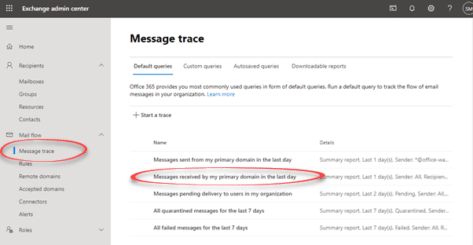
Message Trace – the way to find missing Microsoft 365 emails
Trying to find a missing message or why an email is in a particular folder? For Microsoft 365 hosted accounts the place to start is Message Trace Microsoft 365 / Exchange Server admin has a system for tracking all messages. Other Exchange Server systems have a similar feature for administrators. Maybe someone swears they sent […]

Black Right Pointing index ☛ symbol in Office
How to insert the Black Right Pointing index ☛ into Microsoft Word, Excel, PowerPoint or Outlook. Both in Office for Windows and Office for Mac. Black Right Pointing index ☛ symbol can be used for pointing a direction on a sign or as a different bullet symbol. There’s also a similar, lesser known symbol Black […]
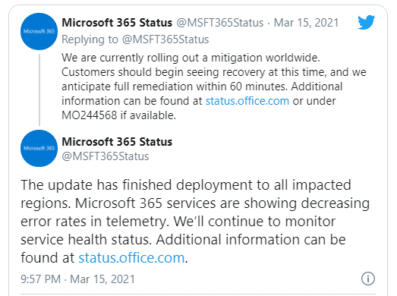
Microsoft 365 cloud outages, what happened and what you can do
Another bad week for Microsoft’s customers who rely on the Microsoft 365 hosting and other cloud technologies. There were global outages for more than half a day in Teams, Azure, Xbox Live and many other Microsoft Cloud services. All should be restored by the time you read this but there are still questions about what […]
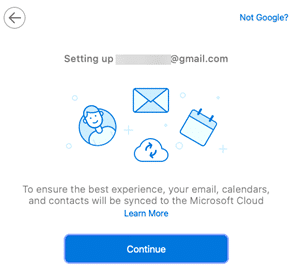
Outlook for Mac vital tips and traps with Gmail
Outlook 365 for Mac has a more complete connection to Gmail accounts which includes calendar and contacts. But it’s not a simple link and there are so many ‘gotchas’ we wonder if it’s worth the trouble. Microsoft is hyping an Outlook for Mac feature that synchronizes not just mail, but also calendar and contacts. But […]
Exchange Server users pay the price for Microsoft’s delays
Microsoft’s customers have paid a heavy price for Microsoft’s delays in releasing fixes for the security holes in their Exchange Server technology. According to various reports, the company wanted to delay releasing the so-called ‘HAFINIUM’ patch until the March ‘Patch Tuesday’. That self-serving pause gave hackers an opportunity to steal vital data that customers rely […]

Broken Vertical Bar ¦ symbol in Word, Excel, PowerPoint and Outlook
Type the Broken Vertical Bar ¦ in Microsoft Word, Excel, PowerPoint or Outlook. Both in Office for Windows and Office for Mac. Broken Vertical Bar ¦ symbol was sometimes used in computing. These days there’s no specific use for the broken vertical bar but it’s good to keep in mind as a design alternative to […]
Office docs to avoid at all costs, the old formats
There are types of Office documents that you should NOT open, even if they come from someone you trust. Here’s the full list of file extensions for the older Office document formats which are much more likely to be ‘malicious’ docs from hackers and criminals. We’ve talked about the risks of receiving hacked documents using […]
What Exchange Server ‘HAFNIUM’ attacks mean to you
Microsoft Exchange Server software has been comprehensively hacked over the last few months, focusing on US systems but spreading across the world. What happened, who needs to act now and what everyone should watch out for. Exchange Server is the mailbox technology used by many, many companies around the world. Most public and private organizations […]
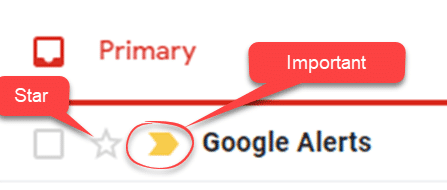
How Important and Star Gmail messages appear in Outlook
In Gmail online, messages can be tagged as ‘Important’ or ‘Star’, clicking the little arrow or star next to a message. Important and Star are treated very differently in Outlook for Windows. Flags in Outlook – Starred in Gmail Gmail has a ‘Star’ option for messages, just click the star icon on the message list. […]

How Gmail Labels and Categories work with Outlook
Gmail has a very different way of organizing mail to the Outlook/Microsoft system of folders. Gmail’s Labels, Important and Categories have different or no meaning in Outlook for Windows. Labels Gmail has Labels which are tags that can be applied to messages. Outlook shows those labelled messages as if they are in separate folders which […]
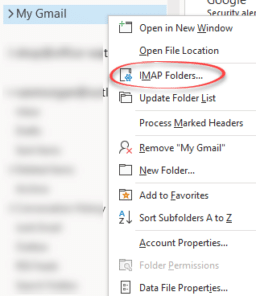
Even more Gmail settings in Outlook… select or Subscribe Folders
You can choose which mail folders are synchronized with Outlook but you won’t find this option with the rest of the Gmail account settings in Outlook. Instead go to the heading of the Gmail account in the folder pane, right-click and choose IMAP folders. Subscribed folders Let’s stop for a little IMAP terminology. Folders that […]
PowerPoint crashes fixed with February 2021 bug patches
PowerPoint 2016, 2013 and 2010 users need these bug fixes from Microsoft to prevent the program crashing. The bug might happen opening a presentation with a diagram – ouch. There are two updates needed to fix the bug, one for Office generally and for PowerPoint itself. PowerPoint 2016 KB4493164Office 2016 KB4493189 PowerPoint 2013 KB4493169Office 2013 […]

More changes for Word’s Spelling and Grammar
No need to right-click to see spelling and grammar suggestions in Word and Outlook 365. It’s changing so only a single left click will show the suggestions, corrections and more. On the downside, fewer options are initially displayed. Useful features are now multiple clicks away and hidden from view. It’s part of Microsoft unstated policy of […]
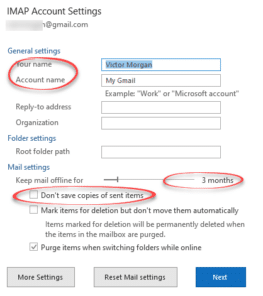
Outlook settings you need to ‘fix’ for Gmail accounts
The default Gmail settings in Outlook need some attention because, frankly, they aren’t very good. Once you’re add Gmail to Outlook for Windows, there are settings to fix or check. This article explains the important Outlook settings for Gmail accounts, where they are, what they mean and which ones to change for a better Outlook […]









