
Latest Samsung phones degrade Microsoft Office
Samsung phones have a hidden service which is slowing down Microsoft Office apps including the mobile apps for Word, Excel, PowerPoint, Outlook and the Office ‘all in one’ app. Inside some of the new S22 Galaxy smartphones is a Games Optimization Service, or GOS. Cynical techies know to be wary about anything labelled ‘Optimization’ because […]

Check Accessibility problems as you work in Word, Excel and PowerPoint
Now you can see on the status bar if there’s accessibility problems as you work with your Word, Excel or Powerpoint documents. Tucked away on the Accessibility Pane is a option to run the accessibility checker as you work, instead of only on request. Keep accessibility checker running while I work Turning this on doesn’t […]

Ukraine flag & colors in Word, Excel or PowerPoint
Find and add the Ukraine flag or national colors into Office documents, Word, Excel or PowerPoint, then use some Office picture tools to enhance the image. Ukraine Flag Image There are many, many copies of the Ukraine flag available. We’ve opted for the Wikipedia site because it has an SVG scalable version (preferred) and PNG versions for older […]
More PowerPoint Subtitle tricks
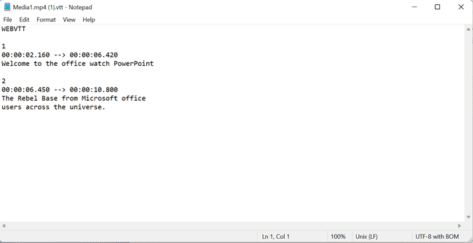
There’s more to making subtitles for a PowerPoint (or any) video. Converters from .srt subtitles, using Microsoft Transcribe or using online tools to make your own subtitles from scratch. Webvtt vs Srt files Webvtt files (used by PowerPoint) are similar to the standard .srt subtitle files (used by Windows Movies & TV and VLC). Both […]

Black Chess King ♚ symbol in Word, Excel, PowerPoint and Outlook
Insert the Black Chess King ♚ into Microsoft Word, Excel, PowerPoint or Outlook. Both in Office for Windows and Office for Mac. Black Chess King ♚symbol is useful for users that want to represent the chess piece as a symbol, rather than an image. Or perhaps as general symbol of royalty? See also Black Chess […]
Get best quality images in a PDF made from Word
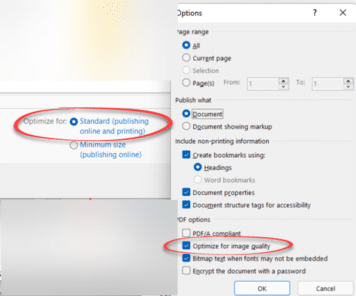
Get the best quality images in a PDF file made from Microsoft Word for Windows by changing some simple settings. There are also options in Word for Mac, Excel and PowerPoint. Better quality images in the PDF file are possible, starting with Word’s settings for saving images within the document. Then changing the image quality […]

Fixing common Office document accessibility problems
Accessibility Checker serves as a free tool that helps ensure that Office files are easy to understand by everyone. Use it to quickly fix common Office doc problems that can make your documents, sheets and slides harder to comprehend. It’s available for Microsoft 365, Office 2021/LTSC and Office 2019. Word, Excel, Outlook, OneNote, and PowerPoint […]
Get some coloring book Word and PowerPoint templates
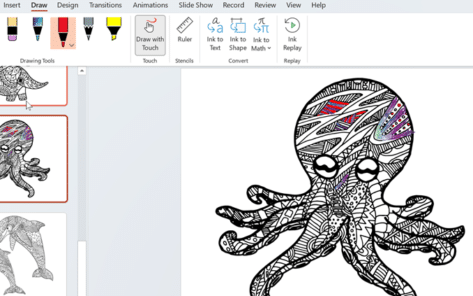
There’s been an uptick in interest for coloring in pages, having the power to relieve anxiety and a form of mindfulness or just pass the time. No wonder Microsoft jumped on the bandwagon and provided a number of coloring-in templates for Word and PowerPoint. As you browse their template selection, you’ll notice some templates are […]

Windows 11 has a better way to clone an existing file
There’s a quick way to clone or duplicate an existing file in Windows 11 so you can make a new, similar document. Quite often a new document is based on an existing one, for example a fresh invoice for the same things each month. Or a proposal to a new client, which is similar to […]
Add current date or time into PowerPoint
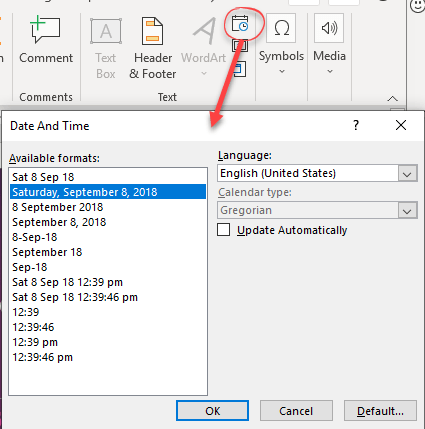
There are limited options for entering the current date and time into PowerPoint slides, notes and handouts. PowerPoint doesn’t have field codes like in Word, so Microsoft seems to have shoehorned in some field like features. Insert Date and Time in slide On the Insert Tab, right side there’s an Insert Date & Time button. […]
Three ways to add EPS graphics into Microsoft Office
Three ways to insert or import an EPS (Encapsulated PostScript) graphic into Word, Excel, PowerPoint or Outlook. There are two a ‘quick and dirty’ options and a way that allows some editing. Microsoft Office did support EPS files for many years but dropped them in 2017/2018 because the EPS format is a security risk. EPS […]

Four SVG editing choices for Office 365/2019/2021
There are four different ways to change an Office icon or SVG graphic in Microsoft 365, Office 2019 or Office 2021. The two official SVG edit methods in Microsoft Office with their in-built limitations or some choices before inserting into Word, Excel, PowerPoint or Outlook. Within Office Limited SVG/Icon changes are available from the Graphics Tools […]

How to add textbox to video on Clipchamp
Sometimes you might be making a video but need to add text to it, luckily video editors, like Clipchamp, make this super easy to do so yourself, in no time at all. For example, you might want to add just some text, titles, or subtitles, or even captions to your video. ClipChamp is an online […]

Changing Text Box backgrounds in Office
There are two ways to make a text box transparent in Office; Word, Excel or PowerPoint. There’s a quick option and other that gives you some more control. The Word, Excel or PowerPoint ‘Text Box’ feature is presented as a way to have ‘pull quotes’ or sidebar text in your documents however it can do […]

Add the Year of the Tiger into Word, PowerPoint and Office
2022 is the Chinese year of the Tiger. Here are some tiger images, emoji and graphics in Word, PowerPoint and Office apps. Drop any of these into your documents or slides for a little New Years fun. See our related article Make your Chinese New Year graphics pop with these Office tricks to change these […]

Make your Chinese New Year graphics pop with these Office tricks
There are simple and traditional color choices for Chinese New Year graphics and text plus some Microsoft Office graphics tricks to make them look a lot better in Word and PowerPoint. Simple design done in a few moments with just the icons and tools in Word 365 or PowerPoint 365. Looking for 2022 New Year […]









