Office Mobile Apps coming soon
Microsoft Word, Excel and PowerPoint will soon be on mobile devices.One interesting snippet generally overlooked in the Office 365 Small Business announcements was the mention of Office Mobile Apps. There’s been plenty of talk about Microsoft Office coming to mobile devices, especially non-Microsoft devices but the Office 365 announcement was the first time Redmond has […]
Watermarks in Word using VBA
Just one example of VBA users being shortchanged in Microsoft Office An obvious way to apply watermarks in Microsoft Word would be via VBA. For example some code to print a document multiple times – once with an ‘Office Copy’ watermark and other showing a ‘Customer Copy’ watermark. Or using VBA to programmatically insert document […]

Office 2013: the real startup guide
Our famous guide to Office, saving money, install and new features. Now for Office 2013. Many of you figured it was coming and now it’s here … Office 2013: the real startup guide is available now. “Things you need to know that Microsoft won’t tell you: saving money, installing, configuring and using Office 2013” Only $9.95 […]
Keep Calm with Microsoft Office
Make the famous WW2 poster yourself, and countless variations, in Microsoft Office. Make the famous WW2 poster yourself, and countless variations, in Microsoft Office Keep Calm with Microsoft Office is the latest in our series of practical ebooks for Microsoft Office users. We don’t just tell you how to use Office, we supply […]
AutoCorrect memorable shortcuts
Tips for making Autocorrect shortcuts that are easy to remember. Bob C writes: ” I use MS Word autocorrect to insert longer words of phrases that I’m too efficient.. OK,lazy.. to try to spell or type out completely, usually duplicating several leading consonants in the word or leading letters of words in a phrase. […]
Some letters don’t need AutoCorrect
Some common characters don’t need help from Autocorrect in Word. Our good friend and budding woodworker, Rose Vines adds her $0.02 to our AutoCorrect suggestions, especially for accented characters. This is something we’ve talked about in Office-Watch.com before, but is worth repeating. “There’s very simple built-in shortcuts for accented characters in both Word and in […]

Do you help Microsoft’s proofing tools?
When Word asks to send your words to Microsoft – should you do it? You may see a window like this pop up in Word.

Word document recovery
Office lets you recover documents lost but it can be hard to choose the right one. For many versions of Office you’ve been able to recover open documents that haven’t been saved before a system crash, but the details aren’t obvious. If Windows or Office unexpectedly stops, there’s a chance that Office can recover the […]

Searching PDF’s on 64-bit Windows
To search PDF’s on a 64-bit machine you need a separate download. The Adobe PDF Reader software isn’t enough on 64-bit Windows computers. If you’re running a 64-bit version of Windows (any release) you’ll probably find that Windows Search doesn’t find text inside PDF’s. Only file names are searched but not the contents. That’s seems […]

Copying tables from Wikipedia to Word
How to copy a table from Wikipedia to Word or Excel. Standard web tables can be copied from a web page to Word or Excel, but not many tables on Wikipedia pages. Office-Watch.com shows you how to do it. Even if you’re not copying from Wikipedia, we’ll show you some useful Word skills. Tables on […]
PDF editing in Word 2013
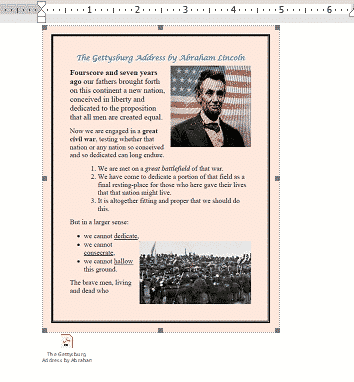
A PDF editing mode arrives in Word 2013. For a long time people have asked for a way to edit PDF files – Word 2013 has it, sort of. It’s an understandable feature request even though it’s a bit like asking to edit a paper book or a stained glass window – neither format is […]

Kindle Fire and DOC files don’t work
Despite Amazon promises, Word DOC files aren’t read directly by the Kindle Fire. Amazon has been a little shifty when it comes to mentioning document compatibility for the Kindle and especially Kindle Fire. The official list includes two file types that DON’T work and omits an important file type that definitely DOES work. Amazon blurs […]

Get folder / file list into Word or Excel
How to get a list of files in a folder into Microsoft Word. As long as there have been word processors, we’ve seen the question of how to get a list of files into a document. It should be simple bit it isn’t. Here’s how … You could write or get a Word macro to […]

Alternative to Office 2010 Print pane
Finding a true Print Preview in Word 2010. Hank S. writes: “Is there any way to remove the approximately left half of the screen (File/Options display) so a print preview may be seen at full size? The new print pane is really handy, but there are times when I want to see how the newsletter […]
Duqu .doc advice
What to do about the ‘Duqu’ malware that can be sent via Word documents. There’s plenty of noise but little hard facts so far about the Duqu malware attack. At the time of writing all we know is: There’s a new Windows exploit that the ‘Duqu’ malware uses to take control of a computer. […]
Getting data from Internet into Excel
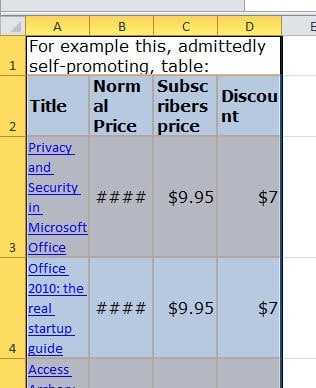
How to get table or other information from the net into Excel (or Word). Ever seen some data on the Internet and want to copy it for yourself? From small tables to large data chunks, there’s several ways to do it. Simple copying Almost any table or grid on a web page can be copied […]









