Does Microsoft Word understand new English words?
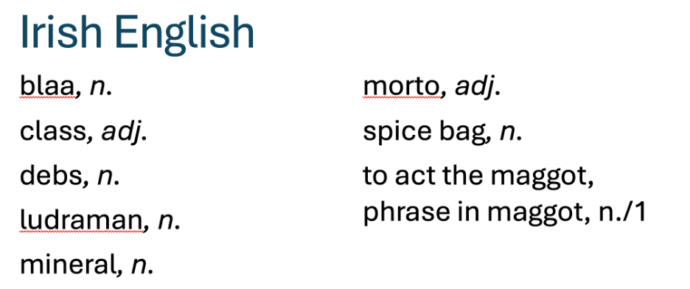
The Oxford English Dictionary has a list of new English words for 2025. We’ve checked to see if the Microsoft Word dictionary understands all these new terms. Some of the ‘new’ words are very familiar (‘load’, ‘class’ or ‘terror’) but with new meanings. Others are quite new (‘gigil’, ‘ludraman’ or ‘shweshwe’). We put them into […]

OneDrive messages pushed into Microsoft 365 apps.
Microsoft is adding yet another push for customers to save all their documents to OneDrive. This time inside Word, Excel and PowerPoint documents. OneDrive is Microsoft’s preferred place to save files and they cite various benefits to cloud storage. The company ignores the downsides to OneDrive and the right of customers to choose where to […]

Publisher to Word Conversion Tested: Microsoft’s Method in the real world
Trying to convert a Microsoft Publisher (.pub) file to Word (.docx)? We test Microsoft’s official recommendation, exporting the Publisher file to PDF and then importing that PDF into Word. It technically works but produces poor results in real-world tests. The conversion often ends up nearly unusable for typical editing tasks. If you rely on Publisher […]

Why Word prefers corporate speak and how to change it
The reason Microsoft Word prefers ‘corporate speak’, phrases and language but there is more than one way to change Word’s grammar and style suggestions to suit you. Quite often on social media there are complaints about Microsoft Word’s grammar and style suggestions like this one. “MS Word suddenly dislikes the phrase “in order to.” Who […]

Would you like some Ramen with your font?
Check out this headline ‘ramen’ font that looks great and has a clever name – Times New Ramen. Seine Kongruangkit made a font from photos of noodles, nifty use of Photoshop and an undying love of Ramen noodles <g>. Times New Ramen – you have to love it, just for the name alone! The photorealistic […]

Group and Ungroup objects in Word, PowerPoint and Office
Shapes, images, and other items can be grouped together and often should be in Word, PowerPoint and other Microsoft Office apps. When you group shapes or objects, you can move, resize, rotate, flip them all at once, as if they were a single object. If you’ve ever had trouble moving something in Office but found […]

How to use Word’s Master Documents safely
Don’t be scared of Master Documents – just very, very careful. Master Documents is useful and sometimes essential but it’s not the most stable or reliable part of Microsoft Word. What is a Master Document? In Microsoft Word, a Master Document is a Word document which has links to other documents – called sub-documents. Each […]

Image privacy breach still in Microsoft Office
Back in 2015 we were amazed and dismayed to discover a privacy gap in Microsoft Office. Seven years later Microsoft has done nothing to fix or warn customers about. The problem is with images inserted into Office documents (Word, Excel, PowerPoint). The image ‘meta-data’ including GPS coordinates are retained with the inserted image. Anyone getting […]

“Free” Office for Windows is being trialed
Microsoft is testing a free version of Office for Windows with limited features, an important requirement and ads to ‘pay’ for the software. It’s three Microsoft 365 for Windows apps but with restrictions on what it can do and where documents are saved. If you download from this page at Microsoft.com and install using a […]
Pinned documents are now Favorites in Office – why?
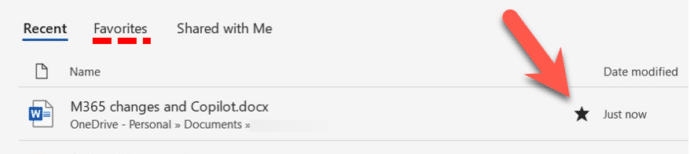
Microsoft 365 apps are changing the ‘Pinned’ document list to ‘Favorites’ but why is Microsoft bothering at all? For many versions of Office/Microsoft 365 you’ve been able to keep regularly used files in a ‘Pinned’ list for faster access. The Pin icon lets you add a file to that list with a single click. Insiders […]
Stop Copilot appearing in Microsoft 365
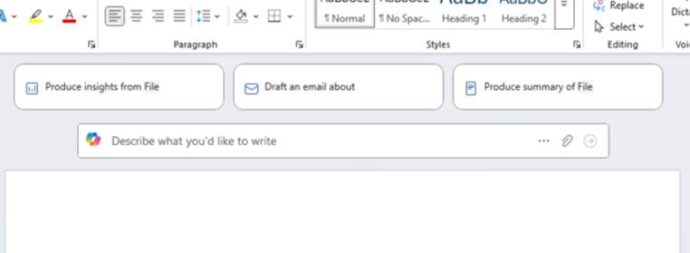
Here’s how to stop Copilot prompts appearing in your documents, sheets and slides. Microsoft 365 customers are now seeing “Copilot Clutter” appearing in their Microsoft 365 apps, Word, Excel and PowerPoint. There is now a way to Disable Copilot available to some Microsoft 365 customers A Microsoft executive expressed surprise that customers didn’t want Copilot […]

How to use QR Codes
What to do if you see one of those ‘square barcodes’? How can you convert that into something useful like a web link or phone number? You see them in ads, signs, billboards, test and trace signs and even menus – little square blobs like this: What are QR Codes and how can you use them? QR […]

Barcodes and QR codes in Word, fast and easy
Adding barcodes and QR codes into Word documents and mail merges is remarkably easy though hidden from view for no good reason. There are two unlisted field codes that drop barcodes or QR codes into a Word document. No need for special fonts, calls to web sites, VBA code or other nerd trickery. It’s all […]

Save a sorting order for Word tables
Create and save custom sort orders for Word, you easily apply them when list changes. You can also set up different sort orders that can be applied with a single click, streamlining your workflow and enhancing efficiency. Brian D writes with a question about custom sorting a table, in his case a To Do List. […]
Copilot now worse in Word on the web
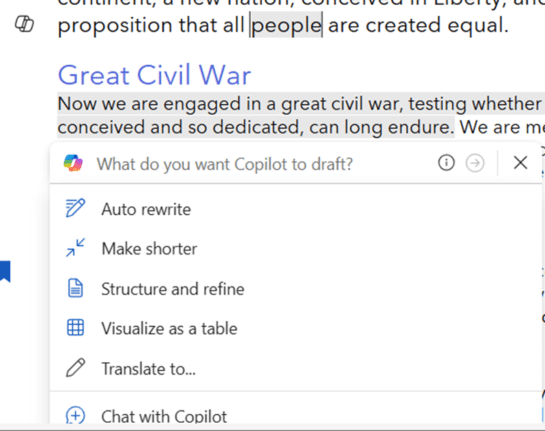
Microsoft Word in a browser now has Copilot appearing more often than before, making things worse for their paying customers. Stunningly ignoring customer complaints about Copilot interrupting Word documents, Microsoft has chosen to make their AI service MORE intrusive. If you thought Microsoft could not make Copilot worse in Microsoft Word … think again. Until […]
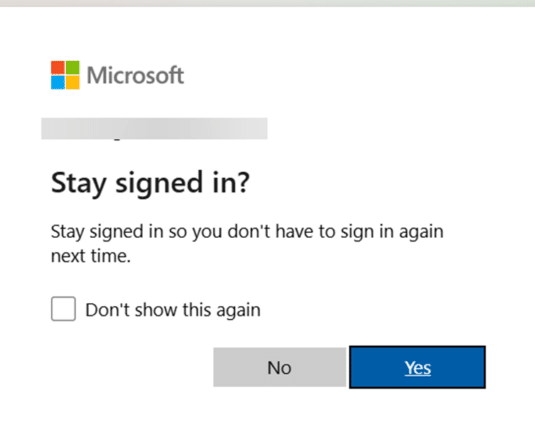
Keep safe after this change to Microsoft account logins
There’s important change in the way Microsoft handles browser logins to Microsoft accounts. If you’re using someone else’s computer or a public terminal, you need to know about this new security hole. Whenever you’ve signed into a Microsoft account for a web site, you’ve almost certainly seen this box. Stay signed in ?Stay signed in […]









