
Solving Word’s Ctrl + F find problem
Here’s the options for reaching Word’s full Find dialog quickly. Ever since Microsoft put in the Word Navigation Pane, they’ve messed up access to the Advanced Find dialog box. Ctrl + F doesn’t jump to the Word Find window anymore. A few readers were surprised to discover that the old Find dialog had been hiding […]

Four Word shortcuts to the Advanced Find dialog
There are four ways to make a shortcut or menu button that jumps directly to the Microsoft Word Advanced Find dialog box, instead of the Navigation pane the default for Ctrl + F. Ever since Microsoft added the left-side Navigation pane, there’s been no shortcut to open the far more powerful, full Find dialog box […]

Essential keyboard shortcuts for the Office Selection Pane
Use these essential keyboard shortcuts to make best use of the Selection pane in Microsoft Office. Alt + F10 Open Selection Pane F6 Move the keyboard focus through the major regions until reaches the Selection Pane Tab Navigate by keyboard through the buttons in the pane and then into the list Up arrow, down arrow […]

See more with Selection Pane in Excel, PowerPoint and Word
Selection Pane is essential in Word, Powerpoint and Excel to hide or display the objects or to change the order, rename objects, group / ungroup, and delete objects. If you’re using images, graphics, Text Boxes, charts, SmartArt or other objects, the Selection Pane is a must. So, let’s start with some basic details of how […]

2001 movie design: using in Office, Word or PowerPoint
Make your own Word or PowerPoint designs inspired by the movie ‘2001: A Space Odyssey‘. See 2001 A Space Odyssey – in Word and PowerPoint and 2001: A Space Odyssey and font kerning for details on the fonts, colors and styles used in Kubrick’s famous movie. PowerPoint slides Moving from film stills to PowerPoint slides […]

Patch Tuesday – Two November 2023 highlights
Here’s just a few of the security breaches that caught our eye from a total of 63 security flaws patched in this months dump of fixes from Microsoft. Including five ‘zero-day’ bugs plus another 20 Edge browser security bugs fixed earlier in November. We’ve included links to more detail and specific patches for each version […]
More real Microsoft Word history
An Office Watch reader has added his own suggestions for important parts of Microsoft Word history (and Office) that Microsoft has forgotten and would like paying customers to ignore in their revisionist history of Word. All these remarks result from Microsoft’s increasing demands for more money from customers. Lot’s of little changes all focused on […]

Does Microsoft Word grok, Grok?
The word ‘grok’ is back in the news, thanks to Elon Musk. As long time Word users and classic science-fiction readers, we naturally wanted to see if Word’s spell check recognized the word. In other words, does Microsoft Word grok the word Grok? Grok is a word made up by Robert Heinlein for his classic […]

Eiffel Tower 🗼 emoji in Word, Excel, PowerPoint and Outlook
Insert the Tower 🗼 (Eiffel Tower, Tokyo Tower) emoji, symbol or stock photo into Microsoft Word, Excel, PowerPoint or Outlook. Both in Office for Windows and Office for Mac. The emoji is commonly called ‘Eiffel Tower’ in the west but it was originally intended to show the Tokyo Tower. That’s why some emoji are colored […]
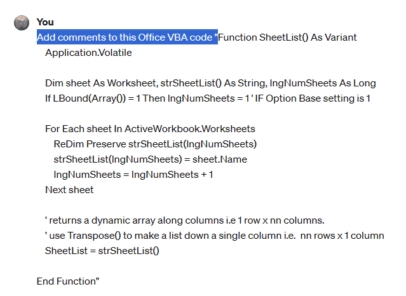
Add comments/help to your Office VBA code
ChatGPT is a powerful tool that can enhance your Office VBA code with comments and help. It or Copilot can analyze your code and generate explanations, tips, and examples to make it easier to read and debug One of the modern AI tricks is to help write and understand programming code. We’ve already looked at […]
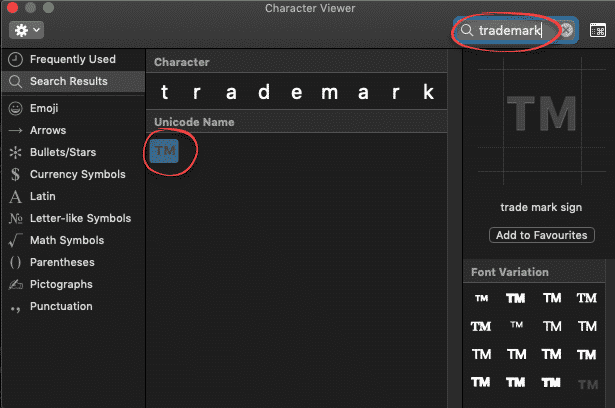
Trademark ™ symbol in Word, Excel, PowerPoint and Outlook
Type the Trademark ™ TM symbol as text and icon into Microsoft Word Excel PowerPoint or Outlook. Both in Office for Windows and Office for Mac. Trademark ™ TM symbol is, strictly speaking, called the Unregistered Trademark symbol. Its counterpart is the Registered Trademark ® Trademark in Word and Outlook The Trademark ™ sign has an […]
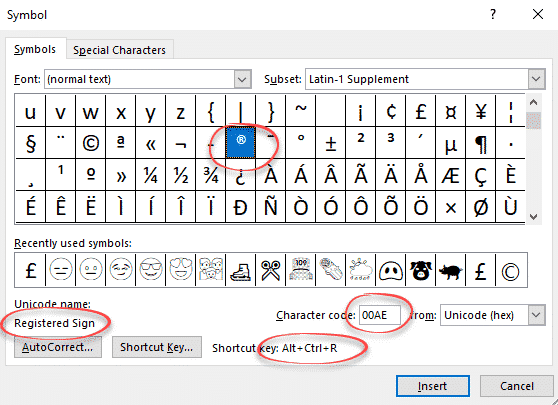
Registered Trade Mark ® symbol in Word and Office
How to insert the Registered Trade Mark ® symbol as text or icon into Microsoft Word, Excel, PowerPoint or Outlook. Both in Office for Windows and Office for Mac. Registered Trade Mark ® not to be confused with the Unregistered Trade Mark ™ symbol. Registered Trade Mark ® in Word and Outlook The Registered Trade Mark […]
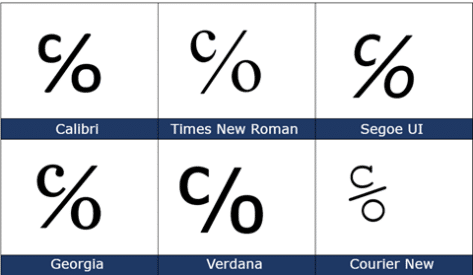
Care of ℅ symbol in Word, Excel, PowerPoint and Outlook
The Care of ℅ symbol can be typed into Microsoft Word, Excel, PowerPoint or Outlook. Both in Office for Windows and Office for Mac. Care of ℅ symbol is one of those useful symbols you’ll never see on a keyboard and have to go hunting for. ℅ is used on envelopes and addresses, it refers to […]

Microsoft Office photo editing with Apollo 8’s Earthrise
As a quick example of what’s possible, here’s a quick look at some photo editing options in Microsoft Office, Word, Excel, PowerPoint or Outlook emails. Since it’s Christmas, we’ll use one of the famous Apollo 8 Earthrise images. We’ve already talked about how Apollo 8’s Earthrise, as we know it, is a cropped, rotated and […]
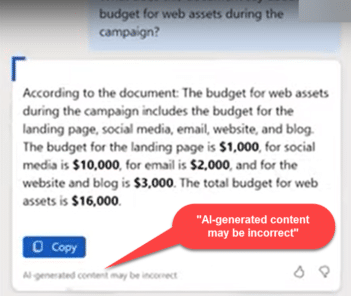
See what Copilot can do for Word – the videos.
Microsoft has released a series of short and somewhat informative videos about their Copilot AI features coming to Microsoft Word. There are important details that are easy to miss in the video so we’ve added some still photos of features like changing the tone or style (including poem!), suggested prompts and prompt library. Keep in […]

Solved! How to connect shapes in Word
There’s a way for Microsoft Word to connect shapes with lines or arrows that remain connected when moved. We’ll explain the trick and why it’s needed in Word and Outlook but not other Office apps. As we’ve already explained, in Excel, PowerPoint and Publisher, you can connect shapes with lines or arrows that change when […]









