
Connect two Office Shapes with lines or arrows
Microsoft Office can make drawings with linked lines or arrows between shapes that automatically change if the shapes are moved. Here’s how Office connectors work and the tricks to make connecting shapes work better. A little known but really useful part of the Insert | Shapes is the ability to link objects with lines that […]

Typing Türkiye in Word, Outlook, Windows or Mac
Türkiye is now the preferred name for the country Turkey. Here’s how to easily type Türkiye with the umlaut in Microsoft Office, Word and Outlook on Windows or Mac. It’s also a good example of the limits or traps in Word’s Autocorrect. A common trick for a change of name is AutoCorrect, e.g. anytime you […]

Fast umlaut ä ë ï ö ü in Microsoft Word and Office
Once you know the ‘secret’ shortcuts, it’s easy to type the umlaut vowels ä ë ï ö ü Ä Ë Ï Ö Ü in Word and Outlook but, alas, it’s not the same in Excel or PowerPoint. There are alternatives in Windows and Mac if you’re not using Word. There’s also a stand-alone ¨ umlaut […]

Satellite Antenna 📡 emoji in Word, Excel, PowerPoint and Outlook
Type the Satellite Antenna 📡 symbol/emoji into Microsoft Word, Excel, PowerPoint or Outlook. Both in Office for Windows and Office for Mac. Satellite Antenna or Dish 📡 symbol can be used for modern television, radio, GPS or wireless broadcasting generally. Can be used with the Satellite 🛰 emoji or icon. How Satellite Antenna 📡 looks […]

Word Editor feature that can’t come soon enough to Windows and Mac
The Editor part of Microsoft Word has a feature that should have been in the Windows and Mac versions many, many years ago. Changing the style of writing that’s being recommended. Word’s Editor pane sometimes lets you choose the style of writing that suits the document. We were delighted to see this appear in the […]
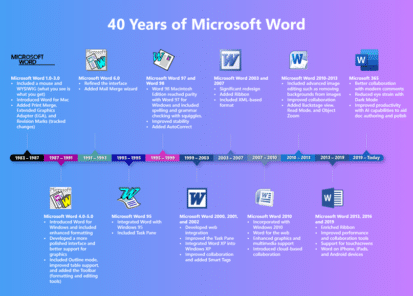
Revisionist History of Microsoft Word
Microsoft noted the 40th anniversary of Microsoft Word with a typically glossy and highly selective history plus some vague platitudes about the future of Word. Their graphic does show how far Word has come from its early days. Of course, plenty has been skipped over in this sanitized history. Like the, literally, thick book of […]

How to quickly switch between Word and Office windows
Often you need to switch between windows of the same program, so there should be a quick keyboard shortcut to do that. Here are your options in Windows or Mac. Whether you’re moving between Word documents, Excel workbooks or PowerPoint decks or Outlook emails, the need is the same. You want to quickly move between […]

Satellite 🛰 emoji in Word, Excel, PowerPoint and Outlook
Insert the Satellite 🛰 emoji or icon into Microsoft Word, Excel, PowerPoint or Outlook. Both in Office for Windows and Office for Mac. How Satellite 🛰 looks in different fonts. In Windows fonts only Segoe UI Emoji and Segoe UI Symbol have the Satellite emoji. As usual the Apple version (Apple Color Emoji font) looks […]
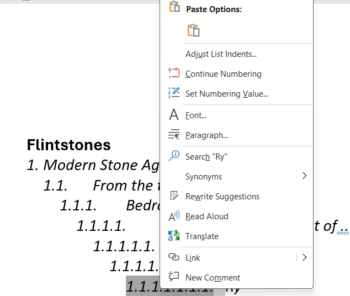
Word multi-level lists, new list, reset numbering and more
Word lists have more power and, let’s face it, confusion hiding under the menus. How to start a new list, continue a previous list, reset the numbering and trying to figure out how a list numbering has been messed up. Many questions arising from our article on Word Autonumbering. Many of them asked about continuing […]
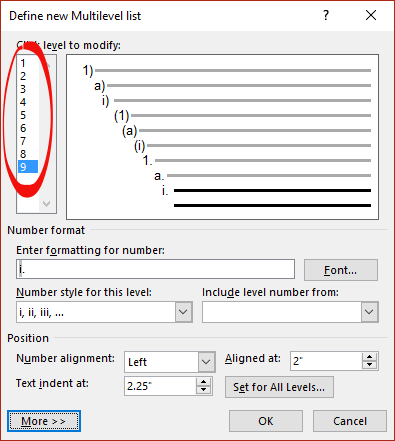
Word Autonumbering … How deep can you go?
There’s a maximum of nine levels available in Word multi-level numbering. That’s enough for the seven dwarves plus two more. There’s a way to get more than nine levels. A Multilevel list setup shows 9 levels. Need more? Perhaps create a separate multilevel list with custom numbering starting at 10? It might be better to […]
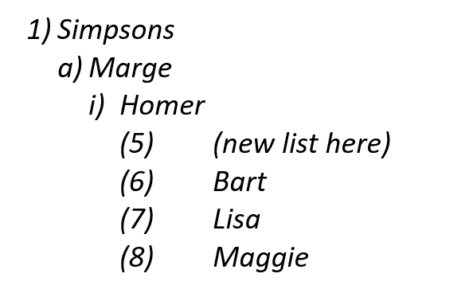
Troubleshooting a Word list problem
Word multi-level lists can get messed up with ‘wrong’ numbering appearing for no obvious reason. Here’s why it can happen, troubleshooting options and how to fix it. It’s too easy to mess up a seemingly normal multi-level list in Word. Options like ‘Start new list’ and ‘Continue from previous list’ are useful (essential at times) […]

Word multi-level Numbering
Word has an amazing range of options for automatically numbering your document headings or paragraphs. Even more amazing is my visit to an office. I found staff going through a long document, laboriously numbering headings and sub-headings by hand! They been doing this for years and weren’t happy when shown this button on the ribbon, it […]

Office 2019 & 2016 lose an important part of their support
Microsoft has stopped supporting connections from Office 2019 and Office 2016 to their Microsoft 365 online services. It’s another ‘passive aggressive’ move to get customers off older versions of Office and onto Microsoft 365. Both Office 2019 and Office 2016 will continue to be supported with bug and security fixes until late 2025 however Microsoft […]

The best Windows color picker
Selecting the exact color from a sample on the screen is best done with one of the PowerToys for Windows 11 and Windows 10 – Color Picker. Unlike the color selector in Office, the PowerToy Color Picker can choose from any visible part of the screen with a keyboard shortcut. Color Picker is just one […]
Color selection in Office for Mac, complete
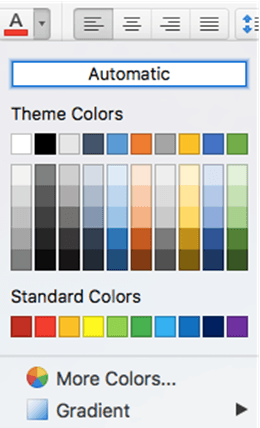
Office for Mac has quite different and extensible color selection options for text, shapes, pages etc. that are the envy of Office for Windows. We’ll explain them all, eyedropper, swatch, color wheel or sliders, palettes and even pencils. Choose from the same range of colors as Windows, but in many different ways and more. All […]
All the Color Picking tools in Microsoft Office
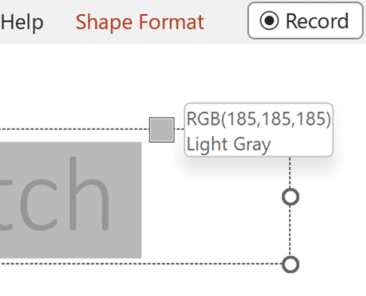
Here’s all the match colors, color picking or color grab tools in Microsoft Office for Windows or Windows itself. While Office for Mac users have it a lot easier with one central ‘eyedropper’ to choose a color from the screen. Naming the color picking tool isn’t consistent in Microsoft Office, it’s called an Eyedropper in […]









