Word has many options to make simple checklists that you can print out and tick with a pen (ink or digital). Plenty of formatting choices for the shape of the tick ‘box’, it’s color and size. There’s a simple shortcut to re-order the list. Previously we’ve discussed how to make
Redo is the often-forgotten partner to Undo. It’s mostly used to ‘undo an undo’ or reverse the last ‘Undo’ action but ‘Redo’ has other uses in Word, Excel, PowerPoint and Outlook. In most cases, you use the redo button to revert to a previous state. For example, if you used
Android users with the Office mobile app also has a voice recording and transcription option. It’s a step up from a simple voice memo, offering live speech to text transcriptions, as well as synced text highlighting during audio file playbacks. Recordings can be exported to other Office 365 apps.
Excel and Wolfram have teamed up to produce a handy interactive Periodic Table Template, useful for those searching for an introduction to chemistry, or a handy guide for study. The table lets you easily access information on elemental properties, chemical compounds, diagrams and more. You can download or open the
Here’s the short list of new and changed features in Access 2021. It has only three new and changed features in the high-end Office 2021 and Office LTSC 2021 bundles. Remove, relink, or refresh linked tables The Access database includes a Linked Table Manager that provides a central location for
Visio 2021 has only two new and changed features in the high-end Office 2021 and Office LTSC 2021 bundles. Visio’s new shapes and stencils Microsoft has added many more stencils for users to use when creating Azure diagrams. For example, stencils can be used to create diagrams on network topologies,
Back in 2010 an Office Watch reader drew our attention to this Microsoft Knowledge Base article 2008277 (update: after we published this article the KB article was totally removed by Microsoft). “Error message “The command cannot be performed because a dialog box is open” when opening a Word file from outside
An essential part of Word’s citations and bibliography feature is the Source Manager dialog – here’s how to, er, manage the Source Manager. Open the Source Manager from References | Citations and Bibliography | Manage Sources. There is a Current List (at right) which is saved in the current document.
The workload of students and academics has been made a lot easier with the arrival of Citation features in Word. They are useful for everyone, not just in academia. Citations are individual references to source material you’ve quoted in your document. A Bibliography is a list of citations and sources
Microsoft Word’s ‘Similarity Checker’ compares Word document text with online sources. That can warn the writer / student or reader / teacher about plagiarism or accidental copying. Word Similarity Checker uses Bing search to compare the text with online sources. It shows a percentage of text similar to text found
How many rows and columns does Excel have now and in the last 25 years of Excel for Windows and Mac? All the talk about 64-bit versions of Office has raised the issue of maximum rows and columns in Excel. A few readers seem to believe that 64-bit Excel will
In Microsoft Outlook you can view two calendars ‘side-by-side’ or overlaid to look like a single calendar. Select two calendars from the left-side pane of a Calendar view. Choose from ‘My Calendars’ or ‘Other Calendars’. The selected calendars appear ‘side-by-side’ in different colors. Overlaid with other calendars Click on the
Excel has six different choices for removing content, formatting, comments or everything from cells. Five are on the ribbon plus another hidden away. Plus three useful keyboard shortcuts, one obvious and two very obscure. Home | Clear On the right of the Home tab is a selection of five ‘Clear’
Microsoft Word has three different keyboard shortcuts to clear formatting, each with its own special variation on how to remove things like bold, italics etc. from text. Choose from Ctrl + Space , Ctrl + Q or Ctrl + Shift + N depending on exactly what you want to remove
Sometimes text formatting can get confusing in Word, PowerPoint, Outlook, Publisher and OneNote. There are several ways to clear the additional formatting and return to original settings. The formatting styles in your text can be easily restored to their default settings by clearing all formatting. Users can waste a lot
A recent attack on Microsoft 365 organizations has highlighted the danger of ‘password spray’ attacks that try to get into your account and perhaps get a foothold into an organization. There’s a simple fix that can protect you and your organization. Regular Office Watch readers will know what we’re going
There are many online tools that will summarize or paraphrase a long Word document into something shorter and more readable. These five tools also have other uses. Originally, Word 2007 had an Auto Summarize feature, but it was dropped in Word 2010, so Word users will need to rely on
Good news iOS users, if you’re a Microsoft 365 subscriber, you now have access the premium content library. Take your Word, Excel, and PowerPoint creations to the next level with thousands of royalty-free images, icons, stickers, and illustrations. Here’s how it works Tap Insert | Pictures | Stock Images on your iOS device,
There are several ways to add images into an Office SmartArt graphic; the official Microsoft way plus some others that aren’t usually mentioned for Word, PowerPoint and other Office apps. In the introductory piece, Much better lists with SmartArt , we looked at the SmartArt basics which are much the
What can you do with a file attachment that has no file extension? Sometimes you get a file, probably an email attachment, that has no file extension. Without something after the dot/period (.doc .docx .xlsx .pptx etc.) Windows doesn’t know what program to use. This is most likely to happen
All the talk about the major outage at Facebook overwhelmed the news that Microsoft had connection troubles of their own. The six hours offline at Facebook, Instagram and WhatsApp rightly attracted all the attention. It wasn’t just an inconvenience but crippling for many businesses that rely on Facebook to connect
Improve your Word, Excel, Outlook or PowerPoint Quick Access Toolbar (QAT) beyond the small changes allowed by Microsoft directly. This works in all modern Office for Windows including Microsoft 365, Office 2016/2019/2021/LTSC. You’ll be able to shorten the overly long text labels or change icons (because too many are the
All about Windows 11 software and accessory compatibility, promises of better and fewer updates and our view on whether Windows 11 is worth switching. See all the Office-Watch.com coverage of Windows 11 Software and accessory compatibility Underneath the changed desktop lies much the same core technology that’s in Windows 10.
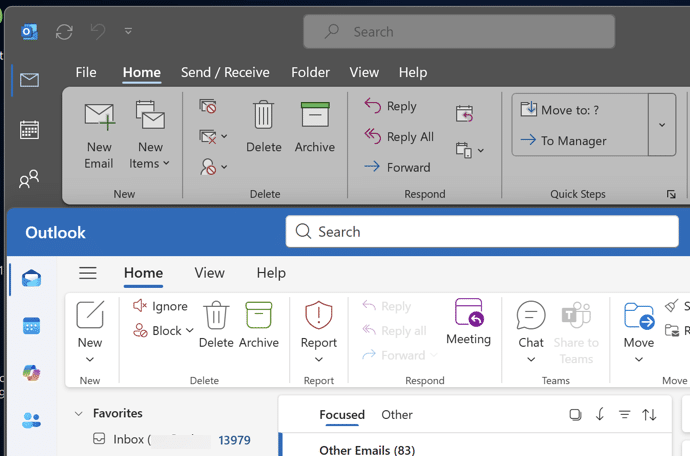
From Tuesday 5 October 2021, a new look is be available to Microsoft 365 and Office 2021. Don’t worry, it’s not a major change. Everything on the tabs, ribbon and dialogs remains exactly where they are. Microsoft grandly calls it a ‘visual update’ we call the changes ‘a new coat